
Participant
March 23, 2019
Answered

How to change the Worspace Background color?

  • March 23, 2019
  • 3 replies
  • 2849 views

Hello all App setup experts,

I just started with PSE 15 and I want to change it's skin appearance. From Photoshop I'm used a dark background and I want to setup PSE somehow similar.

  • Is it possible?
  • How to do it?

Thanks a lot for any helpful hint!

Regards

Chris
This topic has been closed for replies.
Correct answer Greg_S.

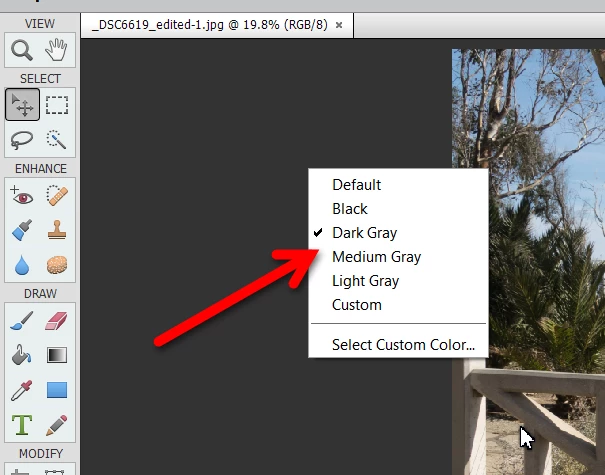
I think the only part of the UI that can be changed is the canvas area.  Right-click anywhere on it to bring up the color choice dialog.

3 replies

Participant
March 6, 2021

You can change Photoshop 2021 to dark or lighter mode by using: SHIFT + F1

Participant
July 8, 2021

Er, doesn't that just open a help page on the web. Please correct if wrong as I too would like to change skin in PE 2021

Participant
July 8, 2021

@pj0D4C That's because it's a Photoshop CC, not Photoshop Elements shortcut (see the reply from @Greg_S.  to that post).


You can only change the canvas background color in Photoshop Elements - again, see the post from @Greg_S. which has already been marked as the "Correct Answer" 🙂


Thanks for the clarification. I had not read your reply carefully enough to note that you said Photoshop 2021.

I had assumed that because the question referred to PSE your reply was related to the same product and not the main Photoshop programme. The canvas area is not an issue for me, and I will just have to learn to live with the rest.

chrimapAuthor
Participant
March 23, 2019

Thank you Greg_S.,

as far as the frames aren't customizeable in colors, this is the best helpful answer.

kind regards

Chris

Greg_S.
Community Expert
Greg_S.Community ExpertCorrect answer
Community Expert
March 23, 2019

I think the only part of the UI that can be changed is the canvas area.  Right-click anywhere on it to bring up the color choice dialog.