Instead of clicking on the '+' icon to create an event, click on the small triangle just right to the '+' icon. This opens a drop-down menu to choose if you want to open an event or an event group.
This is not clear from the help file.
(To get the help file, type 'create groups for events in the organizer' in the search box of the welcome screen)
If necessary, you can organize event tags into groups. To create an event tag, follow these steps:
-
Click Tags/Info from the taskbar.
-
Expand the
menu and then click New Event.
-
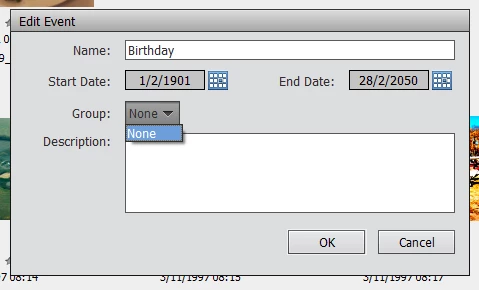
Enter the following event details:
-
Event name
-
Event start and end dates
-
(Optional) Event group. If you haven’t defined any event groups yet, you’ll see None selected by default for this option.
-
(Optional) Event description
-
Drag and drop some media associated with the event to the media bin.
Note:
The same media may be associated with more than one event.
Note:
If you’re migrating a catalog from Elements 10 or an earlier version, any event categories in the catalog are imported as event groups.

 AdChoices