
Participant
November 22, 2021
Answered

How to load photos from organizer into the Editor Guided Help

  • November 22, 2021
  • 3 replies
  • 813 views

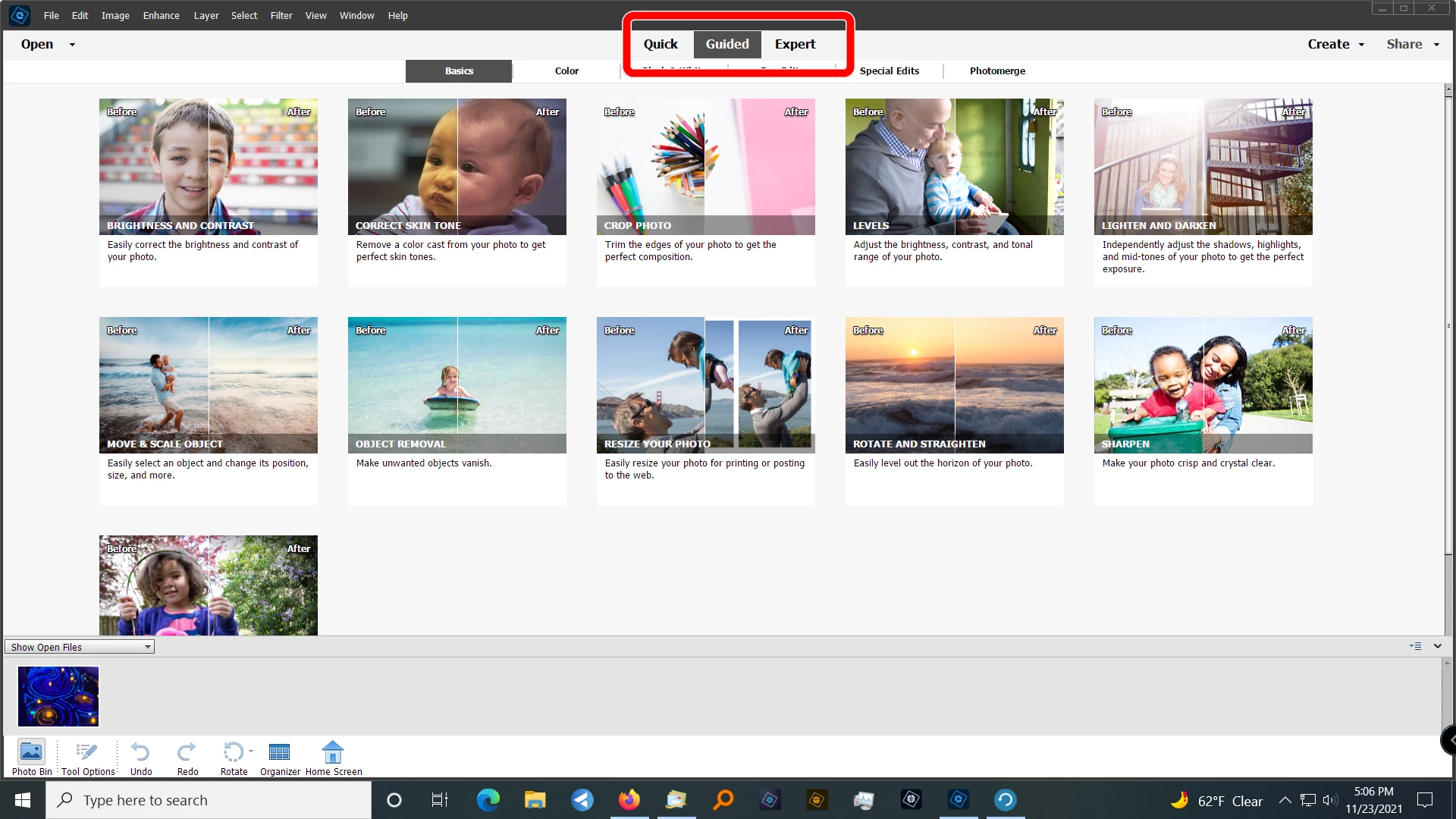
First time user so please bear with me!  I have photos in the Organizer and want to use the Editor.  When I click on Editor in the bottom panel what I get the boilerplace page with all the standard photos.  I can see a thumbnail of my photo in the lower left but I can't get it into the work space.  And, once I get that picture into the workspace I've got 50 behind it!  


Thanks so much for your help to a new user!
This topic has been closed for replies.
Correct answer Greg_S.

Joyce, are you seeing something like the screenshot below?  If so, you are in the Guided Edit mode and you need to click on either the Quick or Expert tabs at the top of the screen in order to get to the main editing space.


3 replies

Greg_S.
Community Expert
Greg_S.Community ExpertCorrect answer
Community Expert
November 24, 2021

Joyce, are you seeing something like the screenshot below?  If so, you are in the Guided Edit mode and you need to click on either the Quick or Expert tabs at the top of the screen in order to get to the main editing space.


Joyce212Author
Participant
November 24, 2021

Oh, YES!  That's exactly what I see.  Now, I'm in the Quick Mode and have successfuly edited and saved one photo!  Thanks so much!

Greg_S.
Community Expert
Community Expert
November 22, 2021

Joyce, you cannot attach a screenshot to an email response to this forum. (Actually, you can attach it, but we won't see it.  😉)  So, please upload your screenshot on the forum website.


In the meantime, I prefer to use keyboard shortcuts.  So, to get a photo from the Organizer to the Editor, I simply select the photo in the Organizer grid and press Ctrl+I


In order to select a photo, you need to click on the thumbnail.  In Walter's screenshot (which you may not have seen if you are viewing his post via email), he is in the Details view and the selected image has a darker border than the other photos.  If you are in the default view, a selected file will have a check mark.  (Screenshot is inserted in my post so you need to view it on the forum webpage.)

Walter_H
Legend
November 22, 2021

Greg, Can you remove the personal info from Joyce's post? She should not have added that!


--Walter in Davie, FL
Greg_S.
Community Expert
Community Expert
November 22, 2021

Thanks, Walter.  Done.

Walter_H
Legend
November 22, 2021

Hi Joyce, When you are in the Organizer, right-click on the photo that you want to edit and select Edit with Photoshop Elements Editor... from the pop-up menu.


--Walter in Davie, FL
Joyce212Author
Participant
November 22, 2021

I'm missing something! Here's my screen and right click in lower left
corner does nothing. I get the menu which includes close, file info, etc.

Thanks,

[image: image.png]
*Joyce*

Joyce


[Personal Information removed by Moderator]

*"Injustice anywhere is a threat to justice everywhere." Martin Luther
King*