Participant
May 29, 2021
Answered

How to locate tools/panel after downloading a raw file in P.S. Elements

  • May 29, 2021
  • 1 reply
  • 266 views

When I open Elements 2021, all the tools are shown.  when I then open a raw file, the raw files open in Elements but the tools are no longer shown. How do you locate the tools panel?

Thanks for your help.
This topic has been closed for replies.
Correct answer Greg_S.

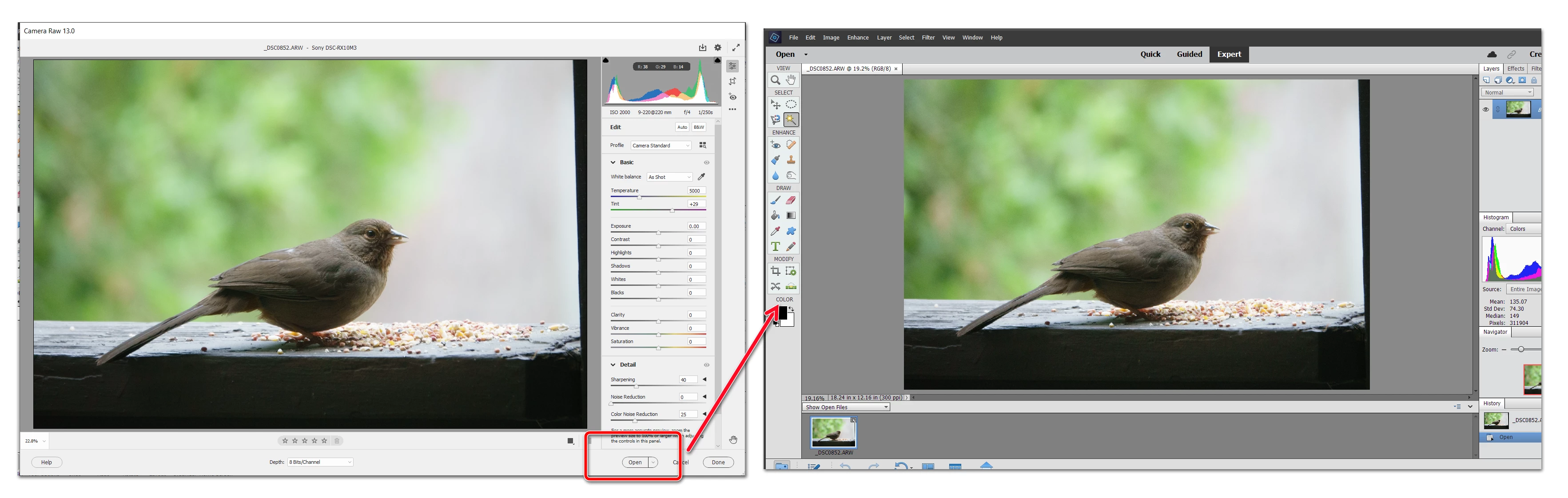
When you open a raw file, it will open in the Adobe Camera Raw (ACR) editor.  IMO, this is the best place to adjust the exposure and tonality of the file.  Once you are done, click the Open button, and the image will open in the full Elements Editor with all of the tools that I think you are referring to.


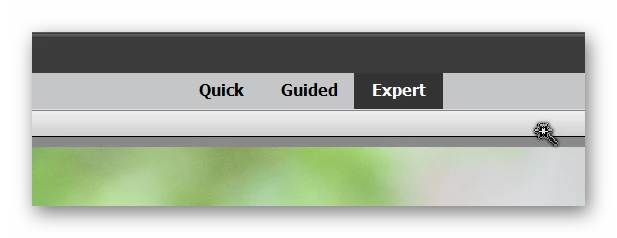
And just in case I may have misunderstood your question, make sure that you are in the Editor's Expert tab.  The Quick mode presents a more limited set of tools.

1 reply

Greg_S.
Community Expert
Greg_S.Community ExpertCorrect answer
Community Expert
May 30, 2021

When you open a raw file, it will open in the Adobe Camera Raw (ACR) editor.  IMO, this is the best place to adjust the exposure and tonality of the file.  Once you are done, click the Open button, and the image will open in the full Elements Editor with all of the tools that I think you are referring to.


And just in case I may have misunderstood your question, make sure that you are in the Editor's Expert tab.  The Quick mode presents a more limited set of tools.

Bill_WWAuthor
Participant
May 30, 2021

Greg, Thanks for your response and help, now that I'm aware of the correct procedure I can process my raw files.

Again, Thanks for your help.