Participant
January 5, 2019
Answered

i cant find direct select tool!!!!!!! in Photoshop elements 2018

  • January 5, 2019
  • 1 reply
  • 1193 views

iam really lost and confused why i cant  find the direct selection tool, i use adobe Photoshop cc 2018,on windows 10 and i cant find (pen tool) nor (direct select tool)

i dont know why. i already tried many things to find but yet i couldn't find it. i tried to (unchick auto select tool) but i dont have select bar that display the auto select tool.

I NEED HELP PLEASE.
    This topic has been closed for replies.
    Correct answer Greg_S.

    Elements does not have all of the same tools as Ps CC. 

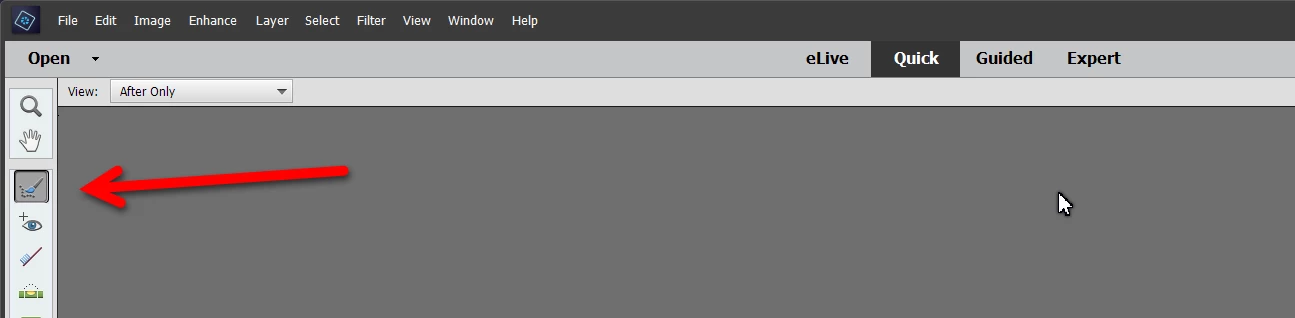
    Are you in the Quick or Expert Mode?  If in Quick Mode, the Selection tools are here:

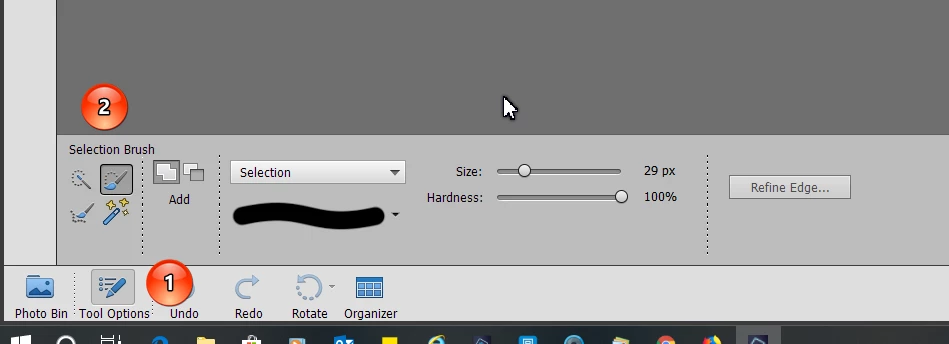
    Once you click on this icon, the tool options are available at the bottom of the screen.  If you don't see the tool options, click on the button (1).

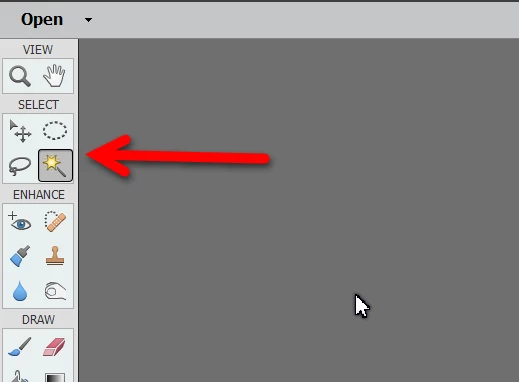
    If you are in Expert Mode, the Selection Tools are all available in the left-hand toolbar. Click one of the icons and the Tool Options are available as in Quick Mode.

    1 reply

    Greg_S.
    Community Expert
    Greg_S.Community ExpertCorrect answer
    Community Expert
    January 5, 2019

    Elements does not have all of the same tools as Ps CC. 

    Are you in the Quick or Expert Mode?  If in Quick Mode, the Selection tools are here:

    Once you click on this icon, the tool options are available at the bottom of the screen.  If you don't see the tool options, click on the button (1).

    If you are in Expert Mode, the Selection Tools are all available in the left-hand toolbar. Click one of the icons and the Tool Options are available as in Quick Mode.