AndrewA_05252019
New Participant
March 22, 2023
Question

Layer Styles --> Style Settings Not Working

  • March 22, 2023
  • 4 replies
  • 1410 views


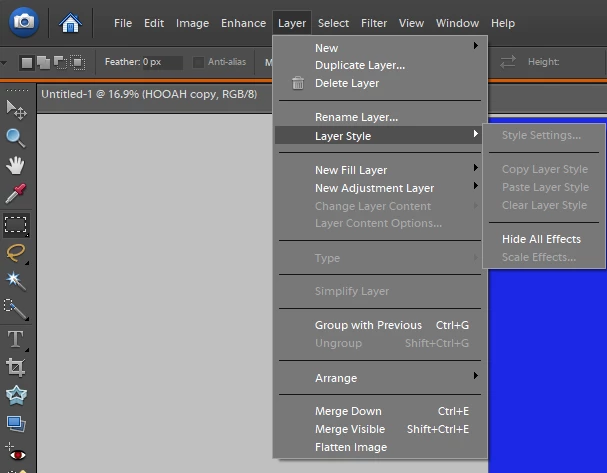
Hey guys, I want to do style settings but for some reason, the option is grayed out. How can I fix this?


This topic has been closed for replies.

4 replies

Jeff Arola
Community Expert
March 22, 2023

Even when you apply a layer style using the trick above, Layer>Layer Style>Style Settings is still greyed out

on the layer with the layer style. Only if one uses one of the premade styles does that menu item become available in photoshop elements 6.


If one applies a premade style, then the Style Settings becomes available.


Jeff Arola
Community Expert
March 22, 2023

I believe photoshop elements 8 was the first version to be able to use the Layer>Layer Style>Style Settings without having already applied a layer style from the Effects>Layer Styles panel.


One trick you can use to get the Layer Styles settings dialog without first applying a premade style is make a text or shape layer then Alt double click on the text/shape thumbnail in the layers panel to bring up the Style Settings dialog, apply a stroke or other setting. Then right click on that layer and Copy Layer Style. Go back to the layer you want to actually put the style on, right click and Paste Layer Style.


The alt double click on the layer thumbnail to bring up the Style settings dialog only works with text, shape

and adjustment layers in photoshop elements 6.

New Participant
December 21, 2023

Thanks Jeff, that did the trick!


Ged_Traynor
Community Expert
March 22, 2023

Moved to the Photoshop Elements forum

c.pfaffenbichler
Community Expert
March 22, 2023

Could you please post screenshots with the pertinent Panels (Toolbar, Layers, Options Bar, …) visible? 

What kind of Layer is selected at current? 

AndrewA_05252019
New Participant
March 22, 2023


c.pfaffenbichler
Community Expert
March 22, 2023

Which programm is that? 

This Forum is dedicated to Photoshop proper.