dianef31111009
Inspiring
October 30, 2021
Answered

new artistic effects missing in PSE

  • October 30, 2021
  • 4 replies
  • 1475 views

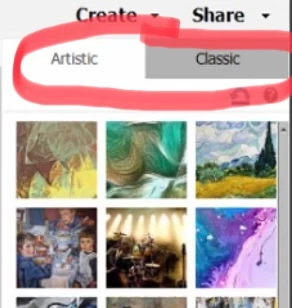
Muvipix on YouTube shows two tabs "artistic and classic" in 2022 version. However I upgradedmy software and it has only "artistic", same as before with PSE 2021.

Can anyone help with this? Thank you
 

This topic has been closed for replies.
Correct answer dianef31111009

Oh, dear!

I am the "bug".

I needed to click on "effects".  Now I can see both tabs. I thought there were additional new filters.

Hard to believe my septugenarian friends come to me for technical advice...


Thank you everyone for all your suggestions.

Diane


4 replies

Glenn 8675309
Legend
October 31, 2021

Nice!

dianef31111009
dianef31111009AuthorCorrect answer
Inspiring
October 31, 2021

Oh, dear!

I am the "bug".

I needed to click on "effects".  Now I can see both tabs. I thought there were additional new filters.

Hard to believe my septugenarian friends come to me for technical advice...


Thank you everyone for all your suggestions.

Diane


Glenn 8675309
Legend
October 31, 2021

Greg_S.
Community Expert
Community Expert
October 31, 2021

Assuming that you are in fact using Elements 2022, I would suggest trying to reset the preferences file. Go to Edit>Preferences>General tab and click the Reset Preferences on next launch button.


If that doesn't work, I would try an uninstall and reinstall of the program. 

dianef31111009
Inspiring
October 31, 2021

Yes, I am positive I am using PSE 2022 version.

I looked at Preferences.  Chose use PSE Elements only (not including Premiere). Re-launched.  No change.

I uninstalled and reinstalled PSE 2022.  Again, no change. 

I simply cannot seem to get the new n improved filters to download.

Buggy.  I will wait until Monday to contact technical support, but the number is not readily available. 

Glenn 8675309
Legend
October 31, 2021

You don't download the filters, like they are are separate item- they are part of the main installation package. 

Glenn 8675309
Legend
October 30, 2021

Make sure you are using the new icon to start the program, you can't use the same one as before. 

dianef31111009
Inspiring
October 30, 2021

Good point. I made sure that I was using 2022.  I can see from the start-up page that it is the new version.

I've tried re-starting my computer, but that did not help.  

dianef31111009
Inspiring
October 31, 2021

It's pretty gosh darn small. Not of any real use.
