Known Participant
December 11, 2019
Answered

new camera Nikon Z50

  • December 11, 2019
  • 4 replies
  • 4583 views

According to the Adobe website, there is supposed to be a December 9 upgrade to include the Z50, but I can't find it.  Elements 2018 says I am up to date, but it won't handel NEF files.  Where can I get the update?

This topic has been closed for replies.
Correct answer 99jon

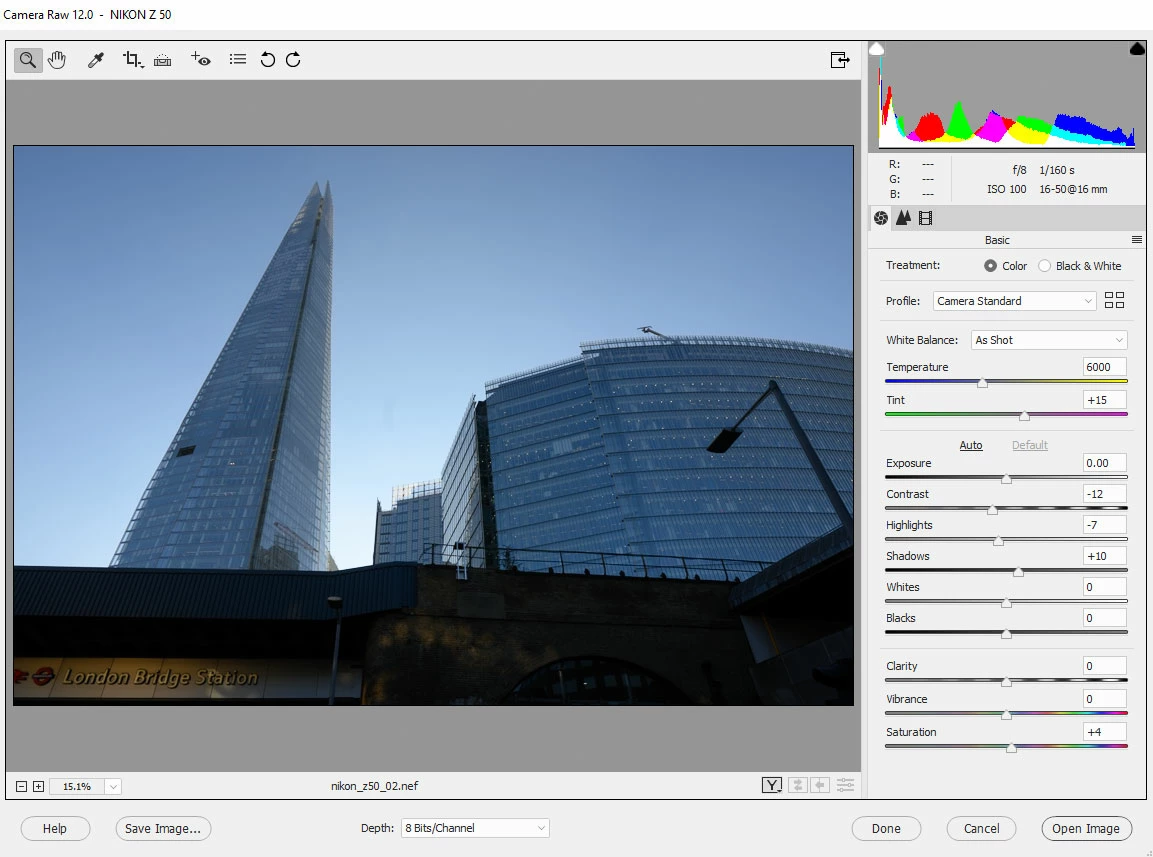
Yes I just tested and those NEF files do open in PSE 2020 with ACR 12. See image below.

To enlarge, click image, then right-click and choose open in new tab. Go to tab to see full size.
4 replies

99jon
99jonCorrect answer
Legend
December 12, 2019

Yes I just tested and those NEF files do open in PSE 2020 with ACR 12. See image below.

To enlarge, click image, then right-click and choose open in new tab. Go to tab to see full size.

99jon
Legend
December 11, 2019

Use one of these links to download the free DNG Converter. You can use the app to convert a  whole folder of raw files in a couple of clicks.


DNG Converter for Windows


DNG Converter for Mac

toxdoc42Author
Known Participant
December 11, 2019
There are alternatives to "convert" Z50 "RAW" files to jpegs, but then Elements would be editing a jpeg, not the RAW. That is disappointing, particularly, when the Adobe site says that Elements does support the camera as of December. I was just in Elements and I still cannot open a RAW file directly.
Participant
December 12, 2019

Sorry and I apologize if you think my tone is too harsh.

I was only factual and it was in your interest.

Why? because there are only two solutions now:

- using your Nikon software to convert, preferably to a tiff 16 bits format which is much better than jpeg and open that tiff format in the normal pixel editor of PSE

- using the DNGconverter. You don't waste much time since you convert a whole folder at a time. You can wait until an upgrade is available for PSE2020 or wait a few years more to upgrade, since PSE2018 is already a very good version.

It's up to you to choose. I thought the second solution was in your interest.


Excuse me, if I repeat myself, but did you read that even PSE2020 does not yet have the ACR plugin 12.1 ?

Sure, it will get an update for free, but nobody knows when; a couple of months?


As it turns out, PS2020 now does support the Z50.    I was told by Adobe that they do not plan to upgrade 2018. They offered to see me 2020 for $99.  I found it on Amazon for $69.  

MichelBParis
Legend
December 11, 2019

Two important things to know:

1 - faq:

https://community.adobe.com/t5/photoshop-elements/faq-will-photoshop-elements-work-with-my-camera-or-why-won-t-my-raw-files-open/td-p/4303022

2 - The ACR plugin in Elements is only available some time after the one of Photoshop, sometimes only in the next yearly release.


So, in your case, today no Elements version is able to be updated to the necessary ACR 12.1 plugin, even the current PSE2020. Older PSE versions will never be updated. PSE2020 users will be prompted to update when the port to Elements is ready. Using the menu Help >> Update shows the option greyed out until the version is ready.


So, as usual when you buy any* new camera, chances are that the ACR plugin is not ready.

Then, either you use the proprietary converter supplied with the camera to output tiff files,

or you download the free DNGconverter mentionned in the faq.

That standalone program (not  a plugin) batch converts a whole folder of raw files to the DNG raw format that older PSE can read and edit. An additional (but free) batch step, with same quality.


*any:

Except a number of manufacturers who are smart enough to use the DNG raw format natively.

toxdoc42Author
Known Participant
December 11, 2019
Will purchasing a new version of Elements give me the ability to directly edit my camera's output? What version will have the Z50 capability?
Legend
December 11, 2019

In the Help menu, go to About Plugin >> Camera Raw ...

Which version do you have currently?