
craigm22874798
Participant
January 5, 2019
Question

Organiser 2019- Fragmenting MOV file thumbnails

  • January 5, 2019
  • 1 reply
  • 401 views

In the 2019 version of Organiser, many of my MOV files are being fragmented and stacked.

This is true of files that were uploaded ages ago (and appeared correctly in my older Organiser) and newly uploaded movies.

The files are complete on my hard drive but when they are uploaded to Organiser they fragment.

Watching the movies on Organiser means that I cannot watch them through as a complete file.

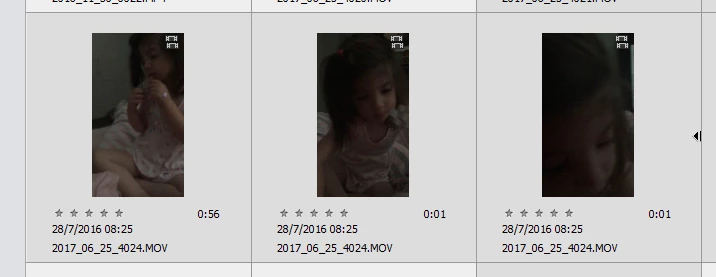
I attach an example of a file that was previously fine.

It is 0:58 on my hard drive but now appears in Organiser as three stacked files of 0:56, 0:01 and 0:01.

All with the same file name.

Is this a known bug? Is there a solution?

Thanks very much
This topic has been closed for replies.

1 reply

Greg_S.
Community Expert
Community Expert
January 5, 2019

I believe what you have is a video clip that has been divided into scenes.  If you right click on one of the "scenes", what are the context menu options?

Greg_S.
Community Expert
Community Expert
January 5, 2019

Never mind, I found a sample in my catalog:

If you collapse the stack (Scene Group), either by the context menu or using the right arrow (in your screen shot), and double-click the stack, the whole video clip will play.

craigm22874798
Participant
January 6, 2019

Hi Greg

Thanks for the speedy reply

So another Photoshop innovation that is about as useful as Suggested Crops!

I recently updated from version 12 and am yet to find any major changes that are more useful or productive than the earlier version.

I read on another forum that the AutoAnalyser will cut these into scenes even if you reload them, so I guess I am stuck with a mountain of 1 sec scenes all stacked together.

Thanks again for the help - much appreciated