
Participant
September 11, 2021
Question

Photoshop Element 2019 kann Leica VLUX-(Typ 114) RWL nicht öffnen.

  • September 11, 2021
  • 2 replies
  • 134 views

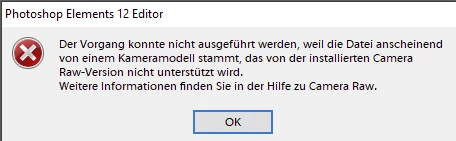
Beide Rechner haben die aktuelle WIN10 Version (automatische Updates eingestellt). Auf dem Laptop mit einer vor länger Zeit installierten Photoshop 2019 Version läuft alles problemlos. Auf dem anderen Rechner werden die gleichen RWL Dateien mit einer heute installierten Photoshop 2019 Version mit dem Hinweis, dass das Format von einer unbekannten Kamera sei nicht erkannt. Greift der Laptop direkt übers Netz auf den Tower zu kann er die RWL Dateien problemlos lösen. Wie kann ich das Problem lösen. Der Verweis auf Camera RAW war nicht hilfreich.

Viele Grüße


Hans-Peter
 

This topic has been closed for replies.

2 replies

Greg_S.
Community Expert
Community Expert
September 11, 2021

I agree with Jeff.  Your camera requires ACR 8.7.  Elements 12 only supports up to ACR 8.5 and will display an error message if you try to open a file from that camera.  

Elements 2019 supports ACR 10.x.  So clearly, you should have no problem with your camera's files when working with Elements 2019.

Jeff Arola
Community Expert
Community Expert
September 11, 2021

Your screenshot says photoshop elements 12.


Is that the photoshop elements version you have or maybe you have both pse 12 and pse 2019 installed on the same computer?