
Deltadawn
Participating Frequently
May 14, 2018
Pergunta

Photoshop Elements 13

  • May 14, 2018
  • 2 respostas
  • 615 Visualizações

A friend has Elements 13 on Windows 7 professional.

A week ago, she installed Elements 15 - but was still using 13.

Yesterday, when she went on the computer, she clicked the desktop icon for Elements 13.

A window opened from Adobe, saying there were updates to be installed.

She never bothered with them previously, but decided to do so this time.

After she did that, she clicked on the icon to open Elements 13.

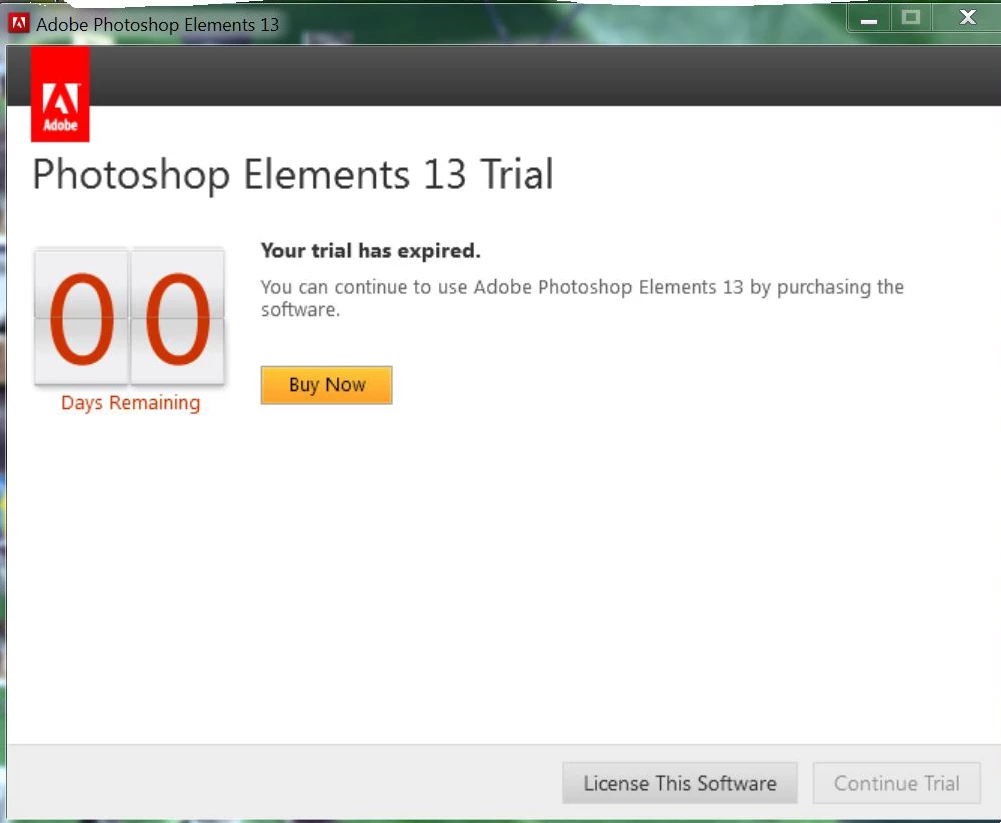
The inserted image came on. It does so now every time she tries to open 13.

She bought a new computer three years ago, and the techie also put Elements 13 on, and registered it.

She has never had any problems with it until now.

He did not leave the registration number with her.

Please can you help.
    Este tópico foi fechado para respostas.

    2 Respostas

    VipinGupta
    Adobe Employee
    Adobe Employee
    May 15, 2018

    If you had signed-in and used your serial key even once on any system, then you should be able to find the serial key in your adobe account dashboard as well.

    Please login to Adobe.com with the same ID, that was used to sign-in and register your product, then go to Manage Account, where you should see a tab named as 'Plans and Products', there you should see a link saying 'View My Products', here should get the list of serial keys that you had associated with your Adobe ID.

    Thanks

    Vipin

    Deltadawn
    Participating Frequently
    May 15, 2018

    Unfortunately, my friend called on her computer man for anything she needed.

    Now, he seems to have vanished, so she can't contact him regarding the  registration or serial number.

    What really puzzles us, is why should this happen when she has been running 13 for one year with no problems whatsoever . . . oh, except for one thing. She did not have a clone tool on her Elements 13 program. Nobody on the 'Photoshop Elements and more' forum seems to know why that is.

    hatstead
    Inspiring
    May 15, 2018

    Deltadawn  wrote

    Unfortunately, my friend called on her computer man for anything she needed.

    Now, he seems to have vanished, so she can't contact him regarding the  registration or serial number.

    You  really don't need a computer guru for this purpose. Save your money. If your friend is not able to follow the instructions to log on to the Adobe site, perhaps a kind high school student can help her.

    hatstead
    Inspiring
    May 14, 2018

    If the software was registered, you should be able to retrieve the registration number in your Adobe account.

    Adobe Licensing Website | Serial numbers, orders, and accounts