adriann98341547
Inspiring
November 20, 2016
Answered

Photoshop Elements 15 start error

  • November 20, 2016
  • 1 reply
  • 1011 views

When i try to start my PSE 15 I get a error message
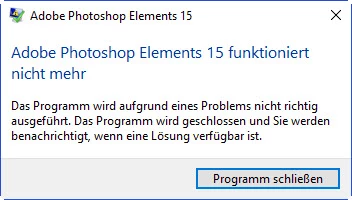
The message just says that because of a problem the programm cant be started.

Any suggestions?

Best wishes from Germany,

Adrian

    This topic has been closed for replies.
    Correct answer adriann98341547

    dashost is probably required for wireless devices. If it is in System32 it is unlikely to be a problem:

    http://www.howtogeek.com/270665/what-is-device-association-framework-provider-host-and-why-is-it-running-on-my-pc/

    One suggestion is to use the tool adwcleaner

    See the reply dated 3 October at the following Microsoft link:

    http://answers.microsoft.com/en-us/windows/forum/windows_10-files/how-do-i-remove-lavasofttcpservice64dll/aaf6c71d-9882-49e9-8b57-dc3e2bc31fc6?auth=1


    I couldnt find a process called dashost.exe. After searching i found out that i needed to stop the framwork process.

    After doing that a new error message came up when tryinf to delete.... reimage.exe. Thann came a akvtray message. This file is from G Data and i had to uninstall the programm. After that..... i finally managed to delete the lavasoft dll. PSE started off perfectly.

    Thank you very much for your help.

    Regards from Germany,

    Adrian

    1 reply

    Sandeep Singh
    Participating Frequently
    November 20, 2016

    Hi Adrian,

    Thanks for posting on the Adobe forums.

    Please check the event viewer log using this link.

    If you see Faulting module name: LavasoftTcpService64.dll in the error log.

    Please use this link to resolve your issue.

    Regards,

    Sandeep

    adriann98341547
    Inspiring
    November 21, 2016

    Thank you for your speedy reply!

    I have two error logs. My version of malwarebytes will for some reason not run; not connected to the internet.

    Which one is important?

    Name der fehlerhaften Anwendung: microsoftedgecp.exe, Version: 11.0.14393.82, Zeitstempel: 0x57a55786

    Name des fehlerhaften Moduls: unknown, Version: 0.0.0.0, Zeitstempel: 0x00000000

    Ausnahmecode: 0xc0000604

    Fehleroffset: 0x0000000000000000

    ID des fehlerhaften Prozesses: 0x1878

    Startzeit der fehlerhaften Anwendung: 0x01d243ddef4ff328

    Pfad der fehlerhaften Anwendung: C:\Windows\SystemApps\Microsoft.MicrosoftEdge_8wekyb3d8bbwe\microsoftedgecp.exe

    Pfad des fehlerhaften Moduls: unknown

    Berichtskennung: ea5ccf7b-aedc-44e8-9083-6d0eb48c0daf

    Vollständiger Name des fehlerhaften Pakets: Microsoft.MicrosoftEdge_38.14393.0.0_neutral__8wekyb3d8bbwe

    Anwendungs-ID, die relativ zum fehlerhaften Paket ist: MicrosoftEdge

    Name der fehlerhaften Anwendung: AVKTray.exe, Version: 25.1.16258.357, Zeitstempel: 0x57da1c37

    Name des fehlerhaften Moduls: unknown, Version: 0.0.0.0, Zeitstempel: 0x00000000

    Ausnahmecode: 0xc0000005

    Fehleroffset: 0x0096002a

    ID des fehlerhaften Prozesses: 0x2fe8

    Startzeit der fehlerhaften Anwendung: 0x01d243dd1fc8255f

    Pfad der fehlerhaften Anwendung: C:\Program Files (x86)\G DATA\InternetSecurity\AVKTray\AVKTray.exe

    Pfad des fehlerhaften Moduls: unknown

    Berichtskennung: 258306bc-9f93-4f65-bdcf-f52987e73a33

    Vollständiger Name des fehlerhaften Pakets:

    Anwendungs-ID, die relativ zum fehlerhaften Paket ist:

    Can you understand these logs ?

    Sorry they are in german

    regards,

    Adrian