
olek-Dk
Participant
March 17, 2018
Answered

Photoshop Elements 2018 Editor closes when attempting to PRINT

  • March 17, 2018
  • 1 reply
  • 543 views

When attempting to print from PE 2018 I get the following message (translated from Danish) - Photoshop Elements 2018 Editor stopped working. A problem caused the program to stop working correctly. Windows closes the program.

Then there is no "way out" PE is closed.

All SW is in current versions, printer is Epson-XP860. I do not have the problem when printing from e.g. Windows Pictures App
This topic has been closed for replies.
Correct answer hatstead

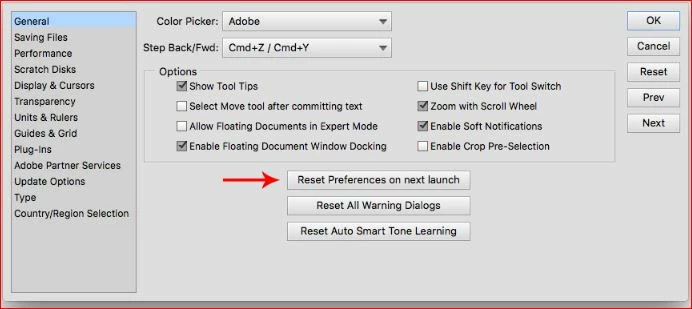
Try resetting preferences to default. To do that, go to Edit>preferences>General and look for this:

1 reply

hatstead
hatsteadCorrect answer
Inspiring
March 17, 2018

Try resetting preferences to default. To do that, go to Edit>preferences>General and look for this:

olek-Dk
olek-DkAuthor
Participant
March 18, 2018

Thanks a lot - worked immediately. Appreciated

hatstead
Inspiring
March 18, 2018

You're welcome. Glad to help.