janeh88919911
Known Participant
November 10, 2024
Answered

Photoshop Elements 2025 Subscription Updates - Will Camera Raw be continuously updated?

  • November 10, 2024
  • 3 replies
  • 2423 views

Does Adobe plan on updating Photoshop Elements Camera Raw on an ongoing basis now that you will a 3 year license agreement?

This topic has been closed for replies.
Correct answer Greg_S.

@janeh88919911, responding to your original post, Adobe is not treating the new 3 year term license the same as a subscription license like CC.  There will be only minor updates and bug fixes for Elements 2025.  As Glenn has already indicated, an update to Adobe Camera Raw has already been issued for the new version.  There may be another ACR update before Elements 2026 is released next year.  It is clear that purchasing Elements 2025 will not entitle you to any new features or enhancements that are released to the program in future versions.


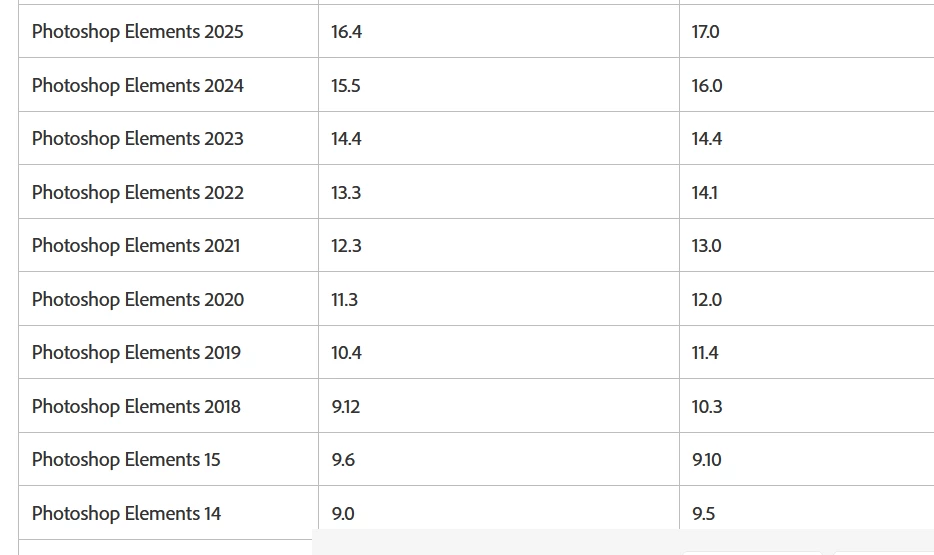
The following chart shows you the history of ACR updates for Elements.  The first column shows the ACR version when the program was released.  The second column shows the last ACR update for that version.  In the past, it has been possible to use the workaround given by Glenn to update ACR beyond the officially released update.  Normally, we have been able to keep ACR updated for at least 2 or 3 versions beyond the official update.
 

3 replies

Greg_S.
Community Expert
Community Expert
November 11, 2024

@janeh88919911 said:  If I convert first to DNG I will need to add a step to then import from Files/Folders to the catalog. 


Yes a new step will be required.  But using Watch Folders makes the import automatic.

janeh88919911
Known Participant
November 11, 2024

Thank you again.  Everything gets so complicated today.  I just get comfortable with the software, the ins and outs of how I want it to work and then they upgrade............subtle changes maybe and I am back to fumbling! Not to mention the cost of upgrades which may even need new hardware. To a certain extent I love playing around with the photo programs but sometimes I just want it to be smooth and easy old school style.  Take a decent picture tweek it just a tad give it a title and save it. I'll probably have more questions once the camera comes and everything I thought I knew goes to h......... LOL

Greg_S.
Community Expert
Greg_S.Community ExpertCorrect answer
Community Expert
November 11, 2024

@janeh88919911, responding to your original post, Adobe is not treating the new 3 year term license the same as a subscription license like CC.  There will be only minor updates and bug fixes for Elements 2025.  As Glenn has already indicated, an update to Adobe Camera Raw has already been issued for the new version.  There may be another ACR update before Elements 2026 is released next year.  It is clear that purchasing Elements 2025 will not entitle you to any new features or enhancements that are released to the program in future versions.


The following chart shows you the history of ACR updates for Elements.  The first column shows the ACR version when the program was released.  The second column shows the last ACR update for that version.  In the past, it has been possible to use the workaround given by Glenn to update ACR beyond the officially released update.  Normally, we have been able to keep ACR updated for at least 2 or 3 versions beyond the official update.


Glenn 8675309
Legend
November 10, 2024

That's a good question:  A few weeks ago they issued a ACR update which installed ACR 17.0 directly into pse 2025, but not the other versions. I doubt that it will become "common practice"- but ya never know. 

I'm pretty sure that's the first time they have ever done that. 

There is really no concern to get the latest and greatest if your camera doesn't require it.   They tend to make it available in Photoshop first, by a few days-- I always just manually install it just to do it,  I got zero reason, or need to do so.

Manually installing it is pretty easy to do. 

janeh88919911
Known Participant
November 10, 2024

I will need the latest camera raw once I get my new Nikon camera.  I also have LR by subscription but I love my Elements catalog.  So I import from a card reader into the Elements Organizer and then edit in LR, and either the elements version of PS or in the "other" pro version of PS and the file then comes back into the Elements Organizer. I do not have the 2025 version of Elements but if my 2 years old Elements can't display raw photos from my new camera I will need a workaround.  I ran into this several years ago....and I never could get the camera raw to update in Elements.

Glenn 8675309
Legend
November 10, 2024

This is the procedure to manually install the latest version of ACR, which you can probably ignore: The update was issued 23 days ago.   The update to 17.0 for PSE 2025 installs automatically.

  1. Open Photoshop Elements 2025
  2. Select Help
  3. Select Install Camera Raw
  4. Photoshop Elements will close and the update will be installed 
     

ONLY BOTHER WITH THE STUFF BELOW IF YOU NEED TO: (PSE 2024 and a few versions earlier)

Note:  Even if you manually install ACR using the 8bi file from Photoshop you still get the basic version of ACR 17.0 that PSE uses, not the version that's in Photoshop- which doess have a lot more bells and whistles.

ONCE YOU INSTALL ACR 17.0 YOU WILL HAVE TO FOLLOW ALL THE INSTRUCTIONS BELOW
The instructions are those that most users use to manually install ACR  I just made it "prettier" to look at. 


Download and install the latest Camera Raw version from https://helpx.adobe.com/camera-raw/kb/camera-raw-plug-in-installer.html

Quit all Adobe applications.

On macOS, double-click the .dmg file to mount it.

On Windows double-click the downloaded .zip file to unzip it.
(Windows might unzip the file for you.)


On macOS, double-click the .pkg file to start the installer. 

On Windows, double-click the resulting .exe file to start the installer.


Follow the on-screen instructions.

 Once installed successfully, close the installer window.

 Navigate to the following folder:

On macOS: /Library/Application Support/Adobe/Plug-ins/CC/File Formats

On Windows: C:\Program Files\Common Files\Adobe\Plug-Ins\CC\File Formats

Copy the Camera Raw plug-in (just the .8bi file) from the CC > File Formats folder that is mentioned in the above step.

Navigate to the following folder: 

On macOS: /Library/Application Support/Adobe/Plug-ins/Elements<Version Number>/File Formats


On Windows: C:\Program Files\Common Files\Adobe\Plug-Ins\Elements<Version Number>\File Formats


Replace the existing Camera Raw plugin in Elements<Version Number> folder with the plug-in that you copied earlier.