- why limiting the RAM by 80% and what are the steps to go there? |
It's increasing, not limiting the RAM useable by Elements.
In the Editor (not the organizer) Menu File >> Edit >> Preferences >> Performance.
By default it's set to 70%, you can increase it slightly, but no more than 80%.
- by "System Information" do you mean the ressource monitor? |
No, from the Editor, use the menu Help >> System Info... You can copy and paste the resulting dialog in your answer.
You have a similar Help menu in the Organizer to know more about your catalog.
- do you think I have better install Photoshop Elements on the C: drive where the operation system is located and the media on different drive (as F:\). Sometimes Windows 10 crashes if adjacent to Photoshop other programs are open... |
I think it may be risky to have the program itself on another drive than C:, but I am no expert for that matter...
It's necessary in your case to locate your media files on another drive like F:
Your SSD (E: would be ideal to store your catalogs and to be used as the scratch disk.
Locate your catalog from the Organizer menu Help >> File info (see above). In Windows you have to set the Explorer to show 'hidden' files; then you can copy the whole folder indicated in the resulting dialog to the E: drive. It's a folder containing the database 'catalog.pse15db'. Close the organizer and double click on that catalog.pse15db file. The organizer will open with that catalog copy.
Setting the scratch disk (area of your hard disk used to give you more memory than the RAM):
Editor, Menu Help >> Edit >> Performance (same as the one to increase the available RAM for Elements).
Remove C: as a possible scratch disk and use E:
If I understand well, your media files are already on F:, that's good.
Are you using the organizer with a big number of files and do you use face recognition?
Hello Michel
The System-Info looks now like this:
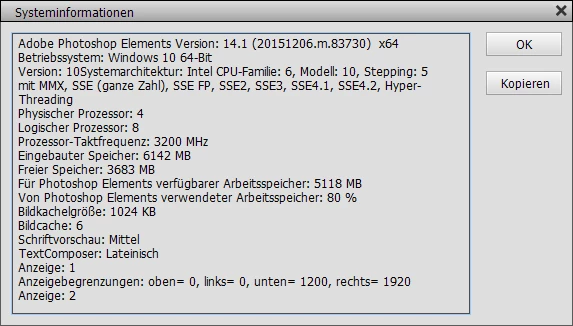
In the meantime I have reinstalled Photoshop on the C:\-drive and media remains on F:\. I'll work now with these parameters
and hope it will turn out as a good amendment. I have three catalogues with about 62 GB loaded in the Organizer. Would you think that even if
only one of them is active (where I'm working on), I should clear the Organizer from the others?
I thank you very much for your help!
Peter


 AdChoices