
Mathias Labie
Participant
April 9, 2018
Answered

problème avec le diamètre des outils

  • April 9, 2018
  • 2 replies
  • 650 views

le problème avec tous les outils est que lorsque que je sélectionne un X diamètre il n'y a qu'un certain diamètre plus petit que l'originale qui fonctionne

( exemple : outils pinceaux 50mm il n'y que 20mm qui peigne (toujours au centre de la forme) ) .
This topic has been closed for replies.
Correct answer Jeff Arola

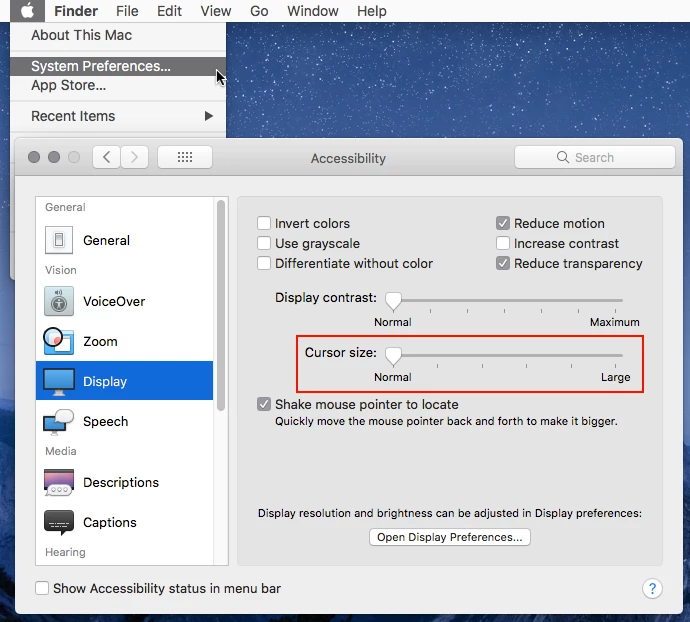
The most common cause is having the system Cursor size set to something other than Normal.

System Preferences>Accessibility>Display.

2 replies

Participating Frequently
April 10, 2018

Hello Mathias,

It seems as though the Caps Lock is turned ON on your keyboard. This hinders the process of altering the brush size. Request you to please try turning off the Caps Lock and then try to change the brush size. This should serve the purpose.

Feel free to reach out to me if you have any more questions.

Thanks,

Medha

Mathias Labie
Participant
April 10, 2018

bonjour Monsieur medha sharma merci pour votre réponse mais hélas cela n'est pas le problème ... c'est que lors de l'utilisation de l'outils que celui-ci peint un diamètre différent de la mesure sélectionner . J'ai ce problème avec tout les logiciels adobe . Voici une photo du problème avec actuellement l'outils pinceaux . Merci

Jeff Arola
Community Expert
Community Expert
April 10, 2018

What operating system and version of photoshop elements are you using?

Mathias Labie
Participant
April 10, 2018

I use MacOS High Sierra version 10.13.4 and I have this problem with all the adobe tools that uses brush and since I installed a wacom tablet intuos pro L (google tradustion)

Jeff Arola
Community Expert
Jeff ArolaCommunity ExpertCorrect answer
Community Expert
April 11, 2018

The most common cause is having the system Cursor size set to something other than Normal.

System Preferences>Accessibility>Display.