
Participating Frequently
December 31, 2016
Question

PSE 15 (Windows 10) crashes: "Elements 15 Organizer has stopped working"

  • December 31, 2016
  • 3 replies
  • 3263 views

My PSE 15 crashes on Windows 10 with the "Elements 15 Organizer has stopped working" error.

I have tried all the fixes mentioned throughout this forum to no avail. I have reinstalled PSE 15 only to have it crash again after importing my photos and adding a few tags.  It always crashes as soon as my catalog is loaded.

Any help is appreciated.

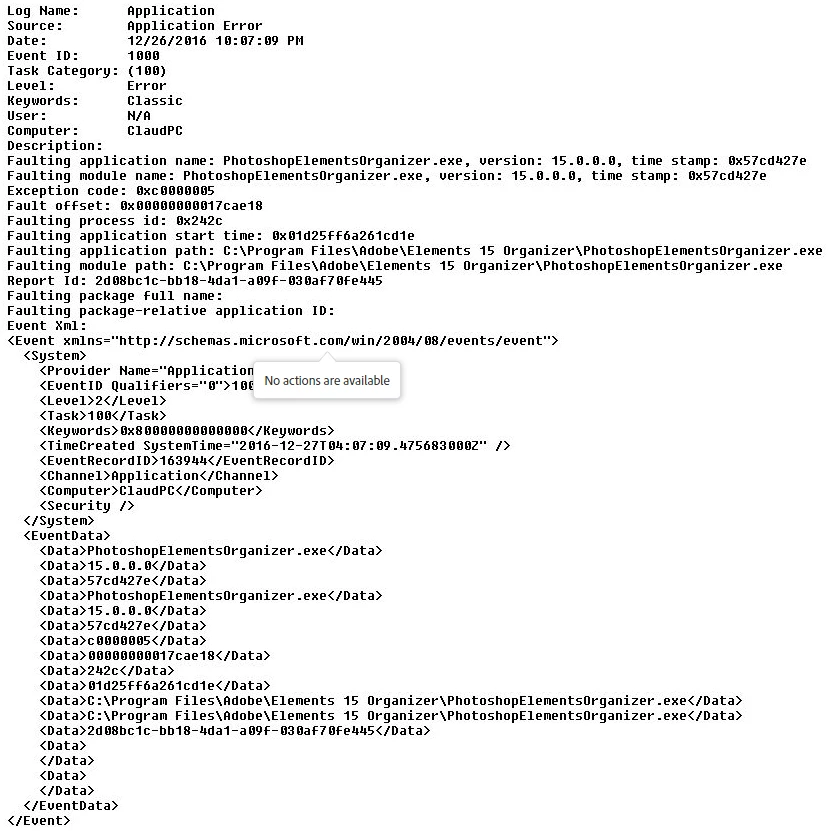
My EventLog:
    This topic has been closed for replies.

    3 replies

    Participating Frequently
    October 5, 2017

    Try downloading free trial of PSE2018 from Download Photoshop Elements | 2018, 15, 14, 13, 12, 11, 10

    Let us know if Elements Organizer still crashes, we will then need detailed crash report from your machine.

    Thanks,

    Anwesha

    8bitbrentAuthor
    Participating Frequently
    December 24, 2017

    PSE2018 crashes in the exact same manner. 
    How do I generate a crash report from my machine?

    8bitbrentAuthor
    Participating Frequently
    October 4, 2017

    Adobe PSE 15 has been on my computer but I've never been able to use it because it crashes. I have tried every imaginable fix to no avail.

    For a second I considered buying PSE 18 which was announced today but I have no guarantee that it would work without crashing. And from the lack of support from Adobe I'm not inclined to make the purchase again.

    Participating Frequently
    January 2, 2017

    Sorry for the inconvenience.

    Please try out the steps mentioned below and let us know if it helps:

    1. Launch Elements Organizer while keeping the Shift key pressed to open the Catalog Manager.
    2. In the Catalog Manager dialog, click New to create a catalog. Provide a name for the catalog, and then click OK.
    3. Launch the Preferences dialog (Ctrl/Cmd + K).
      1. In the Preferences dialog:
      2. In the Media Analysis tab, deselect all checkboxes.
    • In the Files tab, deselect the checkboxes:
      --Automatically Search for and Reconnect Missing Files
      --Automatically Generate Thumbnails for Video Files

       4.  Start Elements Organizer.

       5. If Organizer launches without any issues, switch back to your older catalog.

    Thanks,
    Anwesha

    Participant
    January 30, 2017

    I have the same problem, with Elements 15 crashing every time I try to get photos. I have done what you suggested above and it crashed as soon as I tried to get photos into the new catalog. Does this mean it is not a catalog issue. What do I do next?

    Participant
    March 28, 2017

    Were you ever able to resolve this issue? I too am dealing with the same issue and am beyond frustrated with trying to resolve it.