suzanner95804947
Participant
February 10, 2019
Answered

PSE 2019 Puzzle Effects not working

  • February 10, 2019
  • 3 replies
  • 1018 views

Hello. I purchased and downloaded PSE Elements 2019 this morning. The Puzzle Effects is not working. I get an error message:
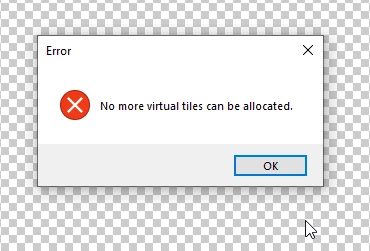
And in PSE 13, I had a different issue with the Puzzle Effects. Help?

!

    This topic has been closed for replies.
    Correct answer Medha_Sharma

    Hello,

    Please navigate to Edit > Preferences > Scratch disk.

    Make sure both the drives (primary and secondary) are checked. Now relaunch Photoshop Elements and try out the Puzzle Effect workflow.

    If that does not help, right click on Photoshop Elements icon and choose 'Run as Administrator'. Let us know if that works for you.

    Thanks,

    Medha

    3 replies

    Medha_Sharma
    Adobe Employee
    Medha_SharmaCorrect answer
    Adobe Employee
    February 11, 2019

    Hello,

    Please navigate to Edit > Preferences > Scratch disk.

    Make sure both the drives (primary and secondary) are checked. Now relaunch Photoshop Elements and try out the Puzzle Effect workflow.

    If that does not help, right click on Photoshop Elements icon and choose 'Run as Administrator'. Let us know if that works for you.

    Thanks,

    Medha

    suzanner95804947
    Participant
    February 11, 2019

    That worked! Thank you! Now for me to figure out how to do a different background for the puzzle. I didn't see that option, but did see it in a tutorial somewhere. Thanks again.

    Medha_Sharma
    Adobe Employee
    Adobe Employee
    February 11, 2019

    Hello,

    You can refer to this video to choose a custom background for your puzzle.

    Creating a realistic puzzle effect Photoshop Elements - YouTube

    Alternatively, you can also open an image in Photoshop Elements Editor and use it as the background layer for the puzzle. Let me know if you need any assistance with this workflow.

    Thanks,

    Medha

    Peru Bob
    Community Expert
    Community Expert
    February 11, 2019

    What size is your hard drive and how much free space is left?

    You may be running out of room for the scratch disk.

    suzanner95804947
    Participant
    February 11, 2019

    HI, Peru Bob. I have plenty of space left.

    Legend
    February 11, 2019

    I'm moving your post to the Photoshop Elements forum.

    suzanner95804947
    Participant
    February 11, 2019

    Thank you, but that's where I THOUGHT I was??