Inspiring
December 13, 2020
Answered

PSE 2021 - serial number

  • December 13, 2020
  • 3 replies
  • 3845 views

I purchased and downloaded PSE 2021. I had to enter the serial number...no problem...downloaded successfully. However I didn't write down the serial number. I want to keep it somewhere safe in case my hard drive crashes at some point (it wouldn't be the first time-ugh!)

Where do I find this serial number.  I don't see it recorded in the program anywhere unless I am not looking in the right place.

This topic has been closed for replies.
Correct answer Greg_S.

Since you purchased it from Staples not from Adobe, it will not be in your Adobe Order History.  And since you ordered from Staples, you probably received a redemption code, not a serial number.  If that is the case, you need to convert the redemption code to a serial number.  See this Help article for how to do that.


Although you have told us that you have downloaded the program successfully, you haven't said whether you have actually installed it.  Nor have you told us whether you have registered the program using your Adobe account.  If you have in fact done all of this, then as you have been told, your serial number should appear in your Adobe account.


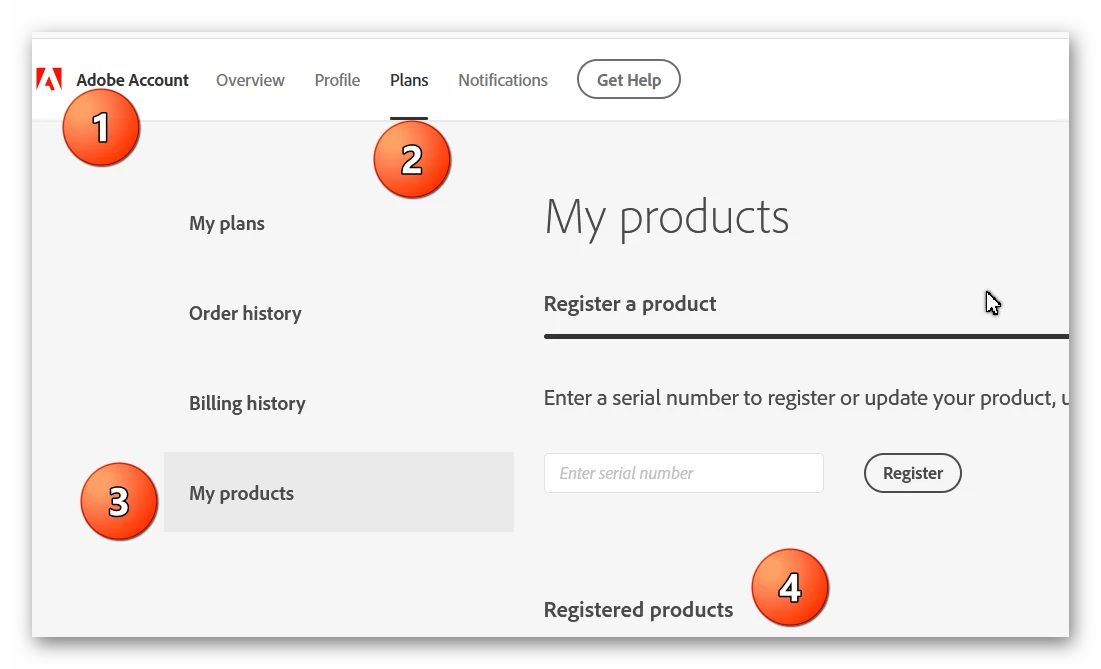
  1. Sign in to your Adobe account on the  Adobe.com website
  2. Click on the Plans menu
  3. Click on My Products
  4. Your Registered Products should be listed with the serial number.
 

It is possible to install the product and use it in trial mode for 30 days without entering the serial number.  If this is what you have done, then you need to find the redemption code from Staples and locate the serial number at the link suggested by Nidhi in an earlier post.


As for having a box, some online sellers still sell these with DVDs.  But you cannot get a boxed DVD version from Adobe.

3 replies

Greg_S.
Community Expert
Community Expert
December 22, 2020

@DEWilley please see my earlier post in this thread.

Glenn 8675309
Legend
December 16, 2020

There really is no reason to write it down- it's all listed in your adobe account-- just go to "my plans" to see the purchases you have registered.   I blurred mine out. 

Peru Bob
Community Expert
Community Expert
December 16, 2020

"There really is no reason to write it down- it's all listed in your adobe account"

I prefer to keep track of my serial numbers (and keep copies of my downloads) in case Adobe decides to stop storing obsolete software info in accounts or in case something happens to Adobe's stored information.

It's not an perfect analogy, but similar situations are described in Schofield's First and Second Laws:

https://www.zdnet.com/article/follow-schofields-three-laws-of-computing-and-avoid-disasters/


DEWilleyAuthor
Inspiring
December 22, 2020

And what happens if my computer crashes. What kind if hoops would I have to jump through in order to get the serial number from Adobe.

And why does My Order history say I have no orders. Is it because I didn't order directly from Adobe but from my local office supply store (namely 

Community Manager
December 15, 2020

Please refer this to find the serial number, 

https://helpx.adobe.com/photoshop-elements/kb/find-serial-number-elements.html


Hope it helps.


Regards,

Nidhi

DEWilleyAuthor
Inspiring
December 22, 2020

I went to Plans and checked order history.  It says there are no orders in my history.  I can assure you I purchased PSE Ekements 3021 from Stapkes and downloaded it from their email to me.  I really dislike not actually having a physical item for this very reason.  If I had the physical box everything would be right there...not out in the internet world somewhere.  Hat do I do now?

Greg_S.
Community Expert
Greg_S.Community ExpertCorrect answer
Community Expert
December 22, 2020

Since you purchased it from Staples not from Adobe, it will not be in your Adobe Order History.  And since you ordered from Staples, you probably received a redemption code, not a serial number.  If that is the case, you need to convert the redemption code to a serial number.  See this Help article for how to do that.


Although you have told us that you have downloaded the program successfully, you haven't said whether you have actually installed it.  Nor have you told us whether you have registered the program using your Adobe account.  If you have in fact done all of this, then as you have been told, your serial number should appear in your Adobe account.


  1. Sign in to your Adobe account on the  Adobe.com website
  2. Click on the Plans menu
  3. Click on My Products
  4. Your Registered Products should be listed with the serial number.


It is possible to install the product and use it in trial mode for 30 days without entering the serial number.  If this is what you have done, then you need to find the redemption code from Staples and locate the serial number at the link suggested by Nidhi in an earlier post.


As for having a box, some online sellers still sell these with DVDs.  But you cannot get a boxed DVD version from Adobe.