
Participant
November 21, 2020
Answered

"Control G" not working in PSE 21

  • November 21, 2020
  • 2 replies
  • 957 views

The "Control G" shortcut to create a clipping mask in my Photoshop Elements 21 is not working. It is working in my Photoshop Elements 14. (I realize I can use "layers/create clipping mask" instead}. I'd be interested to know if anyone else has the same issue. Thx.
This topic has been closed for replies.
Correct answer Jeff Arola

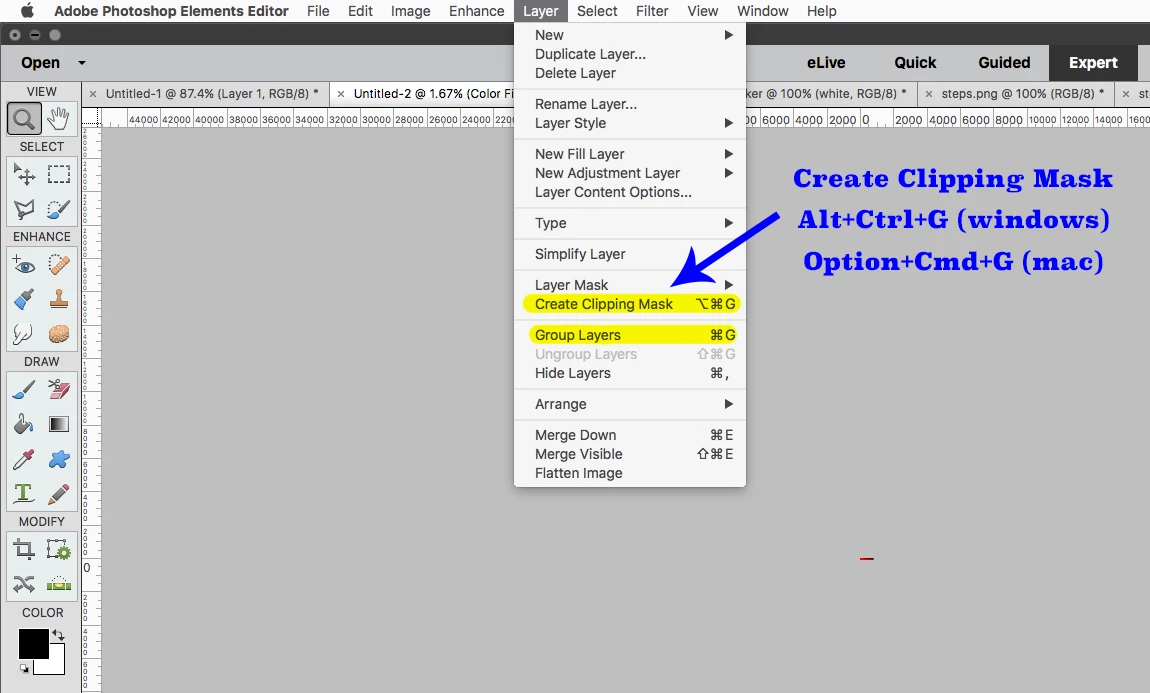
Adobe changed the Create Clipping Mask shortcut starting in pse 15, because pse 15 added

Layer Groups and the shortcut Cmd+G or Ctrl+G is used to Group Layers (create Layer Group or Layer Set)


The new Create Clipping Mask shortcut is Option+Cmd+G (mac) or Alt+Ctrl+G (windows)


2 replies

Jeff Arola
Community Expert
Jeff ArolaCommunity ExpertCorrect answer
Community Expert
November 22, 2020

Adobe changed the Create Clipping Mask shortcut starting in pse 15, because pse 15 added

Layer Groups and the shortcut Cmd+G or Ctrl+G is used to Group Layers (create Layer Group or Layer Set)


The new Create Clipping Mask shortcut is Option+Cmd+G (mac) or Alt+Ctrl+G (windows)


Participant
November 22, 2020
Thank you so much! This works!
ShelLuser
Inspiring
November 22, 2020

I can confirm that ctrl-g doesn't seem to do anything on PSE 2021 ("19"). However I'm not sure if this is a glitch or simply working by design (I skimmed the documentation section but couldn't find anything conclusive (no mention of control-g so far).

Jeff Arola
Community Expert
Community Expert
November 22, 2020

The adobe help files leave a lot to be desired.


One is better off just using your search engine to find info on photoshop elements.


http://www.photokaboom.com/photography/learn/Photoshop_Elements/layers/clipping_masks/1_clipping_masks.htm