
Participant
November 26, 2020
Answered

"Placing" a photo into a template in Elements 2021

  • November 26, 2020
  • 1 reply
  • 1191 views

I just upgraded a very old version of Elements to the new 2021 version.  I like to use psd templates for scrapbooking.  I've always used the "place" command and then control G to snap a photo into the appropriate place in the template.  When I tried this today, I was shocked to find that this no longer works ... and some "group" stuff comes up that I don't have a clue about.  I can't for the life of me figure out how to get a photo into the photo template.  Can someone help??  Thanks so much!
This topic has been closed for replies.
Correct answer Jeff Arola

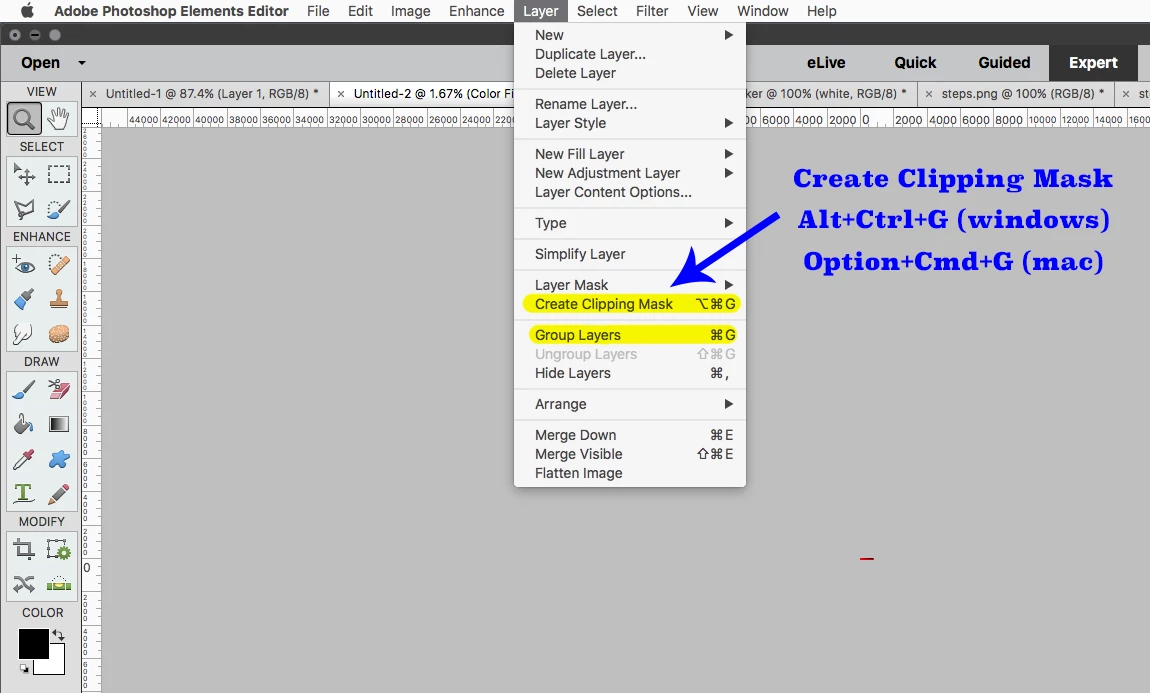
Adobe changed the Create Clipping Mask shortcut starting in pse 15, because pse 15 added

Layer Groups and the shortcut Cmd+G or Ctrl+G is used to Group Layers (create Layer Group or Layer Set)

https://www.essential-photoshop-elements.com/layer-groups.html


The new Create Clipping Mask shortcut is Option+Cmd+G (mac) or Alt+Ctrl+G (windows)


1 reply

Jeff Arola
Community Expert
Jeff ArolaCommunity ExpertCorrect answer
Community Expert
November 26, 2020

Adobe changed the Create Clipping Mask shortcut starting in pse 15, because pse 15 added

Layer Groups and the shortcut Cmd+G or Ctrl+G is used to Group Layers (create Layer Group or Layer Set)

https://www.essential-photoshop-elements.com/layer-groups.html


The new Create Clipping Mask shortcut is Option+Cmd+G (mac) or Alt+Ctrl+G (windows)


Participant
November 26, 2020

Thanks so much!!!