Known Participant
December 4, 2019
Answered

Reorganizing photos on computer hard drive

  • December 4, 2019
  • 2 replies
  • 693 views

My photos in elements are well organized and tagged.

My photos on my computer hard drive are VERY messy and unorganized. I would like to organize them.

Year>month>activity

I have looked all through elements forums and can find a statement that you have to organize your files on your computer through elements

Can someone direct me to a video or post that explains this in detail
This topic has been closed for replies.
Correct answer Greg_S.

Since you say that your photos are well organized and tagged, I first have to ask you why you want to clean up the mess on your computer. It really doesn't matter where the files are stored on your computer if you can quickly access them in the Organizer. 


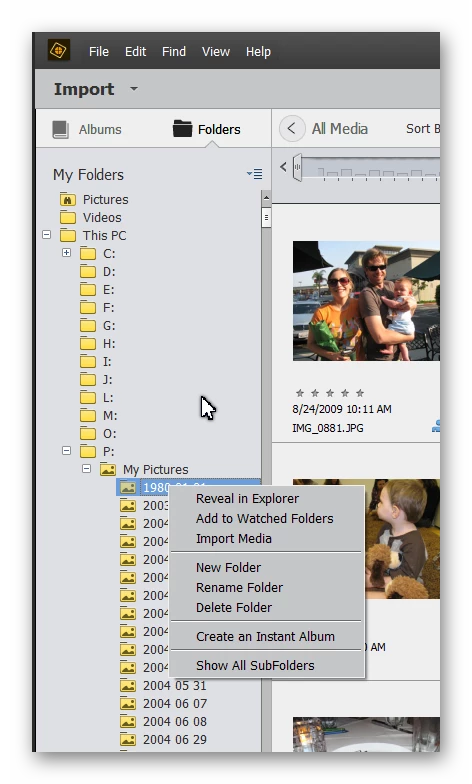
However, having said that, it IS important to only reorganize the storage through the Organizer.  You can do this easily via the Folders panel on the left of the grid.  You can use this pretty much as you use Windows File Explorer or the Mac equivalent. 


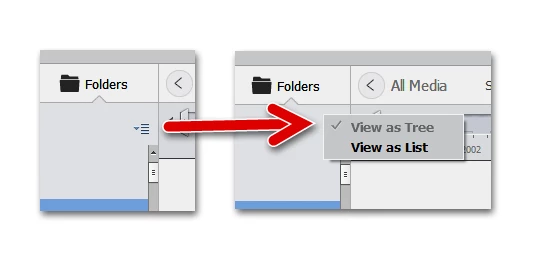
Thus, you can use a context menu to Rename, Delete or create a New Folder.  You can drag and drop folders to different sub-folders, and you can drag and drop images in the grid to whatever folder you desire.  Make sure that you are in the Tree View which will show the folder hierarchy:


2 replies

MichelBParis
Legend
December 4, 2019

There is no video and there will never be...

Because the organizer as well as other catalog-based photo managers are created precisely to be organized independently from the way your drive folder tree looks like. You are supposed NOT to manage your media files from two different systems at the same time (even in two different catalogs). The organizer lets you use about the same tools as explorer/finder to shape your folder trees, for instance by moving or renaming subfolders. So the organizer has the same tools for your purpose as 'organizing' from the explorer/finder. It has the same limitations, that is you can move all subfolders into a new hierarchy tree by dates, but the idea of sorting by 'activity' can't be automated, it's totally arbitrary. In the organizer, you can select all the files with the creation date in a given month and move them into a new destination subfolder in a Year/Month tree, and repeat for each month. You might find external tools to do that, but you would need to reconnect all files afterwards, which is risky. Is it worth the trouble?

Tips;:

- the best option when you import from card reader is to set the default for folder creation to Year/Day. Every year I set my preference master folder destination for the current year = 'Import Photos 2019'. The imported photos are stored in a subfolder by day, which is created automatically. My folder tree looks like Year/Day. I have a different hierarchy for scans and special categories.

- Since the organizer can create that year/day folder hierarchy when importing from card reader, you might want to do the same with a batch of files from different dates coming from another source than a card, say from an external drive or USB thumb. Then copy those files to a big free card and import from card reader.


Remember

Greg_S.
Community Expert
Greg_S.Community ExpertCorrect answer
Community Expert
December 4, 2019

Since you say that your photos are well organized and tagged, I first have to ask you why you want to clean up the mess on your computer. It really doesn't matter where the files are stored on your computer if you can quickly access them in the Organizer. 


However, having said that, it IS important to only reorganize the storage through the Organizer.  You can do this easily via the Folders panel on the left of the grid.  You can use this pretty much as you use Windows File Explorer or the Mac equivalent. 


Thus, you can use a context menu to Rename, Delete or create a New Folder.  You can drag and drop folders to different sub-folders, and you can drag and drop images in the grid to whatever folder you desire.  Make sure that you are in the Tree View which will show the folder hierarchy:


Jan9368Author
Known Participant
December 4, 2019

This is exactly what I was looking for.  I heard that you can only organize your files on the computer through the elemets file folders.  I wanted to make sure that I was understanding this BEFORE I started.  I am going to do a few and then see if it causes any issues.  Thanks for the pictures.  It helped me feel more confident.