
Some slides don't show in Photoshop Elements 8 Storyboard
Hi,
I'm running Photoshop Elements 8 on Windows 10 (64 bit, 8 gigabytes of RAM).
I'm trying to make a slide show for Youtube; it's about an old math puzzle called "How old is Ann?"
Some of the slides don't show up on the storyboard at the bottom of the screen.. They appear blue, which is the background color I selected. I managed to work around the problem for a while since the slides do show up on the center screen when I click on the Play button.
Today, I tried to output a wmv file of the entire slide show. The "movie file" that this produced seemed ok for a while -- until it got to the problem slides -- they did not show up, or rather, they appeared as blue screens.
I tried inputting the slides as jpg files and as png files (and, if I remember correctly, a couple other file types, too). Nothing worked. I worked on the slides in the Photoshop Elements Editor. Some slides that look similar to the problem slides do show up in the storyboard. I can't figure out what the difference is.
Today, I tried running Photoshop Elements 8 as an Administrator. I got the same result.
Once, I tried uninstalling and re-installing the program -- no help.
Any ideas would be appreciated. Would a more modern version of Elements work better?
Thanks,
Steve Maricic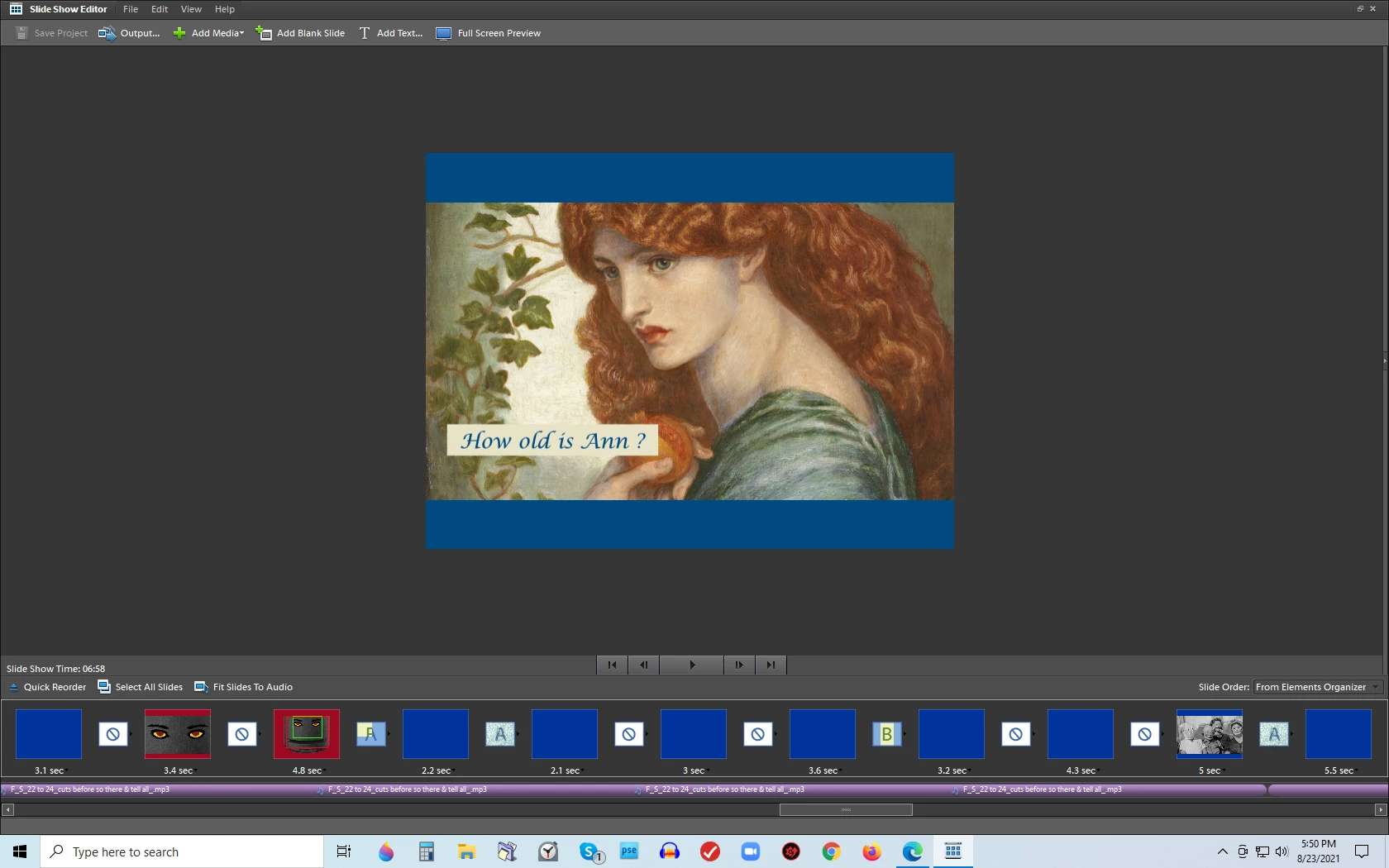
 AdChoices