mdkiwis
Participant
October 30, 2021
Answered

Star ratings integration with other applications

  • October 30, 2021
  • 1 reply
  • 977 views

Does anyone know how to make stars assigned in PSE 2021 appear in other applications such as MS Explorer and vice versa?

This topic has been closed for replies.
Correct answer Somya_Agarwal

Hi,


After applying the star rating to the media, write metadata to file. For this select media you applied star rating to, choose File->Save Metadata to file.


Now go to the media file in File Explorer, right click and choose Properties. Go to details tab.You will find the star rating has been written to the media properties, and is visible outside of Elements organizer.
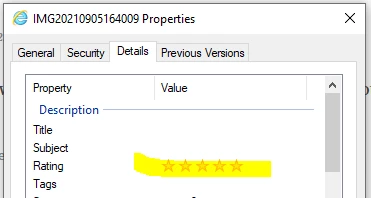


Let me know if this solves your query.


Thanks,

Somya


1 reply

Somya_AgarwalCorrect answer
Adobe Employee
November 8, 2021

Hi,


After applying the star rating to the media, write metadata to file. For this select media you applied star rating to, choose File->Save Metadata to file.


Now go to the media file in File Explorer, right click and choose Properties. Go to details tab.You will find the star rating has been written to the media properties, and is visible outside of Elements organizer.


Let me know if this solves your query.


Thanks,

Somya


mdkiwis
mdkiwisAuthor
Participant
November 16, 2021

Thanks - that seems to work most of time. Occassionally I don't get the confirmation that the metadata was saved. So in those circumstances I manually update the file properties in explorer. Any ideas about how things work the other way - how can I ensure that star ratings changed in other applications get imported into PSE?


MichelBParis
Legend
November 17, 2021

That depends on how other applications do write the changed fields in the metadata.

If they write them in the same fields as what the organizer or the editor do, then the only thing to try is:

- use the update thumbnail option.


You'll discover that if you change the rating and add some keywords in the Explorer, the changes will not be updated in the catalog itself, but they will appear in the files properties, both in the IPTC panel of the organizer and in the File >> info of the editor. If the keyword is written by other compatible applications, then the catalog may be updated; for instance changes made in LR or in a different PSE catalog. Some types or data are written in several distinct locations in the metadata, for instance exif and IPTC. That's pretty confusing for the numerous date fields.