
Participant
April 24, 2021
Answered

Stopping Photo Downloader

  • April 24, 2021
  • 2 replies
  • 839 views

Is there a way to stop Photo Downloader from starting at all?  I don't like it, and I don't use it.  Yet, every time I plug my Android phone into my computer, it tries to start, but gets hung up.  I have to go into Task Manager in Windows 10 to stop the task.  Then I can connect to my phone the way I like.  I'm running Photoshop Elements 12.  I love Photoshop, but absolutely hate Photo Downloader.
This topic has been closed for replies.
Correct answer Greg_S.

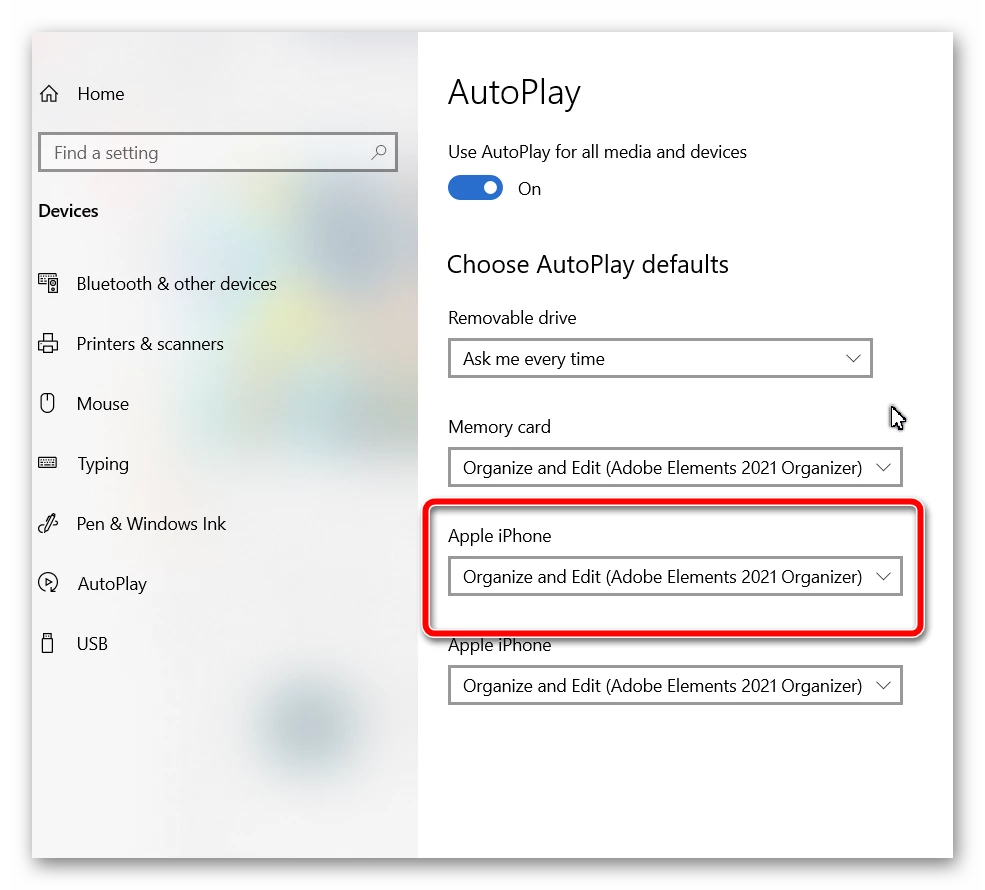
The problem is with your AutoPlay settings in Windows.  You probably have an entry for your Android  phone that says Organize and Edit (Adobe Elements Organizer 12).  You can change it to Take No Action.  Here is the setting for my iPhone.


2 replies

Ralph6C12Author
Participant
April 25, 2021

Figures it would be that simple and I didn't see it.  Thank you so much.  That did the trick.

Greg_S.
Community Expert
Greg_S.Community ExpertCorrect answer
Community Expert
April 25, 2021

The problem is with your AutoPlay settings in Windows.  You probably have an entry for your Android  phone that says Organize and Edit (Adobe Elements Organizer 12).  You can change it to Take No Action.  Here is the setting for my iPhone.