
Trouble opening PS Elements 8 after software update
Hello Community,
I recently updated my iMac's software from Snow Leopard to Maverick. The folks at Apple assured me the update would still be compatible with my existing versions of Photoshop and Dreamwaver. (I have PS Elements 8.)
Post-update, Dreamweaver seems to be working fine, but I get this error message when I try to open Photoshop...
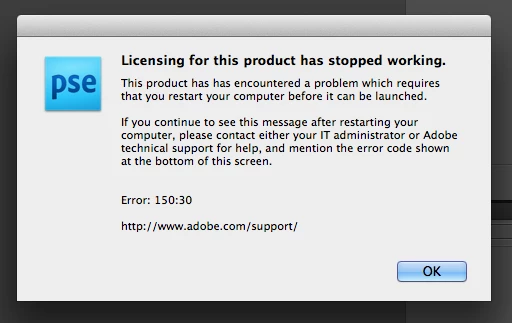
I've tried to restart my computer and nothing changes. I also tried to insert my PS disc to reinstall the program, but the disc drive on my computer is no longer working. (It just spits the disc back out - happens to any disc I try to insert.)
Please, does anyone know what I can do? I am the rightful owner of the product and I have the serial number from my original purchase. I would like for this version to work and not have to buy another one at this time.
I appreciate any insight you might have. Thank you for your time!
Warmly,
Shari
 AdChoices