
Participant
July 14, 2021
Answered

Unable to activate Photoshop Elements 13

  • July 14, 2021
  • 1 reply
  • 485 views

My old Windows Surface tabled died. 
I was able to signout from my installation on that PC and i received the message that i should be able to signin on a new PC. But it won't.
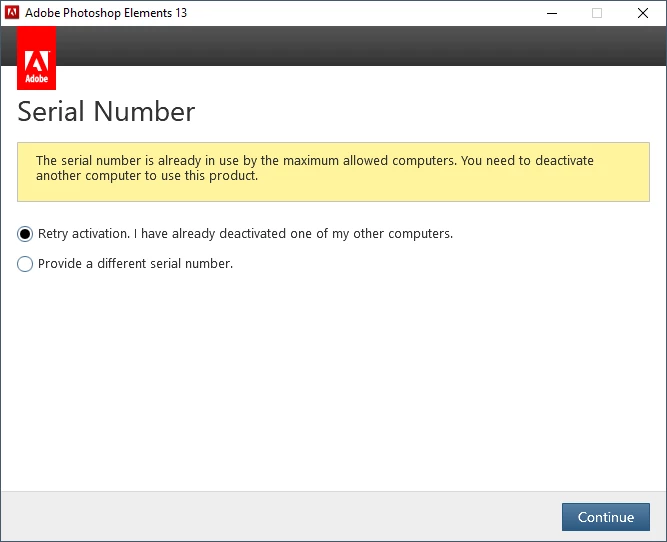
I tried to chat with support but we are going in circles.

First only kb articles that are subscription based,,, after several time telling that it is not a subscription based software they send me the links i already knew about deactivating/logging out from the old PC to be able to login on the new one. (https://helpx.adobe.com/x-productkb/policy-pricing/error-activation-limit-reached-sign.html or https://helpx.adobe.com/x-productkb/policy-pricing/error-activation-limit-reached-sign.html and https://helpx.adobe.com/download-install/kb/activation-deactivation-help.html)


At the end they send me to this community.... 😥

(I have had this similar issue before and then support at adobe was able to remove the 'lock'.)

Is there someone here with an idea that would fix this for me?
Thank you very much in advance.

This topic has been closed for replies.
Correct answer Phil Pickering

Hi Marcel,


Sorry about your experience with Adobe Customer Care so far 😞


They should be able to deactivate your previous installations in a matter of minutes. You can either try and persevere with the online chat - just keep insisting you only want to DEACTIVATE your previous installations. Or, you can try phoning them instead.


From your name, I'm guessing you are Europe-based, so here are the relevant phone numbers that are available Mon-Fri from 9am to 5pm:


Reach us by phone (Europe, Middle East and Africa)


Good luck 🙂

1 reply

Phil Pickering
Phil PickeringCorrect answer
Legend
July 14, 2021

Hi Marcel,


Sorry about your experience with Adobe Customer Care so far 😞


They should be able to deactivate your previous installations in a matter of minutes. You can either try and persevere with the online chat - just keep insisting you only want to DEACTIVATE your previous installations. Or, you can try phoning them instead.


From your name, I'm guessing you are Europe-based, so here are the relevant phone numbers that are available Mon-Fri from 9am to 5pm:


Reach us by phone (Europe, Middle East and Africa)


Good luck 🙂

MarcelK14Author
Participant
July 15, 2021

Hi Phil,


Thank you very much.
Just tried it today via chat one more time (third time) and now i got the right person. 
So i'm happy. It is working again.