

John in Houston
Inspiring
October 9, 2020
Answered

Unable to download/ustall new PSE

  • October 9, 2020
  • 3 replies
  • 669 views

I purchased PSE 2021.  I downloaded it.  Security on my PC blocked installation.  I set security to allow installation.  I tried installation again and got a popup saying:  Invalid access to memory location.

I tried a second download and installation and got the same result.  After several attempts, PSE will no longer download.


I tried uninstalling PSE 2018 and download again.  Same result.


John
 

This topic has been closed for replies.
Correct answer John in Houston

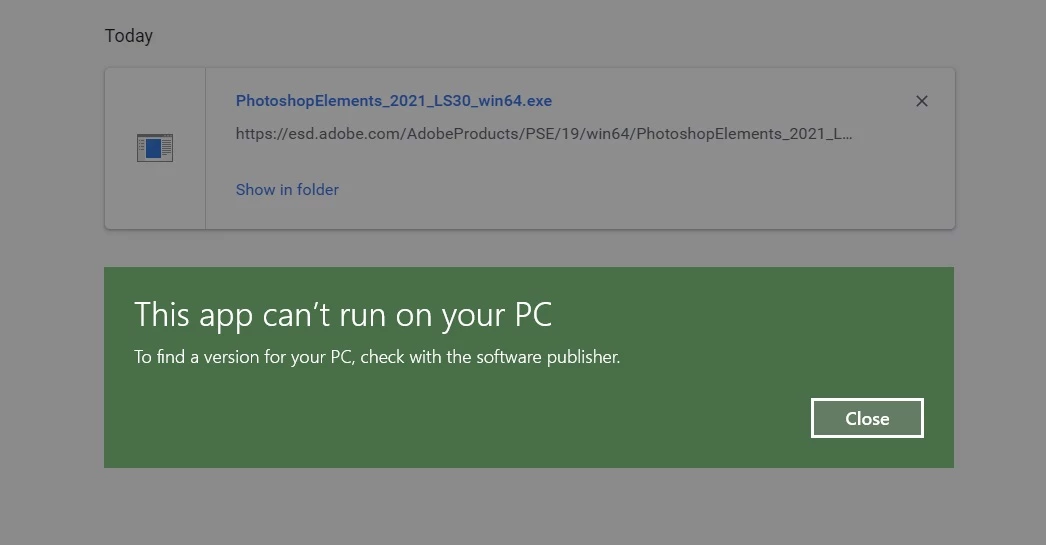
I have a new problem.  After not trying to install for a day, I tried today and got a new rejection.

I have been running PSE for years.  My PC has abundant memory/processor/etc to run PSE2021.

John

3 replies

John in Houston
John in HoustonAuthorCorrect answer
Inspiring
October 12, 2020

I have a new problem.  After not trying to install for a day, I tried today and got a new rejection.

I have been running PSE for years.  My PC has abundant memory/processor/etc to run PSE2021.

John

Peru Bob
Community Expert
Community Expert
October 12, 2020

What are the complete computer specs, including hard drives (how many, what kind, what is on each, and how full)?

John in Houston
Inspiring
October 12, 2020

1TB Samsung 850 EVO M2. SSD (about 350gig on it), 32 Gig RAM. Intel Core 15-7600K CPU 

Running up-to-date Win10.


John


John in Houston
Inspiring
October 10, 2020

Unable to connect with Chat.  Is it not active on weekends?

Greg_S.
Community Expert
Community Expert
October 9, 2020

Contact Adobe Support via a chat session.  You can reach them by clicking on the blue Contact Us button under the Support menu at Adobe.com.

John in Houston
Inspiring
October 12, 2020

The blue Contact Us button does noy work.

John in Houston
Inspiring
October 12, 2020

Correction:  ... Contact Us button does NOT work.