
Mulgravebrad
Inspiring
February 23, 2017
Answered

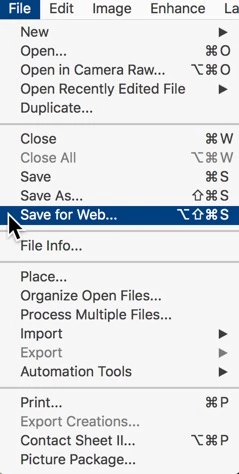
Why does the shortcut Cmd/Option/Shift/S not work in either of my Photoshop CC or Elements 14?

  • February 23, 2017
  • 1 reply
  • 2430 views

I'm on a Mac using the latest Sierra. I can't get this shortcut to work. If I mouse to the Command, it works fine but it's a bit of travelling in Photoshop. I use Shortcuts a lot. It's interesting that it doesn't work in neither Elements nor Photoshop. Could it be a clash with the same command on my Mac?
    This topic has been closed for replies.
    Correct answer Mulgravebrad

    Some things to try:

    https://helpx.adobe.com/photoshop/kb/keyboard-shortcuts-stop-photoshop-mac.html


    Restart in Safe Mode? Are you kidding? I've re-assigned a shortcut which works and I'll use the menu selection in Elements. I won't be restarting the machine in the middle of work. Thanks anyway.

    1 reply

    Jeff Arola
    Community Expert
    Community Expert
    February 24, 2017

    Have you added any Input Sources?

    Apple>System Preferences>Keyboard>Input Sources

    Mulgravebrad
    Inspiring
    February 24, 2017

    No, nothing added. I also checked all the system shortcuts and there was nothing remotely like that shortcut.

    Thanks.

    Adobe Employee
    March 8, 2017

    Hi,

    What is happening on using this (cmd+option+Shift+S) shortcut ?

    Thanks,

    Rupali