
anxiousgeek
Participating Frequently
November 14, 2021
Question

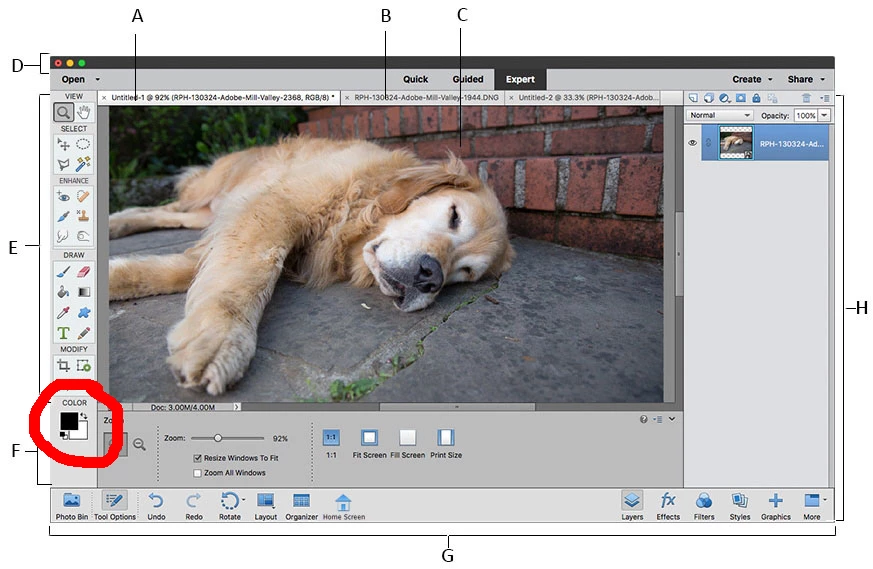
Why is the colour box not in the toolbar anymore?

  • November 14, 2021
  • 3 replies
  • 3269 views

Where is the colour box in PE 2022? I never know what colour I've got on anymore, and to choose a colour I have to open the colour swatch and for the life of me I can't figure out how to get the colour chooser up - the only option to bring it up so I can put in a hex code is when I'm typing or making a shape. But if I'm using a brush then I'm stuck with the swatch. 


It just seems like a really stupid thing to have removed from the toolbar and I can't find how to fix it and I'm considering asking for a refund so I can buy PE 2021 instead and have my colour box back!
 

[edited by moderator]

This topic has been closed for replies.

3 replies

Jeff Arola
Community Expert
Community Expert
March 6, 2022

Yes the most recent pse 2022 update fixed the issue of not seeing the color chips in the Tools Panel on

1280 x 800 displays and also included the 14.1 camera raw update.


https://helpx.adobe.com/photoshop-elements/release-note/update.html


Also fits 1366x768


Jeff Arola
Community Expert
Community Expert
November 15, 2021

Here even with the 1280 x 800 native display resolution on this MacBook Pro, pse 2022 doesn't fit.


Compare that to pse 2021 on the same MacBook Pro.


If on your windows 10 you hide the Taskbar, you should able to get the color chips in the Tools panel, but just barely.


anxiousgeek
Participating Frequently
November 15, 2021

Thank you for this! Definitely nothing to do with my display. PE 2022 has changed the size/spacing of the toolbar.


How do I get rid of the task bar? 

Participant
March 6, 2022
quote

I tried different screen resolution but it doesn't change a thing, PSE stays the same. The only thing that works a little bit is to move the task bar to the right - then I can see the very top of the color box like on the screen shot above by Jeff Arola, still very annoying to work with.

So much white space in the side bar of PSE - if there just was a way to change that. It's really too bad. PSE used to be such a great tool. 


By @Eva22901752i6f8


The big problem is that the system requirements today for Elements require much more power than was necessary for older versions. If you want to find an affordable Windows laptop today for PSE2022, especially RAM and processor requirements, you wont find anything with low res like 1280 x 800 pixels. More important, what is more and more in demand today is high res (even 4k) monitors. So there is little chance that Adobe changes the requirements for users of old configs when what you can buy today is already much more than 800 pixels in height.


For a number of users of old configs, I would rather suggest getting an old second-hand TV set with just the minimal 1920 x 1080 pixel res in about 21 to 23" and use it as an external HDMI monitor for the laptop when working at home. Very affordable or nearly free and so much more comfortable.

https://helpx.adobe.com/lv/photoshop-elements/system-requirements.html


Well I would take any of the above - at least they can see the color box. Here's what mine looks like: If I make that window full screen, I will only see half of the gradient tool. It just so happens I have my old computer hooked up to a tv screen and that works perfect - just inconvenient. Is there any way to get at least a portion of the color boxes?

Jeff Arola
Community Expert
Community Expert
November 14, 2021

What operating system are you using?


What screen resolution is your computer running?


Are you in the Expert mode as is shown in your provided screenshot?


Can you show us a screenshot of what your seeing in your version?

anxiousgeek
Participating Frequently
November 14, 2021

Hi, I'm using Windows 10. Display is 1366x768. i'm in expert mode and this is what I see:


MichelBParis
Legend
November 15, 2021

See the system minimal requirements:

https://helpx.adobe.com/photoshop-elements/system-requirements.html#pse15


You need 1280 x 800 otherwise the bottom of your display is truncated.