
December 15, 2017
Answered

Will elements 2018 organizer change the source folder of images.

  • December 15, 2017
  • 2 replies
  • 3045 views

I am looking to use Photoshop Elements 2018 and Organizer to edit and organise my images.

The problem I have is that at the moment I have thousands of images in one folder within "my pictures". Is it possible to get organiser to change this, I understand in the program things will be all nice and neat, but will it also change the source location of the images. or maybe even create a second copy?

I'm hoping to achieve an organised folder structure within windows as well as the program.

Thanks in advance.
    This topic has been closed for replies.
    Correct answer hammer0909

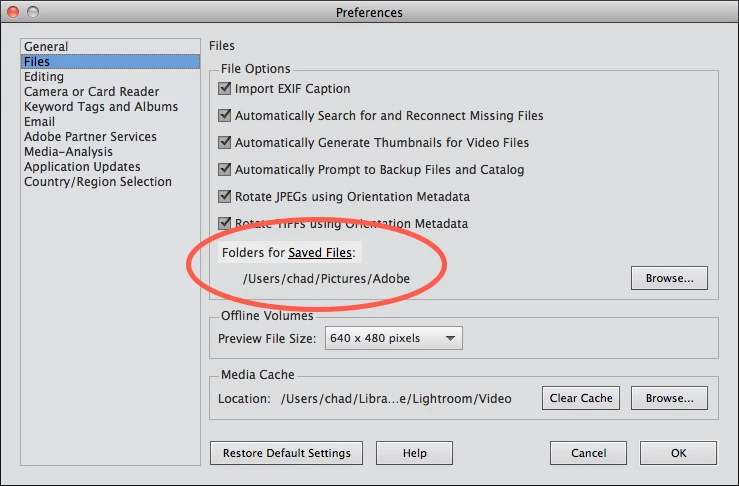
    With Photoshop Elements 2018, you can import all of the photos in your my pictures subfolder and keep those photos in their original location. I'm not sure what you mean by getting Organizer to change this though. Organizer is just going to leave those photos in their original location and allow you to view and manage those photos. Now if you import photos from a camera card, by default they are stored in a different location (see figure below), however you can change this location as well. You can import files from multiple different locations with Elements Organizer and manage them all within one location (the Organizer).

    2 replies

    December 15, 2017

    OK Thank you,

    So on a similar but different note, I use onedrive to auto upload my images taken on my mobile phone. Is there a way to instruct organizer to keep looking at the camera roll for updates. So that I can then move and organise these photos. Will I just need to keep importing from the folder every day?

    Can I store all of my photographs and the catalogue on a NAS or is it advisable to keep them all stored on the local machine?

    MichelBParis
    Legend
    December 15, 2017

    nathand20640154  wrote

    So on a similar but different note, I use onedrive to auto upload my images taken on my mobile phone. Is there a way to instruct organizer to keep looking at the camera roll for updates. So that I can then move and organise these photos. Will I just need to keep importing from the folder every day?

    OnDrive syncs the photo files on your smartphone to your drive in the OneDrive folder.

    So, what you can try is to set your 'Watched' folders in the file menu to watch the roll subfolder of the OneDrive master folder.

    Can I store all of my photographs and the catalogue on a NAS or is it advisable to keep them all stored on the local machine?

    You can store your photo files in an internal or external drive as well as in a NAS.

    For the catalogs, you can store them either in an internal or external drive (not on a NAS).

    hammer0909
    Community Expert
    hammer0909Community ExpertCorrect answer
    Community Expert
    December 15, 2017

    With Photoshop Elements 2018, you can import all of the photos in your my pictures subfolder and keep those photos in their original location. I'm not sure what you mean by getting Organizer to change this though. Organizer is just going to leave those photos in their original location and allow you to view and manage those photos. Now if you import photos from a camera card, by default they are stored in a different location (see figure below), however you can change this location as well. You can import files from multiple different locations with Elements Organizer and manage them all within one location (the Organizer).

    December 15, 2017

    Thank you, This answers exactly what I wanted to know.

    It would seem it will not do what I needed unless I import from a camera.

    I wanted to be able to move a photo in the organiser and it automatically move within windows too. The organiser just giving a better visual representation.

    I know Google Picasa used to do this, Google photos does not.

    Thanks again.

    MichelBParis
    Legend
    December 15, 2017

    nathand20640154  wrote

    Thank you, This answers exactly what I wanted to know.

    It would seem it will not do what I needed unless I import from a camera.

    I wanted to be able to move a photo in the organiser and it automatically move within windows too. The organiser just giving a better visual representation.

    I know Google Picasa used to do this, Google photos does not.

    Thanks again.

    In the organizer you can move photo files just like within the Windows explorer or the Mac Finder.

    Three ways:

    - either by using the left 'folders' panel (in tree mode) and by creating subfolders and moving them in the folder tree on your drives

    - or by selecting files in your browsing space and moving them to a given folder on the left panel

    - or by selecting files in your browsing space and using the menu File >> move.

    That works the same as for the Explorer and Finder AND that keeps the links in your catalog connected with the new location of the files.

    The golden rule is to move, delete or rename files from the organizer, not from the Explorer/Finder.