

nancys96801561
Participant
October 16, 2017
Question

CR2-Format

  • October 16, 2017
  • 1 reply
  • 254 views

Hello,

I've Photoshop Elements 13. When I want to open an RAW-Format (CR2), I got a defect report.
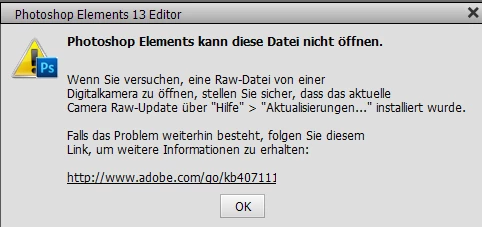
Although I have the actual Camera Raw-Update 9.12 installed!

What could be the error? Thanks for your help.

Nancy

    This topic has been closed for replies.

    1 reply

    MichelBParis
    Legend
    October 16, 2017

    nancys96801561  wrote

    Hello,

    I've Photoshop Elements 13. When I want to open an RAW-Format (CR2), I got a defect report.

    Although I have the actual Camera Raw-Update 9.12 installed!

    What could be the error? Thanks for your help.

    Nancy

    Nancy,

    Elements 13 can't be updated to more recent than ACR 9.0.

    Camera Raw plug-in and Adobe application compatibility

    If you have installed ACR 9.12 manually (outside of the menu Help>>Update) it won't be recognized.

    Check the ACR version needed for your camera:

    Cameras supported by Camera Raw

    If you need a newer ACR version than 9.0, you can either:

    - pay the upgrade to the latest Elements 2018

    - or, use the free Adobe DNGconverter independent software (not a plugin) mentionned  in the faq:

    FAQ: Will Photoshop Elements work with my camera, or Why won't my raw files open?

    You'll be able to convert a whole folder (not a single file) of your CR2 files to the DNG raw format that your Elements 13 can read and edit.