


SergeiKat
Inspiring
March 17, 2019
Answered

Metadata library could not be loaded

  • March 17, 2019
  • 1 reply
  • 1725 views

Windows 10 Home 64-bit / Elements 2019

Clean install on a new PC.

64-bit installer downloaded from Adobe website today.

All appeared to go smoothly & startup was fine.

Both with an existing image & a newly created one, when I go to menu File / File info..

this happens:
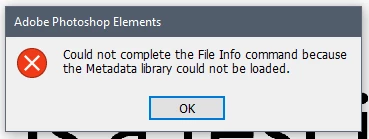
File info cannot be opened!

This clearly is a very bad sign!

From reading previous discussions it seems I am not alone with this problem. However as this is only day 1 of this application unless Adobe can solve it quickly it will be returned for refund.

As soon as support opens I'll try them, but if anyone here has a solution please speak up.

This topic has been closed for replies.
Correct answer SergeiKat

Adobe support confirmed it is due to a missing file from Microsoft.

I installed...

Visual C++ Redistributable for Visual Studio 2012 Update 4

which has resolved the issue

1 reply

SergeiKat
SergeiKatAuthorCorrect answer
Inspiring
March 18, 2019

Adobe support confirmed it is due to a missing file from Microsoft.

I installed...

Visual C++ Redistributable for Visual Studio 2012 Update 4

which has resolved the issue

fredsnake
Participant
May 3, 2019

Hi, I have the same problem only installing the missing has not resolved the issue. Any thoughts anyone?