Participant
June 4, 2017
Answered

Photoshop not loading tiles and constantly crashing!

  • June 4, 2017
  • 7 replies
  • 8956 views

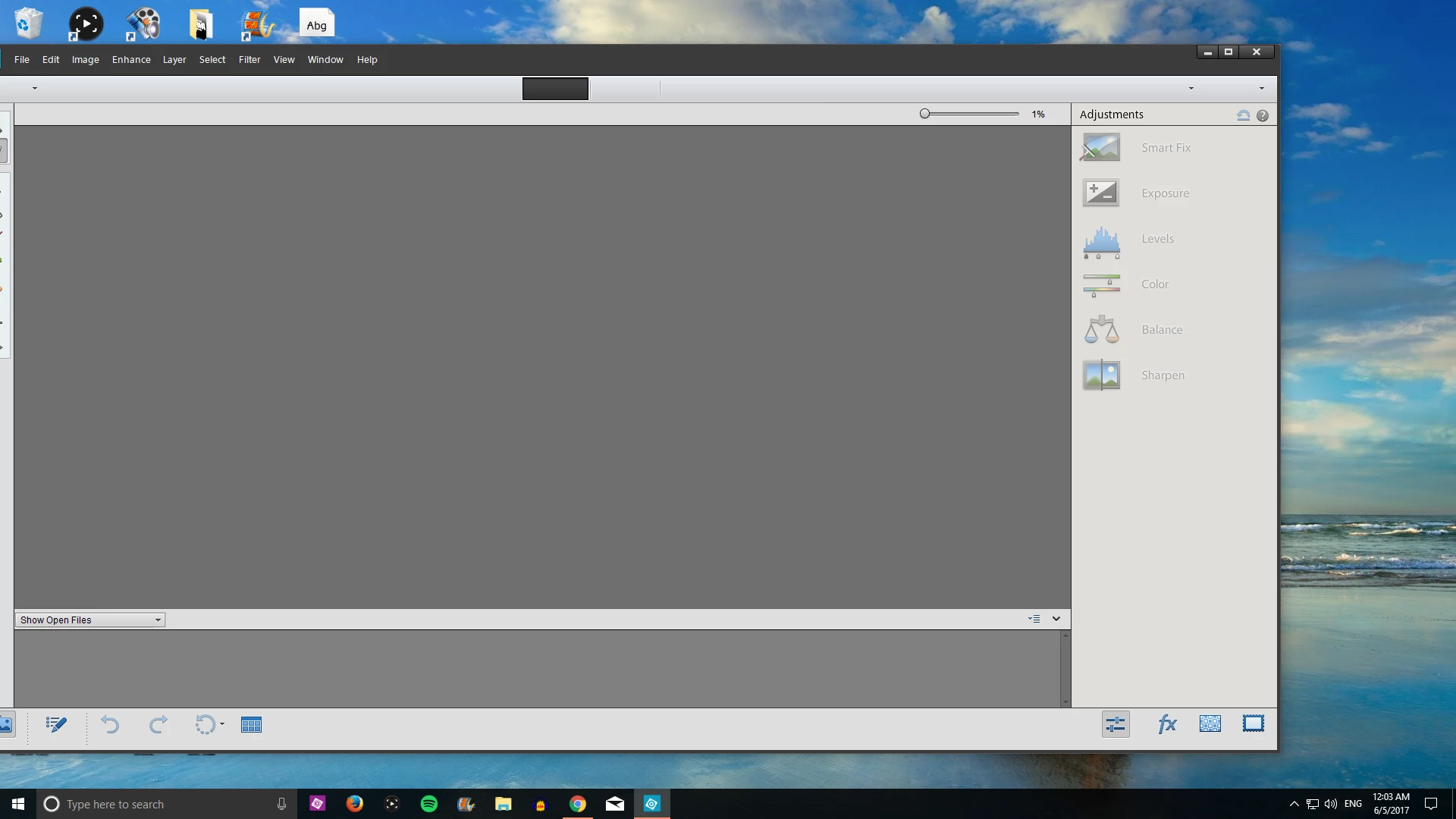
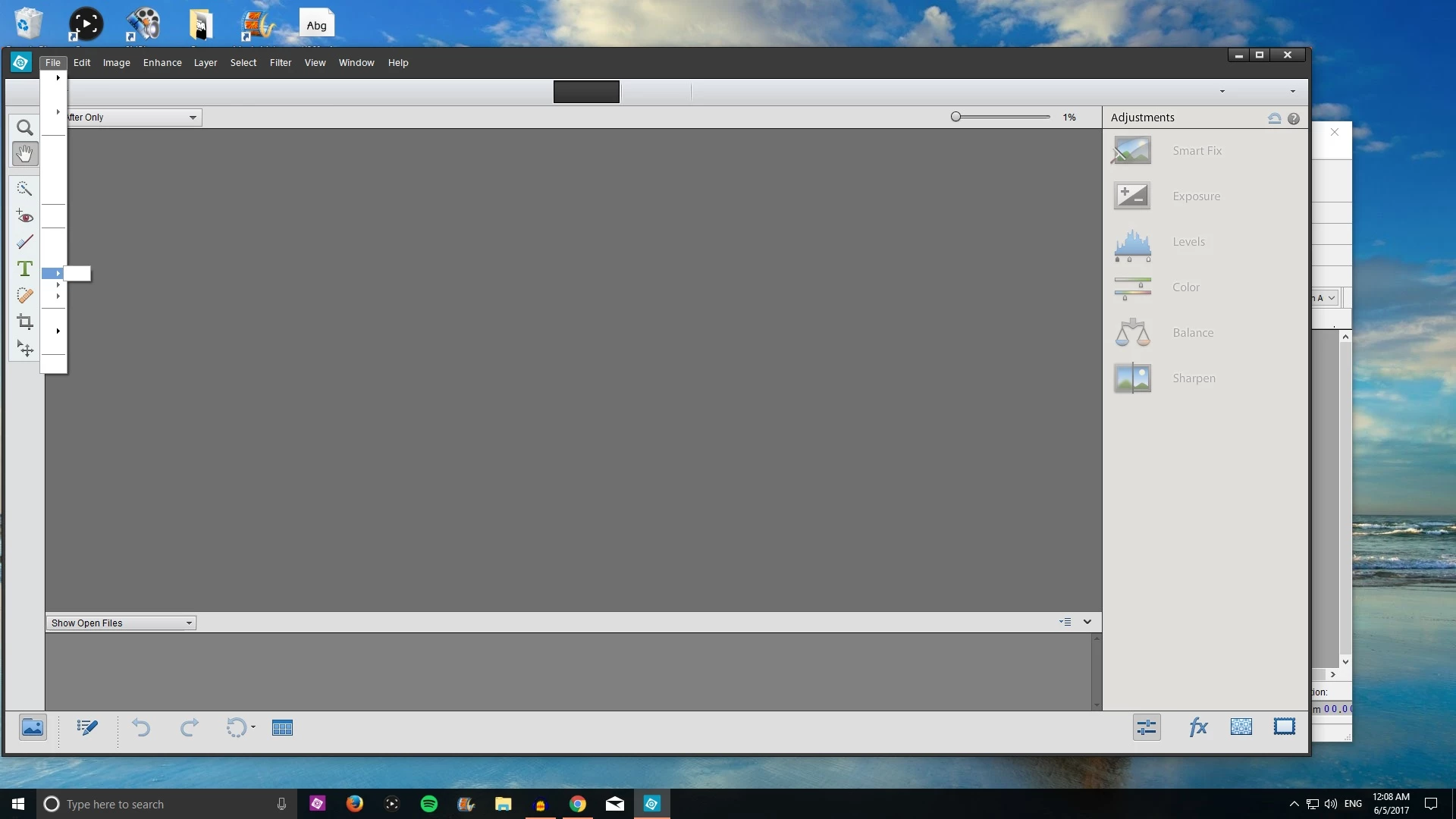
For the last week whenever I've tried to use Photoshop some of the tiles aren't rendering. Also, along the middle top where the black box is there should be three sections that read Beginner/Guided/Expert or something like that, but they don't show! When I try to access anything through drop boxes nothing shows! I don't know what or how to fix this but please help! Oh and it also crashes every couple of minutes!

This topic has been closed for replies.
Correct answer Dhananjay Sati

Hi ArooderDooder,

Thanks for contacting Adobe forum.

I can understand you are facing issue with Adobe Elements 11 after you updated Windows 10 recently.

If after installing the Windows 10 Creators Update v1703 you are facing problems and issues with it, you can uninstall it and go back or rollback to the previous Windows version 1607. Most of you may be familiar with the instructions, but for those of you who are not, this post will help you uninstall Windows 10 Creators Update from your PC.

To uninstall Windows 10 Creators Update you will have to open the Start Menu. Next, click on the Settings link.

Having opened the Settings panel, click on Update and security and here select Recovery settings.

Next click on the Get started button under Go back to an earlier build section.

The process will start and you will be asked some questions for information purposes, as to why you are going back to the previous build of Windows 10.

The options are:

My apps or devices don’t work on this build

  • Earlier builds seemed easier to use
  • Earlier builds seemed faster
  • Earlier builds seemed more reliable
  • For another reason – Tell them more.

Do the needful and click Next to move on. If you wish, you have a chance to Cancel now.

You have to remember that when you go back, you will lose the settings changes or the apps you may have installed after you upgraded to the current build.

Windows 10 will offer to check for updates. Maybe some new fixes have been released!

Remember to note down your password or login credentials as you will be required to enter them after the process is completed.

Click on Next and you will be thanked for trying out this build.

Once you are completely sure click on the Go back to earlier build button and the upgrade process will start.

Just to be on the safe side, you may want to also back up your data before you begin.

Once you have done this, you may want to defer installing of Windows Updates on your Windows 10.

Hope this works for you.

Thanks

Regards

Dhananjay

7 replies

Participant
August 29, 2017

PSE12's dropdown  Menu are gibberish and not readable after the creator's update. Has the update to resolve the compatibility of the program to Windows 10's recent update been released? It's not allowing me to update the recent update either with a non-existing error code link.

Participating Frequently
August 14, 2017

I am unhappy about this because Adobe has changed or removed some features in newer version. "Variations" is the one I miss most, and I've been very hesitant to upgrade Premiere Elements because I read complaints about how newer versions handle slideshows. I also have an old scanner that I miraculously got to work with PSE9 + Win 10, and I'll probably have to upgrade that too if I don't get the menus back. (Note: I lost my menus in PSE9 on 8/11/17. Organizer & Editor have distinctly different problems (see image), but PRE9 menus are still fine).


Anton+
Participating Frequently
August 18, 2017

As alternative of undoing the W10 Creators Update, see the solution in this thread

Photoshop Elements opens, but menus are blank

Participating Frequently
August 13, 2017

Begrudgingly, I installed the demo for PSE 15.  Before running it, I verified that my PSE 9 wasn't working.  Nope, missing fonts.  Installed PSE 15 and ran it.  It works.  Rebooting now to make sure it stays working.

Seriously not happy about this.  I don't need any of the features of 15.  No, I don't expect Adobe to continue to support older versions.  There should be some expected time of support though.  They're basically doing the 1 version a year philosophy just so they can ... never mind, not worth the soapbox.  Regardless, I do feel this points to Adobe using some kind of shortcut in their development environment, and now that old shortcut broke.  Sucks.

Participant
June 16, 2017

I don't see the option to go back to the previous version of Windows. What now?

shelbymel
Participant
June 25, 2017

I have the same problem as Kirstenj_2004.

OneWileyDog
Participating Frequently
July 3, 2017

I have the same screen as above and I am now unable to work in my Photoshop Elements 12. Will someone at Adobe PLEASE get this fixed and tell us how to fix this?

Dhananjay Sati
Dhananjay SatiCorrect answer
Participating Frequently
June 5, 2017

Hi ArooderDooder,

Thanks for contacting Adobe forum.

I can understand you are facing issue with Adobe Elements 11 after you updated Windows 10 recently.

If after installing the Windows 10 Creators Update v1703 you are facing problems and issues with it, you can uninstall it and go back or rollback to the previous Windows version 1607. Most of you may be familiar with the instructions, but for those of you who are not, this post will help you uninstall Windows 10 Creators Update from your PC.

To uninstall Windows 10 Creators Update you will have to open the Start Menu. Next, click on the Settings link.

Having opened the Settings panel, click on Update and security and here select Recovery settings.

Next click on the Get started button under Go back to an earlier build section.

The process will start and you will be asked some questions for information purposes, as to why you are going back to the previous build of Windows 10.

The options are:

My apps or devices don’t work on this build

  • Earlier builds seemed easier to use
  • Earlier builds seemed faster
  • Earlier builds seemed more reliable
  • For another reason – Tell them more.

Do the needful and click Next to move on. If you wish, you have a chance to Cancel now.

You have to remember that when you go back, you will lose the settings changes or the apps you may have installed after you upgraded to the current build.

Windows 10 will offer to check for updates. Maybe some new fixes have been released!

Remember to note down your password or login credentials as you will be required to enter them after the process is completed.

Click on Next and you will be thanked for trying out this build.

Once you are completely sure click on the Go back to earlier build button and the upgrade process will start.

Just to be on the safe side, you may want to also back up your data before you begin.

Once you have done this, you may want to defer installing of Windows Updates on your Windows 10.

Hope this works for you.

Thanks

Regards

Dhananjay
Participant
June 5, 2017

Thanks so much mate, it was the new Windows Creators update that did it. Thanks a bunch bro!

Dhananjay Sati
Participating Frequently
June 5, 2017

Hi ArooderDooder,

I am glad it worked for you. Take care & keep smiling.

Thanks

Regards

Dhananjay

Akash Sharma
Legend
June 5, 2017

Moving to Photoshop Elements

JJMack
Community Expert
Community Expert
June 5, 2017

Try resetting you Photoshop Preferences

JJMack
September 3, 2017

I did that.  It did not help.  Thank you for the suggestion!