
Inspiring
March 7, 2012
解決済み

a4 landscape orientation

  • March 7, 2012
  • 返信数 1.
  • 32999 ビュー

hello all.

is there a way to set an a4 in landspace orientation rather than seeing it as a portrait?and i dont want to change the settings from a4 vice versa to make it landscape.id like to know if there is a hidden option for the orientation we can set our document to.

tthank you
    このトピックへの返信は締め切られました。
    解決に役立った回答 Noel Carboni

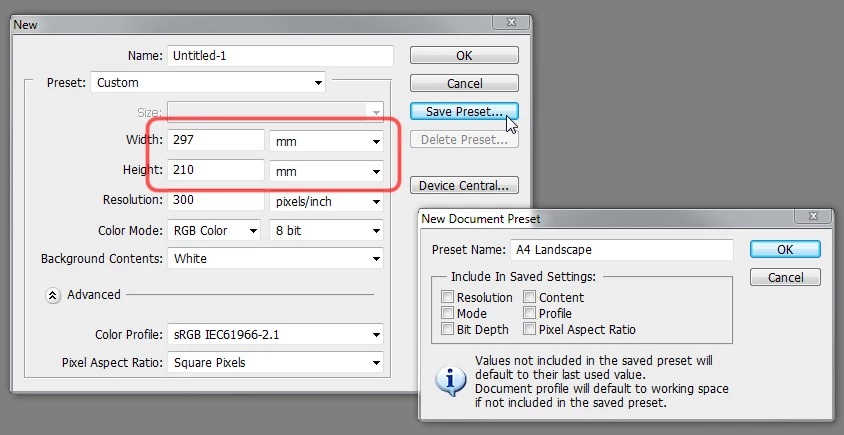
    Are you looking to make a new named preset for making new documents in the File - New menu?  That's pretty easy to do - just swap Width and Height from the standard International Papers - A4 preset then click the [Save Preset...] button.

    Or would something like Image - Image Rotation - 90 degrees CCW be what you're looking for?

    -Noel

    返信数 1

    Noel Carboni
    Noel Carboni解決!
    Legend
    March 8, 2012

    Are you looking to make a new named preset for making new documents in the File - New menu?  That's pretty easy to do - just swap Width and Height from the standard International Papers - A4 preset then click the [Save Preset...] button.

    Or would something like Image - Image Rotation - 90 degrees CCW be what you're looking for?

    -Noel

    inquestflash作成者
    Inspiring
    March 12, 2012

    Sorry for the late reply Noel,yes i did that as you instructed and now have an A4 landscape orientation.would be great if adobe updated that minor feature though

    thank you.