
Known Participant
April 19, 2018
Question

Auto picking the most distinct accent color from an image

  • April 19, 2018
  • 2 replies
  • 3364 views

This might be asking way too much but I thought i'd put it out there...

Project:

I have written a script and action that reads file names (col.A) and Hex colors (col.B) from a csv file.

First it finds a file from a folder that contains an image of a lamp and shade, it removes the lamp and trims to the shade. Then it places the shade into another image that is a scene with a lamp. Now I have a new shade on the lamp in the scene. Ok, so that's all working! Here's where the color comes in.

The color was chosen from somewhere in the shade and written to the CSV file by someone. Currently, the script sets the foreground color and the action fills a layer with it and creates a clipping group and changes the mode to color. This works too!!

I have artwork, a pillow and a wall that have a color matching some highlight color on the lamp shade... Still with me?

Now for the challenge:

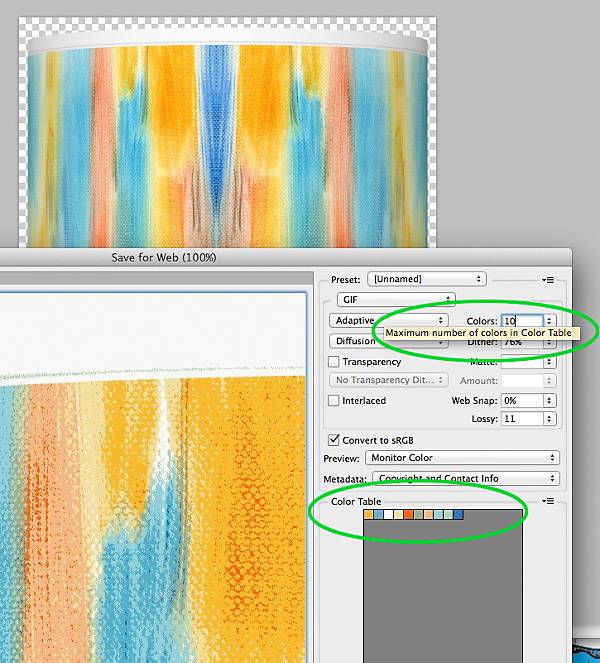
I was wondering if perhaps the shade (while it is open on it's own and after it's trimmed) could be sampled for the top say 10 colors as can be done when optimizing a GIF in "Save for Web" ( see resource (e) below). It would even work if the document was duplicated, reduced to 200 x 200 and then sampled. The vivid colors will still be there. My thinking is that the vivid colors are the ones with the greatest disparity between R, G and B.

Example: Grays are all 000000 to FFFFFF with RGB values that are always equal. Any colors that are more muted will be a combination of different R,G,B values but closer in value than a more vivid colors.

Example:

In the resources I listed below the image in (a) has a vivid pink flower R:244, G:0, B:145. Although the Red and Blue values are higher, Green is zero making for a very distinct color.  Here is another #d33aff is R:211,G:58, B:255

I think I have a formula that can determine the more vivd colors as a percentage.

Step 1: Take the 2 highest values of R,G or B and add the two.

Step 2: Divide the answer by 2 to get the average.

Step3: Divide the remaining value (the lowest of the 3) by the resulting average from Step 2

Step 4: Multiply by 100 to provide a percentage (rounded to the nearest integer)

Purple:  #ac5aab   R=172, G=90, B=171       The Math: 90/((172+171)/2)*100 = 52%

Orange: #fd971e   R=253, G=151, B=30        The Math: 30/((253+151)/2)*100 = 14%

Orange would be chosen out of the two.

I believe the lower the percentage, the more vivid is the color. Grays will always be 100% (OK, there is a question then if the image is Greyscale

I hope I'm making sense...

So my thought is that if the colors in the image could be evaluated and the one with the greatest variation in values be singled out, I would not need to manually pick it and write it to the CSV. In essence, the color could be chosen on the fly.

Tie Breaker

Often times the RGB values contain a zero. In that case the percentage will always be zero. This could result in a tie against another color. Both would be a vivid color but "there can be only one". I don't think it matters to me which is chosen at this point as long as one of them is picked.

Resources:

(a)  Here is a good one to work with. The color might be the pink, blue or orange.

https://www.lampsplus.com/products/peacocks-in-the-garden-giclee-droplet-table-lamp__k3334-15m02.html

(b)  More lamps with shades (bigger images on product pages)

https://www.lampsplus.com/products/s_k3334/?s=1

(c)  Here are some colorized scenes where the lamp base, art, pillow and walls were colored by script and action. All files named and saved automatically by script.

https://www.lampsplus.com/products/s_1r412/

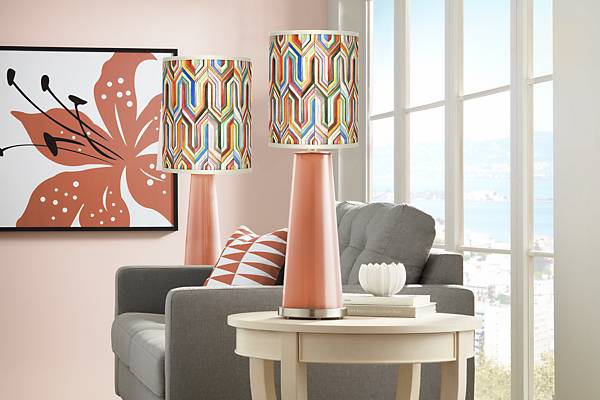
(d)  This image is just a test but it is the result of using the method and formula from above.
test-color-selection?qlt=70&wid=600&fmt=jpeg&resMode=sharp2&op_usm=2,0.3,3

(e) Photoshop's "Save for web" allows the user to specify the maximum numbers of colors in a table. Could something similar be used to pick key colors for the purpose of this post?
save-for-web?qlt=70&wid=600&fmt=jpeg&resMode=sharp2&op_usm=2,0.3,3

Many thanks for reading through this and for any help or ideas that you may have.

This is way above my head but I know some of you geniuses might  have some thoughts.

Thanks,

Limey (Paul)

This topic has been closed for replies.

2 replies

Legend
April 19, 2018

Did not quite understand what you need.

If you need to establish what a saturated average color prevails in the picture, you can use this script

You need to have HSBHSL plugin installed

Optional Photoshop CC plug-ins

var min_saturation = 50;

// create tmp layer and move it on top

app.activeDocument.artLayers.add();

if (app.activeDocument.activeLayer != app.activeDocument.layers[0])

    app.activeDocument.activeLayer.move(app.activeDocument.layers[0], ElementPlacement.PLACEBEFORE);

// stamp visible to tmp layer

var d = new ActionDescriptor();

d.putBoolean( charIDToTypeID( "Dplc" ), true );

executeAction( charIDToTypeID( "MrgV" ), d, DialogModes.NO );

// call hsb/hsl filter (rgb -> hsb)

var d = new ActionDescriptor();

d.putEnumerated( charIDToTypeID( "Inpt" ), charIDToTypeID( "ClrS" ), charIDToTypeID( "RGBC" ) );

d.putEnumerated( charIDToTypeID( "Otpt" ), charIDToTypeID( "ClrS" ), charIDToTypeID( "HSBl" ) );

executeAction( charIDToTypeID( "HsbP" ), d, DialogModes.NO );

// select "green" channel

app.activeDocument.activeChannels = [ app.activeDocument.channels[1] ];

// threshold 128 ==> saturation 50% or higher

var d = new ActionDescriptor();

d.putInteger( charIDToTypeID( "Lvl " ), min_saturation * 255/100 );

executeAction( charIDToTypeID( "Thrs" ), d, DialogModes.NO );

// selection from current channel

var r1 = new ActionReference();

r1.putProperty( charIDToTypeID( "Chnl" ), charIDToTypeID( "fsel" ) );

var d = new ActionDescriptor();

d.putReference( charIDToTypeID( "null" ), r1 );

var r2 = new ActionReference();

r2.putEnumerated( charIDToTypeID( "Chnl" ), charIDToTypeID( "Ordn" ), charIDToTypeID( "Trgt" ) );

d.putReference( charIDToTypeID( "T   " ), r2 );

executeAction( charIDToTypeID( "setd" ), d, DialogModes.NO );

// remove tmp layer

app.activeDocument.layers[0].remove();

// get average color for selection

var c = new SolidColor();

if (!get_average_color(c)) { alert("Something is wrong"); }

app.activeDocument.selection.deselect();

app.foregroundColor = c;

alert(c.rgb.red + " " +  c.rgb.green + " " + c.rgb.blue);

///////////////////////////////////////////////////////////////////////////////////

function get_average_color(color)

    {

    try {

        var chnl = 3;

        if (app.activeDocument.mode == DocumentMode.CMYK) chnl = 4;

        var lm = new Array();

        var px = new Array();

        for (var i = 0; i < chnl; i++)

            {

            try { var hst = app.activeDocument.channels.histogram; } catch(e) { alert(e); return false; }

            var l = 0;

            var p = 0;

            for (var n in hst) { l += hst * n; p += hst; } 

            hst = null;

            lm.push(l);

            px.push(p);

            }

        if (app.activeDocument.mode == DocumentMode.RGB)

            {

            var r =lm[0]/px[0];

            var g =lm[1]/px[1];

            var b =lm[2]/px[2];

            with (color.rgb) { red = Math.round(r); green = Math.round(g); blue = Math.round(b); };

            }

        else if (app.activeDocument.mode == DocumentMode.LAB)

            {

            var _l = lm[0]/px[0] * 100/255;

            var _a = lm[1]/px[1] - 128;

            var _b = lm[2]/px[2] - 128;

            with (color.lab) { l = Math.round(_l); a = Math.round(_a); b = Math.round(_b); };

            }

        else if (app.activeDocument.mode == DocumentMode.CMYK)

            {

            var c = 100 - lm[0]/px[0] * 100/255;

            var m = 100 - lm[1]/px[1] * 100/255;

            var y = 100 - lm[2]/px[2] * 100/255;

            var k = 100 - lm[3]/px[3] * 100/255;

            with (color.cmyk) { cyan = Math.round(c); magenta = Math.round(m); yellow = Math.round(y); black = Math.round(k); };

            }

        return true;

        }

    catch (e) { alert(e); }

    }

PS-GuruAuthor
Known Participant
April 20, 2018

Thanks r-bin! That does what you said it would but what I need is not the average saturated color that prevails in the picture but instead the "most" saturated and if tied with others, the brightest, and then by hue if it came to it.

So if this were equated to a sort in excel, and the columns were Hue Saturation and Brightness (HSB) I would sort by S(aturation) and then B(rightness) followed by H(ue)

Do you think the script that you shared could be modified to do that? I do have the plugin installed. I have attached a visual of what I am trying to accomplish.

Thanks,

Paul

hsb-sort-order?qlt=70&wid=600&fmt=jpeg&resMode=sharp2&op_usm=2,0.3,3

Legend
April 20, 2018

Again it is not clear what kind of colors they are and who sets them or chooses (and for what).
An image can contain as many different colors as there are pixels in it. Suppose you have access to each pixel. What colors (or one color) are you going to get?

c.pfaffenbichler
Community Expert
Community Expert
April 19, 2018

Have you considered utilising the S from HSB?

PS-GuruAuthor
Known Participant
April 19, 2018

Thanks c.pfaffenbichler, I just read up on HSB and that sounds like a awesome idea! Essentially the "S" in HSB is the same as the percentage value that my calculation was coming up with. Yellow #fbda15 comes out to 8% using the calculation or S=92 in HSB. Purple #ac5aab is 52% with the calculation and S=48.

Your insight makes great sense and easier.

Then "all" that remains is sampling an image to determine which of the colors would be the chosen one. Is there a way to find the highest saturated colors in an image and ultimately pick one to update the foreground color? As I mentioned earlier, if it involves sampling the entire image, pixel by pixel, the original might be duplicated, reduced in size and then sampled.

I have been searching all over the forums for something that I might modify but not having a lot of luck.

Thanks,

Paul