
January 4, 2021

P: There is a bug in when using chinese input method

  • January 4, 2021
  • 7 replies
  • 1042 views
hi,
I am bd manager from sogou input method company and my email is [email removed].
Sogou input method hopes to communicate with Photoshop to solve the following bug.

We really hope to get technical support from Photoshop,

We need the email of photosop technicians for technical exchange.

 
*This is a problem that it never worked in all chinese input method(TSF or IME). The candidate postion is wrong.
*Not only photoshop7、 photoshop2019 also has this problem.
*OS: WIN10
Screen shot:
1、button T
2、focus In Edit
3、input "nin hao" use chinese input method
4、The candidate postion is wrong
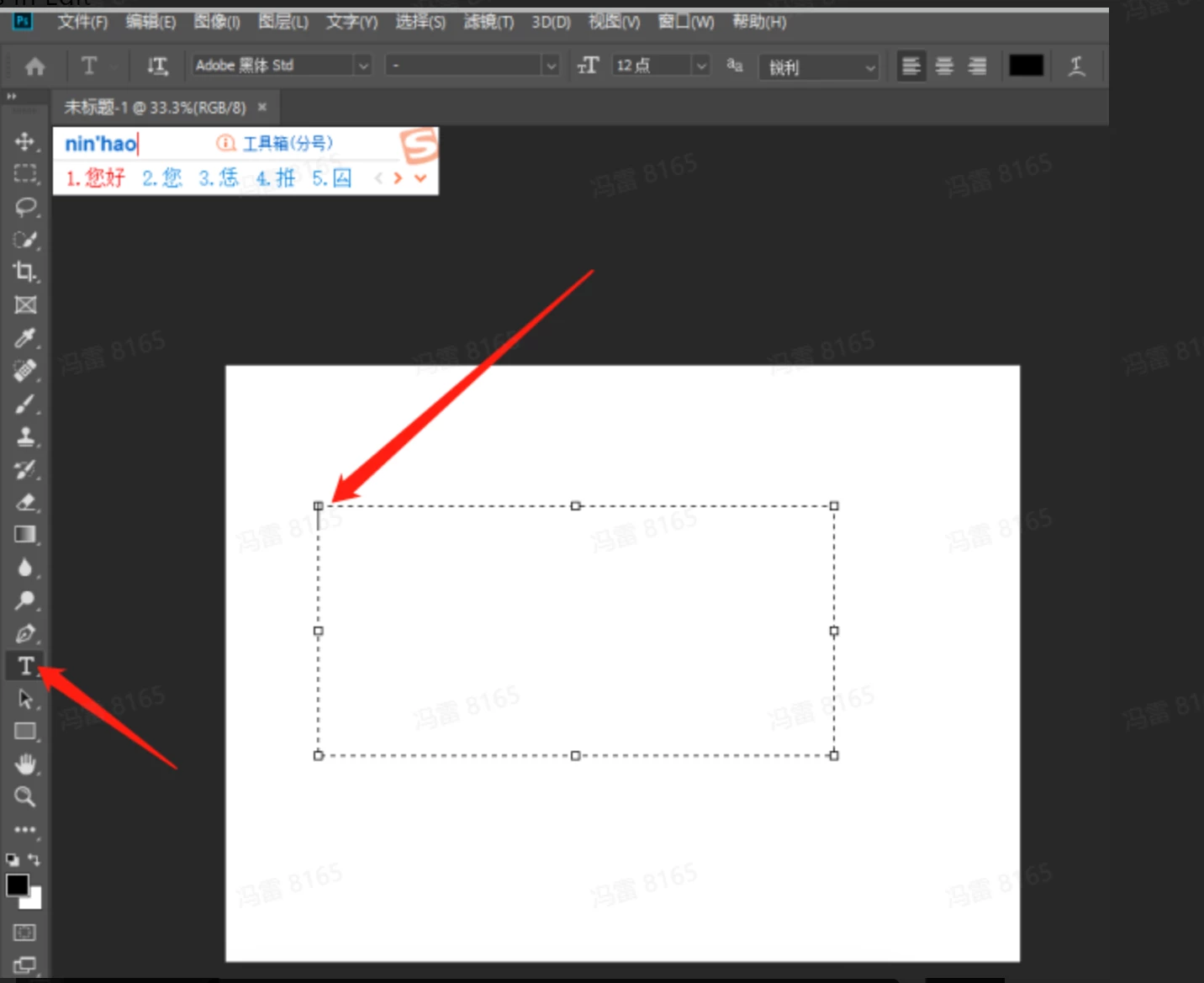
The right candidate postion like this:

Image is not available

7 replies

Known Participant
December 18, 2024

我也遇到了这个问题,到 2024 年仍然没有解决

Legend
November 25, 2021

Engineering cannot reproduce in the current version of Photoshop. Can you please try Photoshop 23.0.2 and let us know if you're still have a problem.

January 8, 2021

@JeffreyTranberry 

Dear Jeffery,

Sorry to ask you again

Because we need to reply to the user about the plan, we hope to get your reply as soon as possible.

Is there any progress on our feedback?

Is there any assessment result or plan?

If you can, I hope we can communicate by email.

Best regards

Felix

BD manager,Sogou input method

fenglei01@sogou-inc.com

January 5, 2021

hi,Jeffery,

Thank you very much.

Looking forward to your reply.

Felix

BD manager,Sogou input method

Legend
January 4, 2021

I've asked engineering to take a look.

January 4, 2021
hi,
I am bd manager from sogou input method company and my email is [removed by moderator]
Sogou input method hopes to communicate with Photoshop to solve the following bug.
 
*This is a problem that it never worked in all chinese input method(TSF or IME). The candidate postion is wrong.
*Not only photoshop7、 photoshop2019 also has this problem.
*OS: WIN10
Screen shot:
1、button T
2、focus In Edit
3、input "nin hao" use chinese input method
4、The candidate postion is wrong
 
The right candidate postion like this:
January 4, 2021

We really hope to get technical support from Photoshop,

We need the email of photosop technicians for technical exchange.

Felix


January 4, 2021

【Bug】There is a bug in photoshop 7 when using the sogou input method.

Photoshop editing area input method mouse does not follow and candidate column position is wrong.

I am Feng Lei, product manager of sogou input method, and I hope to solve this bug with PS.


My email:[email address removed by moderator]

Looking forward to your reply


jane-e
Community Expert
Community Expert
January 4, 2021

Photoshop 7 was released in 2002. Since then there have been 6 releases of Creative Suite and 9 releases of Creative Cloud. Since this is something you are developing (or have developed) for a very old version of Photoshop, you will have to tell us more.

  • Was it working before and then stopped?
  • Or has it never worked?
  • Did you make any changes to your hardware or OS?
  • Why are you using an old version of Photoshop?
  • What is happening or not happening? We can't translate the screen shot.

~ Jane

January 4, 2021

May I have your email?

I ask technical personnel to communicate with you.