



Ares Hovhannesyan
Community Expert
Community Expert
October 22, 2020
해결됨

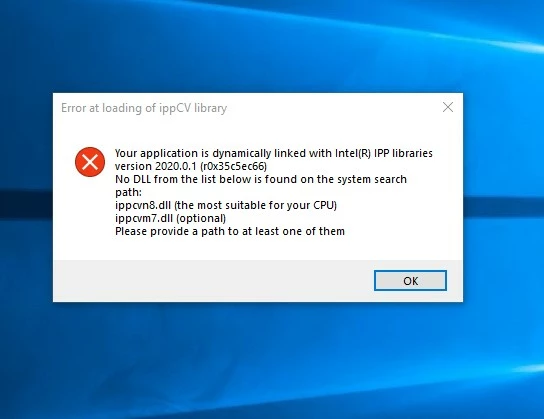
Can't Run Official Ps 2021 after updating in CC Apps (build 22.0)

  • October 22, 2020
  • 1 답변
  • 1484 조회

The latest official update of Ps Buid 22 shows the error with DLL that do not allow me to use latest build. So I have stack on 21..2.4. All other Adobe App including Ai, Ae, Premier Pro and others work smoothly after yesterday update. That means that error do not depends on my VGA or CPU and is specific only for Ps installation core code that is dynamically linked to ippcvn7.dll or ippcvn7.dll . Also

my win OS dll testing don't find any error in my dll files.

I would appreciate if Ps dev team investigated this error.


이 주제는 답변이 닫혔습니다.
최고의 답변: Ares Hovhannesyan

Some interesting new points about this problem has been mention in https://community.adobe.com/t5/photoshop/m-error-at-loading-of-ippcv-library-photoshop-22-0-windows-10/m-p/11537837?page=3#M477067

1 답변

October 22, 2020
Ares Hovhannesyan
Community Expert
Community Expert
October 22, 2020

Thanks Ged, It seems Adobe add limitation for:  Intel CPU Family:6, Model:14, Stepping:3 with MMX, SSE Integer, SSE FP, SSE2, SSE3, SSE4.1, SSE4.2, AVX, AVX2, HyperThreading 


Therefore many user (me as well) will have to stack on older version of Ps 21.2.4 till it will be available in CC Apps.   

October 25, 2020

Some interesting new points about this problem has been mention in https://community.adobe.com/t5/photoshop/m-error-at-loading-of-ippcv-library-photoshop-22-0-windows-10/m-p/11537837?page=3#M477067


There's a fix mentioned in this thread

https://feedback.photoshop.com/conversations/photoshop/photoshop-error-at-loading-of-ippcv-library/5f8f06c2c17a06631eb72c7e

If you got this error:
"
    Error at loading of ippCV library
 
    Your application is dynamically linked with Intel(R) IPP libraries version 2020.0.1.
    No DLL from the list below is found an the system search path:
     ippcvm7.dll (the most suitable for your CPU)
    Please provide a path to at least one of them.
"
Here is the fix.


Despite what Adobe is saying officially, Photoshop 2021 does NOT require support of SSE4.2 to run.
The real problem is that:
- IPP libraries optimized for SSE3 are missing from distribution (they are available from Intel)
- OpenCV library was build with SSE4.2 requirement
To fix this download this pack of libs from any source below (it's the same):
https://www113.zippyshare.com/v/cqtznzt2/file.html
https://www.sendspace.com/file/vh0wjm
Unpack archive and copy libs to Photoshop 2021 installation directory (overwrite opencv_world440.dll when requested).

This fixes the problem an PS runs just fine.
But disclaimer as usual - all this at your own risk.


Please note that this is not a hack or something like this - this is official libraries from official sources.
Intel IPP libraries was taken from Intel Parallels Studio XE 2020.1.0 and contains valid signature from Intel.
OpenCV library was taken from official release of OpenCV 4.4.0 on GitHUB (https://github.com/opencv/opencv, build by VC15).