DaveMcKeen
Inspiring
January 15, 2018
Answered

Cannot Find or Open Adobe Paper Texture Pro

  • January 15, 2018
  • 5 replies
  • 11815 views

Hello,

I am following a tutorial that demonstrates the use of Adobe Paper Texture Pro.  It shows opening the Window menu, then Extensions, and finally choosing Adobe Paper Texture Pro.  However I do not see that option (nor do I see Recent Files).  I only see Adobe Color Themes.

I am on a Windows 7 PC, major components listed below.  I updated Photoshop CC to the latest build on 13 January, yesterday.  I think I should be on 19.0.1, but in Help > About Adobe Photoshop CC it shows I have 19.0.  My Adobe Creative Cloud app shows I have Photoshop CC (2017).  The updater created a shortcut named Adobe Photoshop CC 2018. I also have a shortcut named Adobe Photoshop CC 2017!

Any ideas about what I should do to access Adobe Paper Texture Pro?

Thanks very much!  - Dave

ASUS MAXIMUS VII HERO LGA 1150 Intel Z97 ATX

Intel Core i7-4790K 4.0GHz LGA 1150 Boxed Processor

G.SKILL  F3-19200CL10Q-32GBZHD  Ripjaws Z Series 32GB (4 x 8GB) 240-Pin DDR3 SDRAM

2 Each Crucial MX100 256GB SATA SSD

Hitachi            Ultrastar 2TB

EVGA GeForce GTX 760 2GB 256-bit GDDR5 PCI Express 3.0 SLI Support

Microsoft Windows 7 Professional SP1 64-bit - OEM
    This topic has been closed for replies.
    Correct answer gener7

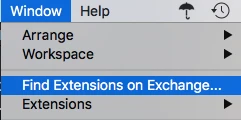
    It should be listed under the Extensions submenu.  If it is not listed there, go to Exchange...

    Search for Paper Textures It's compatible with CC 2018. "Aqcuire" it and it should then be in your extensions list.

    5 replies

    ProDesignTools
    Brainiac
    April 21, 2020

    This is the only location the Adobe Paper Texture Pro extension still seems to be available:


    http://www.russellbrown.com/scripts.html (CC)

    http://www.russellbrown.com/scripts_archive.html (CS6)


    Not sure if it works with the latest 2020 release, but there it is...


    As Gail pointed out above, another free resource that is still available is the Fly Taster Pack, which is 20 hand-picked web-sized textures from the Flypaper Textures collection:

    https://exchange.adobe.com/creativecloud.details.806.taster.html


    ProDesignTools
    Brainiac
    April 21, 2020

    Update: 


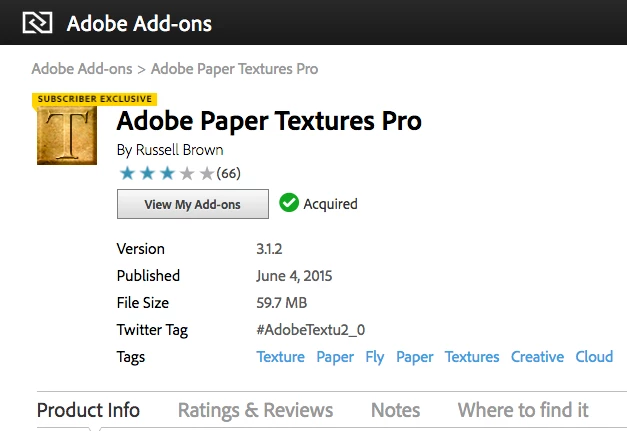
    The last available version (3.1.2) of Paper Textures Pro is downloadable from this Adobe page:


    https://exchange.adobe.com/creativecloud/install-instructions.791.html


    Vladimir78
    Inspiring
    April 21, 2020

    Hi,

    Thanks for the link but when i click on it it says... Unauthorized access...:-((

    New Participant
    April 9, 2020

    I lost adobe Textures an when i try to reinstall it says "denied Access" or from another site Developer has discontinued . Since it is a plugin I can't get help from Adobe. They told me I had to contact the manufacturer. I can't find any contact info for Russell Brown. Any ideas?

    Participating Frequently
    April 14, 2020

    Same problem here – I'm watching what is supposed to be a new (this week) tutorial, and the teacher suggested downloading Paper Texture Pro in it, but all the links in this thread lead to a blank page with the message "This extension has been retracted by the partner". 


    Is it no longer available?

    New Participant
    April 15, 2020

    According to Adobe support Adobe Paper Textures is no longer available. Spent 3 hours with a technician before I found that out. 🤪

    ProDesignTools
    Brainiac
    September 23, 2018

    Note that Paper Textures Pro has recently been moved off the main Adobe site, and onto the new dedicated "Adobe Exchange App Marketplace" website...


    It can now be found here:


    https://www.adobeexchange.com/creativecloud.details.791.html


    Everything else still works the same as described above.


    Update:


    The last available version (3.1.2) of  Paper Textures Pro is downloadable from this Adobe page:


    https://exchange.adobe.com/creativecloud/install-instructions.791.html


    Kiranphotography
    New Participant
    April 3, 2020

    Searched Adobe with no luck trying to find this. 

    gener7
    gener7Correct answer
    Adobe Expert
    January 15, 2018

    It should be listed under the Extensions submenu.  If it is not listed there, go to Exchange...

    Search for Paper Textures It's compatible with CC 2018. "Aqcuire" it and it should then be in your extensions list.

    DaveMcKeen
    Inspiring
    January 15, 2018

    Yay!  You're both right!  It took a bit of fussing and troubleshooting, but it finally did appear in my PS 2018 Window > Extensions menu.

    Where should that appear in my installed Program Files?  Not in Plugins; should it be in Presets?

    Thanks very much!  Can I give a Correct Answer to both posts? 

    - Dave

    gener7
    Adobe Expert
    January 15, 2018

    Location for windows: C:\Program Files (x86)\Common Files\Adobe\CEP\extensions\com.AdobePaperTexturePro\textures

    Only one correct, but you can mark the other "Helpful"

    Jeff Arola
    Adobe Expert
    January 15, 2018

    Adobe Paper Texture Pro doesn't ship with photoshop.

    You can get it from here:

    https://exchange.adobe.com/addons/products/791#.WlwSrEtOkWo