K Sabrina
Participant
Sep 5, 2017 3:24 PM UTC
Answered

Color Overlay Not Working

Hi everyone,

I have followed the steps for adding an overlay color to my layer and none of the colors are working.  Here are my steps:

Select Layer > Fx > Color Overlay > Choose color e79d46 > Ok

I get no color change at all - just a white page. I have even tried opening a new document and immediately trying to add a color overlay and it still isn't working. Any suggestions?

    This topic is closed to new replies. Start a new post to keep the conversation going.
    davescm
    davescmCorrect answer
    Community Expert
    Sep 5, 2017 5:58 PM UTC

    Hi Dave,

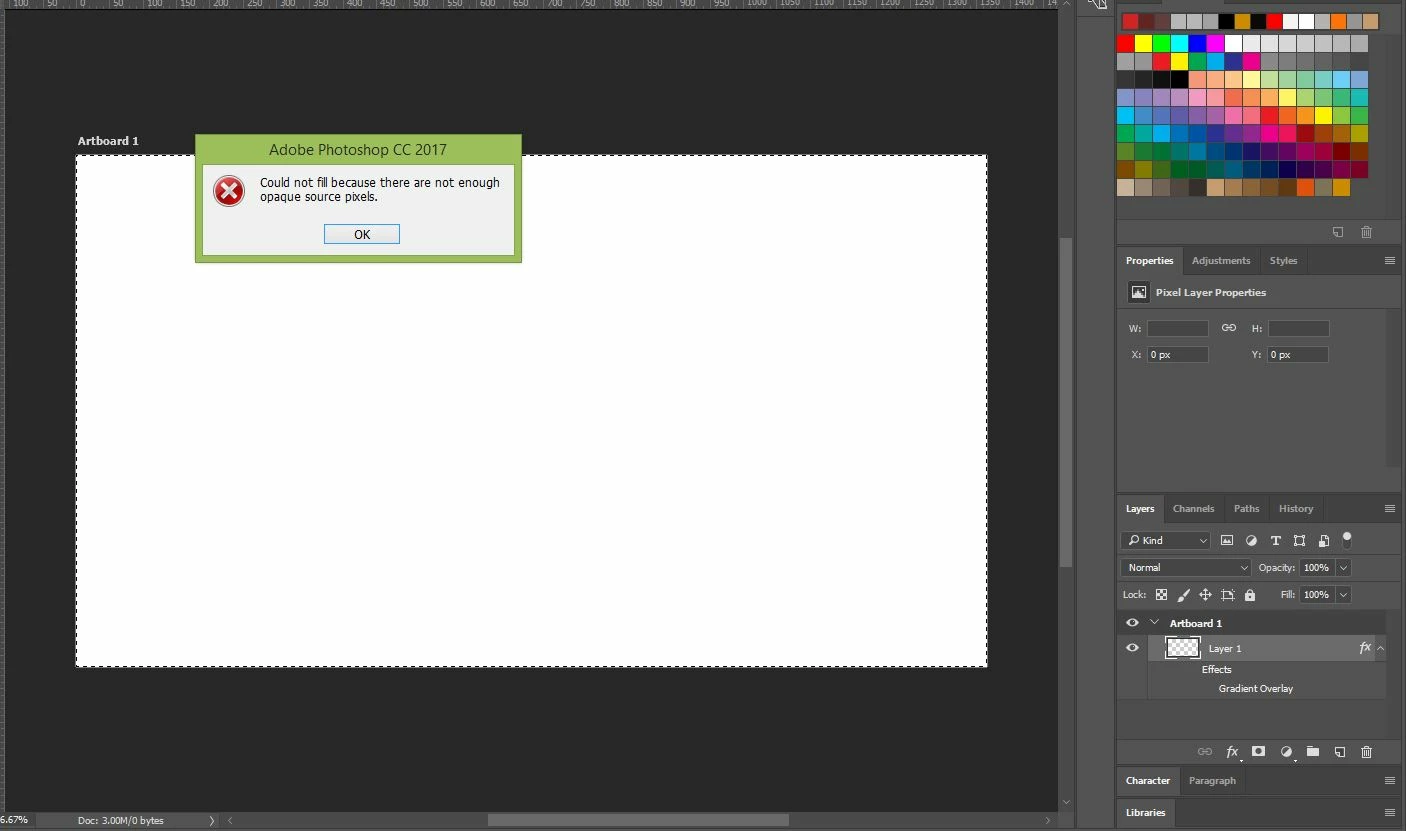
    Here is what I got when following your above instructions - something is not right here. Is this something I have to do each time I open a new template?


    Hi

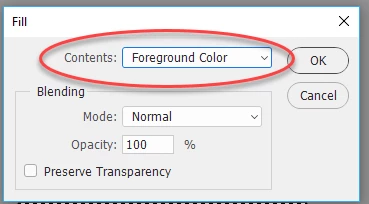
    When you use Shift -F5 you should get a dialogue on how to fill. Choose a solid colour (e.g. foreground color) not Content Aware

    Dave

    32 replies

    Participant
    May 8, 2020 2:14 PM UTC

    when I clicked shift and F5 nothing happened.

    I want to change the colour but I can't and I don't understand why I go to colour overlay and try to change the colour but the colour remains the same grey what should I do I have a photoshop cc

    Translate
    jane-e
    Community Expert
    Community Expert
    May 10, 2020 12:30 PM UTC

    Hi FarFetched,

    Shift+F5 is the shortcut for Edit > Fill. Try it from the menu, and if that doesn't work, please give us screenshots as shown earlier in this thread.

    ~ Jane

    Translate
    Participant
    Apr 20, 2020 5:58 AM UTC

    Hi Dave, I have a problem with trying to do a drop shadow of an elephant. I have copied the layer then went to FX to select a color overlay which I want black, however it blacks the entire screen and not just the elephant. What am I missing?

    Translate
    jane-e
    Community Expert
    Community Expert
    May 10, 2020 12:44 PM UTC

    Hi AC,

    Did you make a selection of the elephant first? Without a selection, the entire layer will get the color. An alternate method is to paint the shadow in with a soft brush on the underneath layer. Can you show screen shots of your layers and image so we can better advise?

    Jane

    Translate
    emmanuela19068638
    Participant
    May 6, 2019 7:29 PM UTC

    The same problem is happening to me and I have made sure that all my setting are correct

    Translate
    jane-e
    Community Expert
    Community Expert
    May 10, 2020 12:40 PM UTC

    "The same problem is happening to me"


    Hi Emmanuela,

    Several slightly different problems have been asked in the thread. Can you clarify your issue and show screen shots?

    ~ Jane

    Translate
    Participant
    Feb 22, 2018 1:13 PM UTC

    Hi Everyone,   I'm am trying to add an overlay to a photo in Photoshop, but it turns into mosaic pixels once I transfer it in to PS.  Here is a snapshot of what I mean.   Can anyone provide guidance or tips on how to fix this?  The overlay is in my downloads as bokeh stars.

    Translate
    davescm
    Community Expert
    Community Expert
    Feb 22, 2018 1:25 PM UTC

    Hi

    It looks like you are trying to embed a png file. There is a bug affecting that process on the Mac that Adobe developers have acknowledged.

    In the meantime, as a temporary measure, go to Preferences > Plug Ins and uncheck "Allow extensions to Connect to the Internet" and "Load Extension Panels". That should get you working.

    Dave

    Translate
    Participant
    Feb 22, 2018 1:38 PM UTC

    Thank you!  That worked!  It didn't work when I unchecked both but it did when I only unchecked 'Allow extensions to Connect to the Internet'.   Really appreciate your help!

    Translate
    davescm
    Community Expert
    Community Expert
    Sep 5, 2017 3:30 PM UTC

    Can you show a screenshot of your layers panel (with the layer you are adding the color overlay to selected)  and your layer style color overlay settings (as below)

    Dave

    Translate
    K Sabrina
    K SabrinaAuthor
    Participant
    Sep 5, 2017 3:33 PM UTC

    Translate
    davescm
    Community Expert
    Community Expert
    Sep 5, 2017 3:48 PM UTC

    Hi

    Your layer is empty. Fill it with pixels (any colour it doesn't matter) and the overlay will work

    Dave

    Translate