Occeane
Participant
May 29, 2014
Answered

Custom shape tool missing from Photoshop CC tool bar

  • May 29, 2014
  • 2 replies
  • 43950 views

Hi

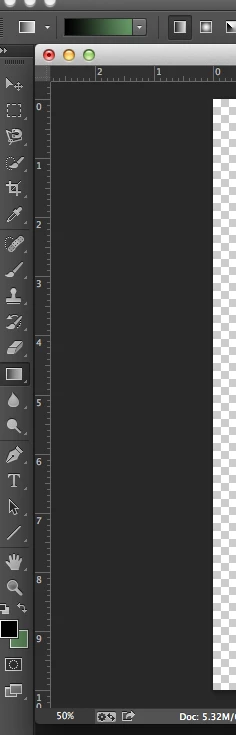
I am a subscriber to Photoshop and Lightroom CC and have just noticed (I need to draw a circle) that there is no custom shape tool in the left hand side tool bar; I've always just assumed it was there before. I've checked around and it seems as if it should be there but mine just isn't.

Any help gratefully received

Nick Garnett
This topic has been closed for replies.
Correct answer JJMack

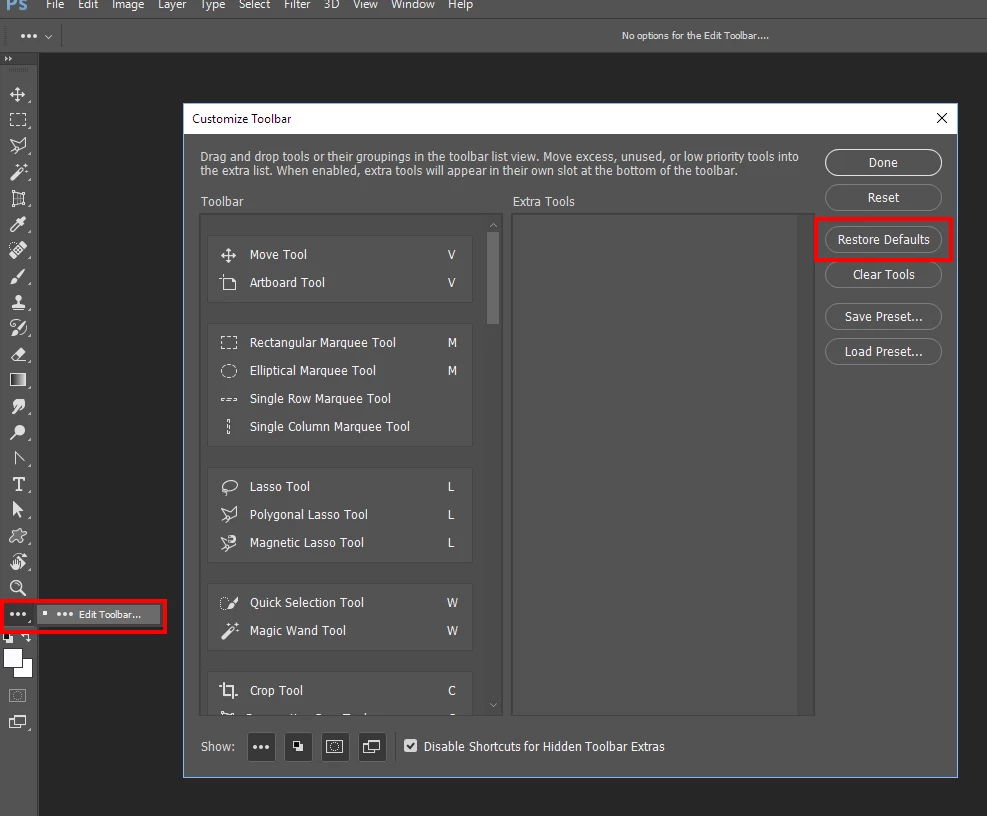
Right click on the thee dots ... and click on edit toolbar than click on restore defaults.

2 replies

JJMack
Community Expert
Community Expert
May 29, 2014

JJMack
Participant
January 20, 2021

I also have missing custom shapes - and also need to draw a circle.

I have reset the default settings as noted above but all the custom shapes I have are as below. I have tried to load new shapes but there is nothing in the preset file. Can anyone help ?? 


JJMack
Community Expert
Community Expert
June 6, 2021

Have you use the Shape Palette hamburger menu to import  customs shapes like Adobe legacy shapes?

JJMack
John Waller
Community Expert
Community Expert
May 29, 2014

Hover your mouse over the line tool (just above the Hand tool) and select the Custom Shape tool from the menu which appears.

Photoshop Help | Tool galleries

Occeane
OcceaneAuthor
Participant
May 29, 2014

John

That's very kind of you, just seemed to slip out of my mind, maybe because I'm on holiday in France and the sun and Beaujolais has got to me.

Thanks again

Nick Garnett