
Participant
November 19, 2018
Answered

Export in same folder as where the psd-file is

  • November 19, 2018
  • 3 replies
  • 3794 views

Hi,

Whenever I export a file, it always want to export to the last folder that I exported to, and not into the folder that the psd-file is already in.

This is annoying and pretty time consuming to find the right folder every time.

Is the an export setting that can help me, or is it just the way it works?

I see the same problem in indesign, after effects and illustrator too.
    Correct answer curtisdei

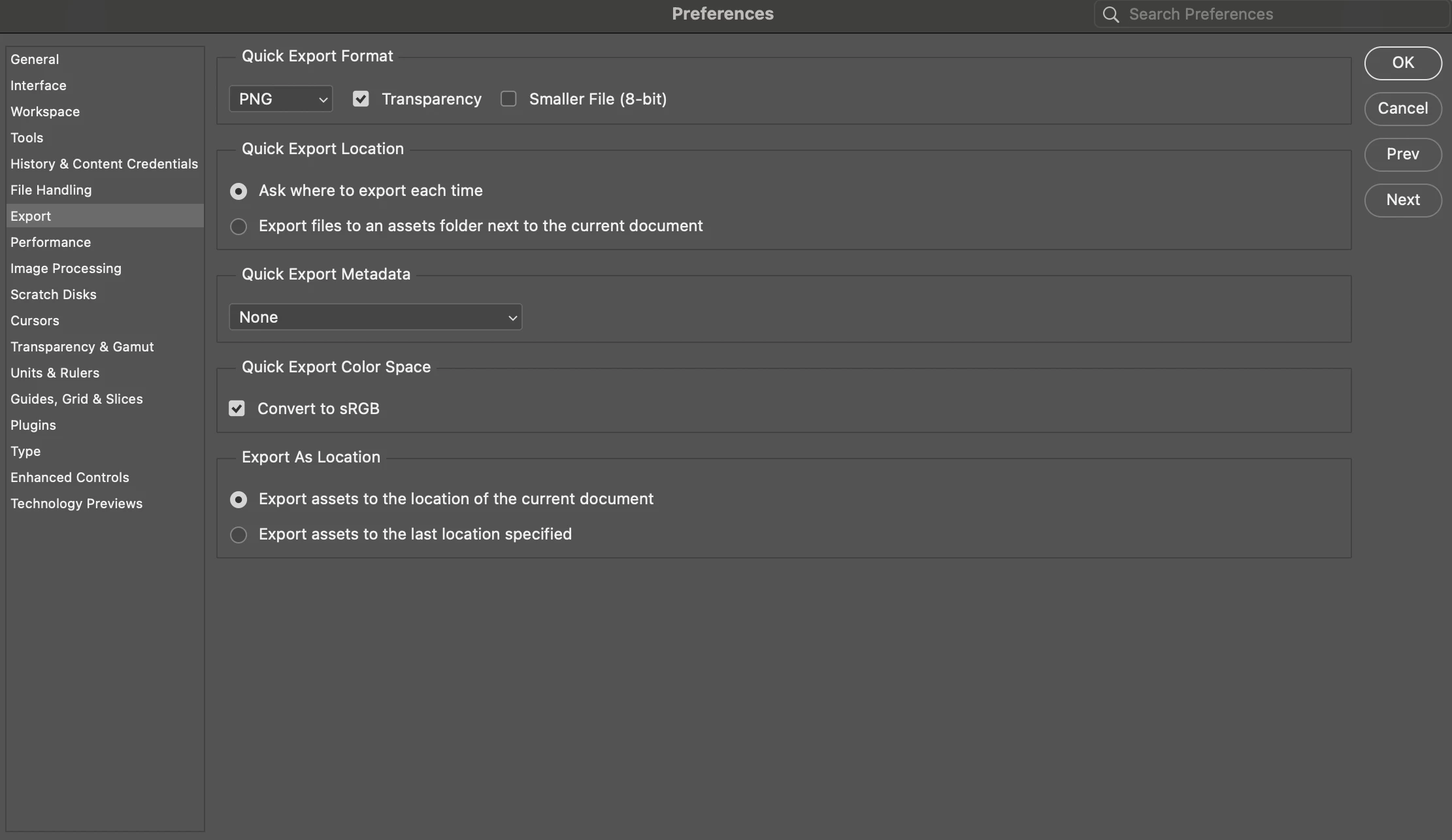
    Its an older thread, but for anyone experiencing this like i did. Under the "Export" settings you can change this from last location to the location of the current document. 

    3 replies

    Participant
    May 3, 2025

    For anyone searching for this in 2025, I found the fix.

    Edit > Prefrences > Export...  (This will bring up a menu) under "Export As Locaton"

    Select (Export assets to the location of the current document).


    Hope that helps. It has been frustrating me to no end, ever since it changed.

    And I had to figure it out myself, because this post was no help.

    curtisdei
    curtisdeiCorrect answer
    Participant
    April 29, 2024

    Its an older thread, but for anyone experiencing this like i did. Under the "Export" settings you can change this from last location to the location of the current document. 

    Participant
    June 19, 2024

    its doesnt help, I changed all preferences to current document and it still open last folder not current

    D Fosse
    Community Expert
    Community Expert
    November 19, 2018

    Preferences > File Handling > uncheck "Save As to Original Folder".

    Save For Web should always remember last destination.

    martins97988739
    Participant
    January 8, 2019

    It does not help. We WANT to export to "Original Folder". Anyway you mentioned "File Saving Options", but we want "Export options". Yes I know that there is the setting "Quick export location", but its about "Quick export" function. We want this for "Export" function.

    D Fosse
    Community Expert
    Community Expert
    January 8, 2019

    This new workflow is so uncomfortable to me. Because when I use "Save" or "Save as..." it doesn't give me same options as "Export" dialog (e.g. the default format after adding some layers is .psb; I could not define Image Size when saving; etc... ).

    I just want the Photoshop 2018 Export file handling. The assertion "Exporting to the same folder would defeat the purpose of an Export" is just your subjective opinion. Why can't you just add this option to Export Preference dialog besides to Quick Export Location, please?

    I am not satisfied with this situation. It completely RUINS my photo editing workflow and it drives me really crazy! Please, give me the Photoshop 2018 export behaviour back.


    Well, AFAIK it has always worked this way and there's no change from 2018 to 2019. It defaults to last location, wherever that is.

    Some people lately have experienced that Export "forgets" all settings - is that what happened in 2018? In that case it would probably go to the same folder as the original.

    I should say that I mostly use SFW for other reasons, but I do try Export from time to time just to check on the progress.