


victord52584193
Participant
October 1, 2018
Question

Export SVG for web?

  • October 1, 2018
  • 4 replies
  • 8250 views

I've been using SVG images in websites for a while now and it looks really crisp. Before I signed up for Photoshop I used Pixlr Pro and free conversion services like https://www.aconvert.com/image/png-to-svg/ to create SVG files for web. It works good BUT when I export SVG files from Photoshop, they don't display correctly in the web browser (Chrome).

Example:

  1. SVG image converted from PNG to SVG with aconvert.com: https://tvatteriforbundet.dusemedia.se/wp-content/uploads/2018/09/solros-aconvert.svg (visible in web browser)
  2. SVG image exported directly from Photoshop: https://tvatteriforbundet.dusemedia.se/wp-content/uploads/2018/09/solros-svg.svg​ (invisible in web browser)

Question: How can I export images in SVG format for web directly from Photoshop, without using shady free conversion services as an extra and time consuming step?

Here are the Photoshop settings used for SVG image 2 above:
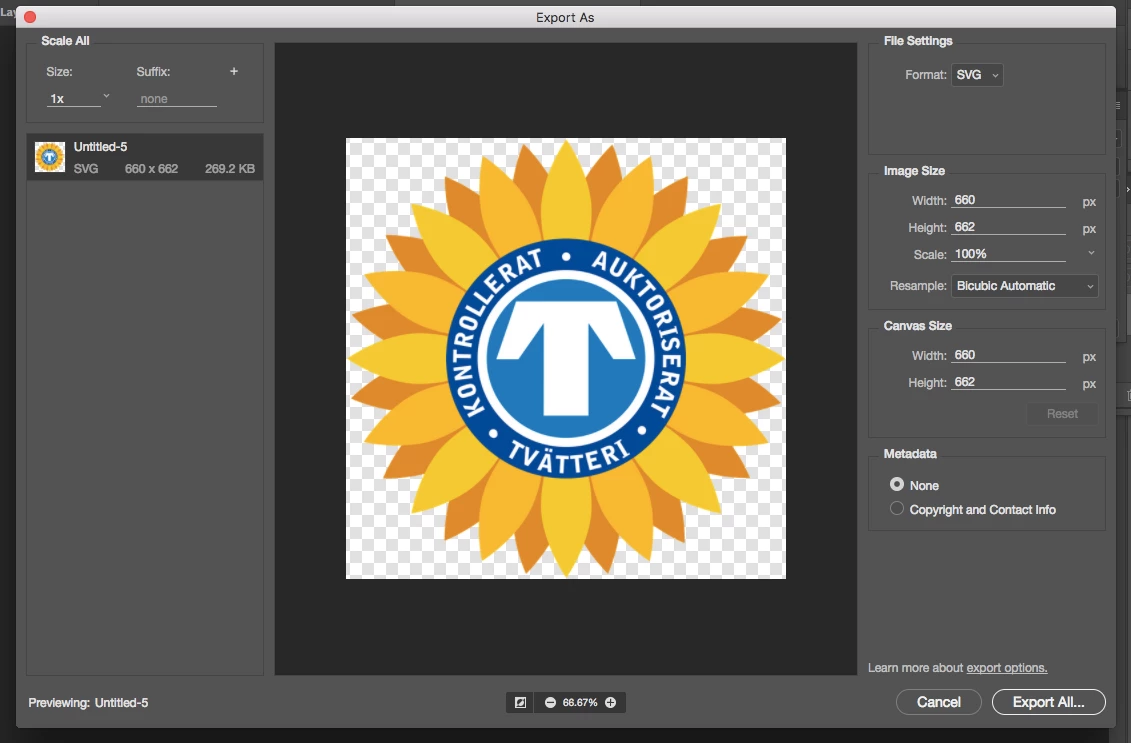
This topic has been closed for replies.

4 replies

victord52584193
Participant
October 2, 2018

Could changing the "Resample" setting when exporting solve the problem? I have used the default setting: Bicubic automatic (but I don't know what that means really).

I don't have an Adobe Illustrator license. This is a very basic task, shouldn't a PS license be enough?

How can free services like https://www.aconvert.com/image/png-to-svg​ and low budget apps like Pixlr Pro export to SVG without any problems? I have done about 10 exports from Photoshop to SVG (with two different Photoshop versions, one for Mac and one for PC) with the same result: error in the files. I use the default SVG export settings in Photoshop.

I could of course keep on using aconvert.com but one of the reasons for buying a solid application like Photoshop was to not have to use these free shady services.

JJMack
Community Expert
Community Expert
October 2, 2018

If you have a png it a raster image that you have. Simply converting the PNF format file to a SVG file format is not going to covert your image into vector graphics. You will still have a raster image in a SVG container.  The image will scale via interpolation.  A Small raster raster image will not scale up in size well for too much details you do not have for the image needs to be materialized through interpolation.   Large raster image scale down in much better for you have great detail you just have to discard some when the image is scaled down in size.   Any time you resample an image you lose some image quality. You either through away details or you makeup details you do not have upsize images become soft  and fuzzy.

If your png is a simple graphic you can use Photoshop tools to create vector layer like Shape and text layer for your graphic  then eliminate the raster layer by turning its visibility off.  If you png is like a photograph you are not going to be able to vectorize it.

Photoshop is Adobe Image editor that also has some vector tools.  You will not see .SVG listed as a supported file type.  Photoshop cane export .SVG and if your document contains all vector layers the will be vector graphics ins the svg file.   If your layer are raster layers the .svg file will contain raster images.

While you can open and place .SVG files and in the open process scale the .svg via vector graphics  what open in Photoshop is a single raster layer with transparency no vector information is in Photoshop for the svg. A Place .svg objects as call vector objects for when you scale the placed SVG smart object layer Photoshop reprocess the SVG file in the object new pixels are rendered for the smart object raster layers pixels for the layer size you want.

I could create vector layer for

solros-aconvert.svg

In Photoshop it would take time and may not be perfect it would be like 7 or 8 shape layers in a stack line and in a layer group.

Color Fill layer 7 would need to be edited or several Text on a Path layers used instead. Magic Wand, Ellipse Tool made short work of it.

I exported the above as a .svg from photoshop I coulf if it were my project do a much better job.

Photoshop.svg

JJMack
Nancy OShea
Community Expert
Community Expert
October 1, 2018

For SVG, I always use Adobe Illustrator because it is a vector graphics app. 

Nancy O'Shea— Product User & Community Expert
JJMack
Community Expert
Community Expert
October 1, 2018

The OP has a Png to begin with would AI convert a PNG to vector graphics?

JJMack
Nancy OShea
Community Expert
Community Expert
October 1, 2018

For best results, bring raster into AI, select and trace the paths.  Depending on image complexity, this could be simple or labor intensive.  The goal though is to create a full vector image before exporting to SVG.

How To Convert a PNG To Vector | Illustrator - YouTube

The resulting SVG code can be further edited for the web in Dreamweaver or similar code editor.

Nancy O'Shea— Product User & Community Expert
JJMack
Community Expert
Community Expert
October 1, 2018

victord52584193  wrote

Example:

  1. SVG image converted from PNG to SVG with aconvert.com: https://tvatteriforbundet.dusemedia.se/wp-content/uploads/2018/09/solros-aconvert.svg (visible in web browser)

That file was converted from a Raster layer with transparency PNG file format to a SVG file format.  The SVG file will have a raster image in it, The will be no vector paths shape layers etc.    Photoshop does not actually support SVG file format.  If you open a SVG file in Photoshop it will open as a single layer with transparency there will be no vectors associated with the layer.   Photoshop can scale the SVG using vector graphics during the open process.  Therefor it is pest to Place in SVG file in Photoshop for Photoshop can scale the layer object by reprocessing the Object SVG file and scale it opening it to render pixel for the layers object.

I was able to with CC 2018 open the above image svg file and also place it into a document.  I was also able to export the layers as a image svg files.  Chrome had no problem displaying the image svg files I exported from Photoshop.

What I was able to download for you bad file seem to missing at least 66KB worth if data compared  to the good one of yours and the two I exported from Photoshop. Howevet was I was able to doe load doe not see to be exactlt what you have on the wev foe the error message do not match.

I Can Export Photoshop Vector Shape layers as SVG file the hace vectors in the SVG file.

JJMack
War Unicorn
Community Expert
Community Expert
October 1, 2018

Something happen with the document itself, maybe? Since I use Brave for my browser, opening your second link gave me an encoding error.

I just tried repro'ing using my own assets but cannot seem to repro; I can open my own SVGs rendered from Photoshop just fine in Brave.

Did you try saving the document under another name and try exporting again?