


Known Participant
October 12, 2018
解決済み

Gif making - No "make frames from layers"

  • October 12, 2018
  • 返信数 6.
  • 10066 ビュー

Hello,

I need your expertise.

I am trying to create a gif, I have followedAdobe's tutorial, but I am stumped at Step 3.

While I am supposed to click on the "make frames from layers", I cannot find this option on my menu of PS CC.

I get this instead :
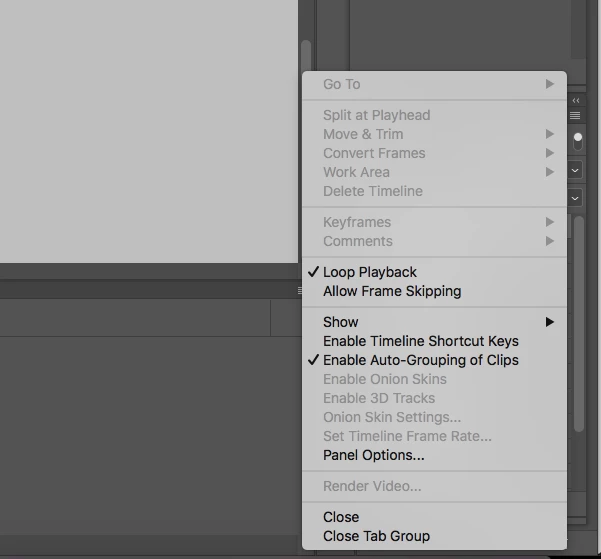
What to do so I can proceed?

Thank you very much

このトピックへの返信は締め切られました。
解決に役立った回答 varDale_undefined

Yeah, you see where it says "Create Frame Animation" - click that.

返信数 6

Participant
January 23, 2023

Hi! I just had the same problem. Once you picked frame animation, select 'frame animation'  AGAIN which will automatically open the timeline with your first layer, and then you should have the option to create frames from layers. Hope this helps someone, I know I am replying to an older post, but this is for all of those struggling now! 🙂

jamesw2759356
Participant
February 28, 2021

I was having the same problem. I figured out the problem but I see this is a very old post... so maybe you figured it out 

michaelm66277552
Participant
November 14, 2022

I just searched for this help and had to read all the way down. Their directions are horrible. Thanks everyone.

Inspiring
October 12, 2018

Also, just to make sure. When you select "Frame Animation" from the drop down... Have you pressed the actual "Create Frame Animation" button to the left of the triangle as highlighted in Ged's screenshot?

sophiek_photo作成者
Known Participant
October 12, 2018

Thank you guys for taking the time to get me out of this pickle.

Here is the full screenshot. All seem normal but for the menu.

My Photoshop version is up to date, so I don't understand.

October 12, 2018

Can you show a screenshot of the layers panels and when you select a layer and click on Create Frame Animation button can you also show the timeline

Inspiring
October 12, 2018

Your menu is the menu for "Video Timeline" instead of "Frame Animation" which is why I suggested deleting the timeline.

If you have followed the steps above, it could be a bug. I would suggest first restarting Photoshop.

If that still does not work, if you share your Photoshop and OS version, one of the Adobe techies may be able to help

Inspiring
October 12, 2018

I managed to figure out your issue. (I think!)

Click on the timeline > then select > delete timeline > then when you see the below, hit the arrow and press "create frame animation"

Hope that helps.

sophiek_photo作成者
Known Participant
October 12, 2018

Thank you varDale, but it is still not working

October 12, 2018

Can you post a screenshot with all the appropriate layers and panels opened

October 12, 2018

Hi

You need to click on the Create Frame Animation button

sophiek_photo作成者
Known Participant
October 12, 2018

It is what I did, but alas no luck... the result is the screenshot I posted, which is why I am stumped

Inspiring
October 12, 2018

make sure you have all layers highlighted, then it not greyed out.