
Participant
April 21, 2021
Answered

Graphics card not detected and sniffer crashed

  • April 21, 2021
  • 2 replies
  • 1217 views

Hello.

I have come upon a problem I simple cannot find the solution to. 


The Issue

Suddenly my brush started lagging, and after some search I found that Photoshop couldn't detect my graphics card.
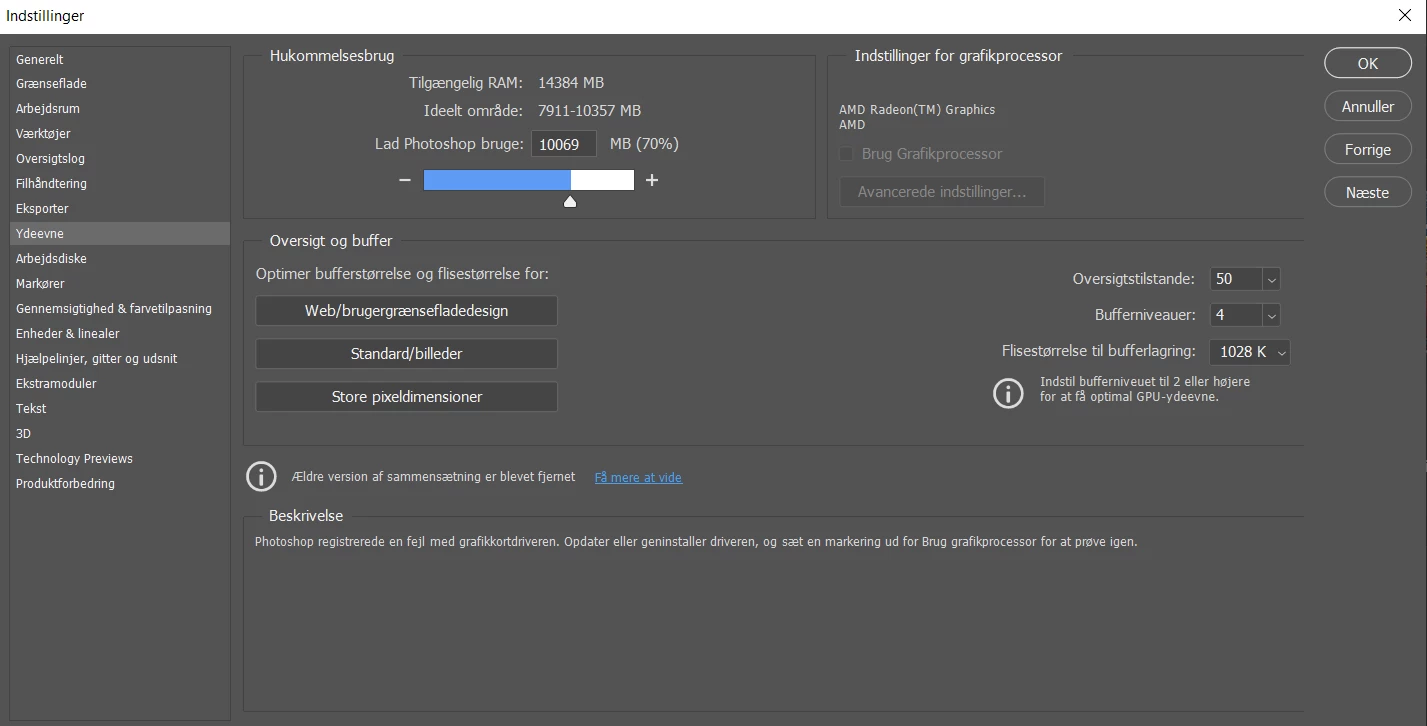
(it's in Danish but you can see how the field is greyed out)


What I have tried so far

I re-installed my graphics card and have made sure I have the newest version. It did not solve the problem. I have tried uninstalling and then reinstalling both Photoshop and Creative Cloud. That didn't help either (though it is lagging a bit less than before). I tried to move the sniffer.exe file, that did not help. I do not have dual graphic cards as far as I can figure out. I have tried setting my graphic card to top performance, that didn't help either. 

I am lost, I don't know what else I can do. 


System info

Ryzen 5 4500U

Windows 10

AMD Radeon (TM) Graphics

Photoshop system info linked below. (It's in Danish though)


I hope somebody can help me. Thank you.

This topic has been closed for replies.
Correct answer Kevin Stohlmeyer

Yes, I believe I do.


So its entirely possible your Windows OS or Photoshop auto updated past the point of compatibility. You can try downgrading to an earlier version of Photoshop.

https://helpx.adobe.com/download-install/using/install-previous-version.html 

2 replies

nadinef56330185
Known Participant
April 22, 2021

J'ai eu le même problème, voila la réponse qui m'a été donnée :

Try resetting preferences:

https://helpx.adobe.com/photoshop/using/preferences.html#reset_preferences


If that doesn't work, install the previous version (which users are having success with):

https://helpx.adobe.com/download-install/using/install-previous-version.html


Chez moi le reset des préférences a fonctionné

Kevin Stohlmeyer
Community Expert
Community Expert
April 21, 2021

You do not have enough VRam to use this graphics card with Photoshop.

From your system text: "

HasSufficientRAM: 0
 
VRAM: 520 MB
Required VRAM: 1,500 MB


Participant
April 21, 2021

Ah, I see... That's unfortunate... Thank you for your answer. 

The only thing that makes me confused then is that Photoshop has worked quite well for me the past 6 months on this device, it just suddenly became a problem yesterday. Shouldn't it have been a problem from the start then?

Kevin Stohlmeyer
Community Expert
Community Expert
April 21, 2021

Do you have auto updates turned on?