
Participating Frequently
March 4, 2020
Answered

Hand Tool won't work in Photoshop 2020 with spacebar

  • March 4, 2020
  • 15 replies
  • 19575 views

In Photoshop 2020,  when zoomed in and using the Lasso tool and wishing to engage the Hand tool (by pressing the spacebar) the Hand tool doesn't work.


Here is some addtional information that may be relevant.


I  have both Photoshop 2020  and Photoshop cc 2019 installed on my computer (Windows 10).  The  Hand tool works fine with Photoshop cc 2019.  


..If I open Photoshop by clicking on a file (rather than opening Photoshop first), a JPEG file always will open with Photoshop 2020, even when I select  Photoshop cc 2019.


..In Photoshop cc 2019 the hand tool works with the lasso plus spacebar regardless of what other apps are open.  With Photoshop 2020, it doesn't work with the lasso tool plus spacebar under any circumstances.


I realize that the short term solution may be "use Photoshop cc 2019",  but I am wanting to get this fixed realizing that about a year from now "Photoshop cc 2019" may not be available to me.


Hope you can help


Thanks


This topic has been closed for replies.
Correct answer JJMack

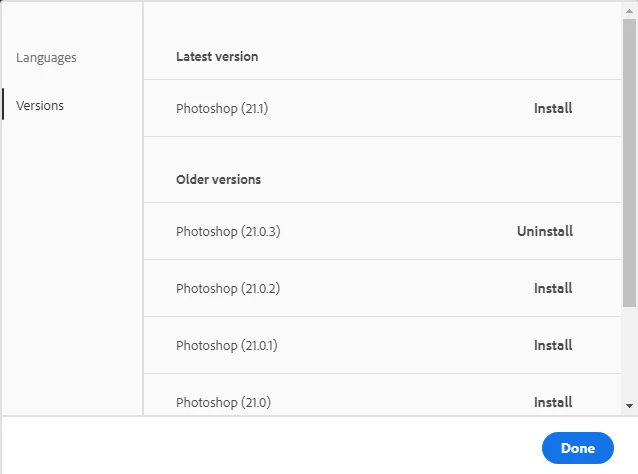
Which 2020 version are you using I dropped back to version 21.0.3  I had major problems with 21.1.0. If you have a Wacom Pen I would advise you to use 21.0.3


15 replies

Participating Frequently
November 12, 2024

I'm using versin 21.1.0 and bont have a problem

Participant
May 9, 2022

Sorry for the late response. A driver update in the wacom Desktop center did it for me (I'm using a Mac with a 22" Cintiq monitor).


- n8

Known Participant
February 26, 2022

I had the same issue just recently. I think it might be a setting in Zoom > Preferences > Audio that I recently enabled that allows Zoom to take over the Spacebar. Even after quitting Zoom, the spacebar seems to be unavailable to Adobe apps. Restarting the Mac corrected it. 

Participant
September 2, 2021

Hi,


I had to enable 'Use OpenCL' on my M1 Apple MBP, nothing else worked for me.


jessicab18583955
Participant
March 10, 2021

My hand tool stopped working and I tried set the shorcut from H to spacebar and PS wouldn't let me. Why aren't you Adobe trying to fix the issue? It is such an integreal part of my workflow day to day!

happie_97
Community Expert
Community Expert
March 10, 2021

Hi Jessica.

Have you tried reverting back to version 21.0.3 as suggested earlier to troubleshoot this issue?

jessicab18583955
Participant
March 10, 2021

Thank you for your reply. My oldest version I can go back to is 21.2.6 so it doesn't help me much. But really appreciate the help 😃
/Jessica

Participant
February 18, 2021

Hand Tool returns!
Regarding Convergnt's comment below about Photoshop preferences, I unchecked the box which I've highlighted in red, and now I have the hand tool back! I'm running Adobe Cloud Photoshop 22.1.1 on Catalina 10.15.7

Participant
February 21, 2021

I just tried that, but it doesn't work for me. Incidentally, my spacebar hand tool does work in Affinity Photo (a software I sometimes use, which is quite similar to Photoshop though less powerful/advanced). So this is a photoshop problem, not a Windows or Mac related one.

Known Participant
October 14, 2020

Hi!  This was also driving me absolutely nuts which is what brought me to this forum.  I finally solved it by updating my Wacom Tablet.  I didn't realize it needed a software update and a firmware update.  Thankfully that did the trick (for me)! 

Known Participant
November 12, 2020

so the space bar breaking in the lastest ps is bc of wacom drivers?


its almost the only keyboard short cut i use in ps. so irritated

Participant
November 12, 2020

I think it might be. Sometimes it stops working, then I restart and it works, and sometimes the restart doesn't help much. I see a new update on drivers now... gotta try that.


ToastyBisks
Participant
August 31, 2020

August 31st and this is STILL happening!!!  This is absolutely FRUSTRATING, Adobe! Fix this issue PLEASE.

Convergnt
Inspiring
June 25, 2020

I've started having this issue as well. MacBook pro 2016; mOS 10.15.5; PS 21.2.

I was using the legacy rendering engine, so toggled that off. Afterwards, using spacebar produces the message in my screenshot. Spacebar is now attempting to manipulate the layer; not pan it. 

Dropped down to PS 21.0.3, but the problem persists, and result are the same on either rendering engine.

But scrubby zoom still works fine...

the Wacom driver is the same, the latest offered. I don't see what else could have changed. It is… annoying.


Convergnt
Inspiring
June 29, 2020

May be something… may be nothing… back on 21.2 and my hand tool is working again after making these changes to preferences/performance…

Participant
August 25, 2020

Yeah I got the same issue. Mine started today.

Running on a macbook pro Mojave and v 21.1 of photoshop.

Nothing I tried works. At first I thought it might be a wacom tablet driver conflict. Nothing


Participating Frequently
June 11, 2020

Any suggestion on same issue on Windows?

No way to get this combination to work again.

Thank you