
Participant
February 3, 2020
Question

How to create this photoshop effect?

  • February 3, 2020
  • 3 replies
  • 1268 views

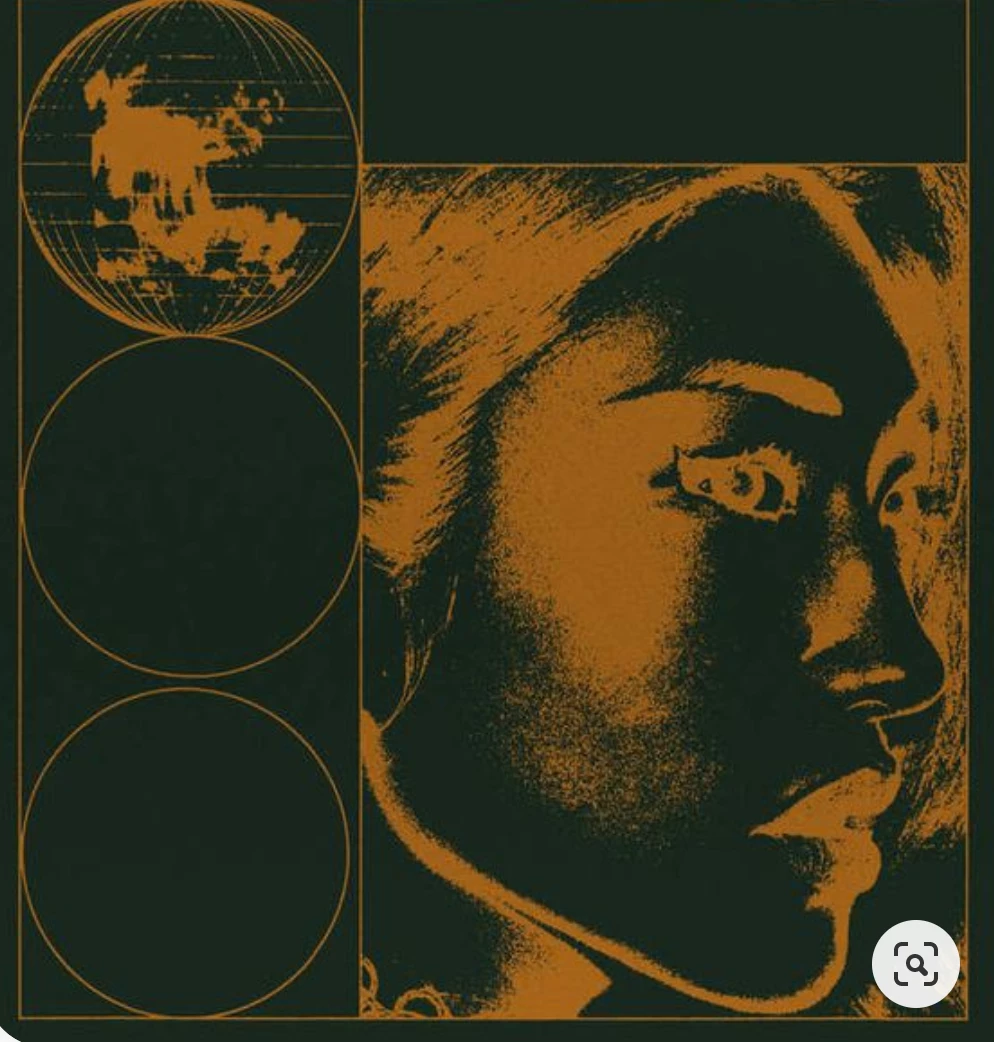
Hi there, I'm looking to create a photo effect like the attached file. I've tried various things but can't seem to match it, so I'm not sure if I'm using the right effects. 


So far I've tried > Inverese image > brightness contrast / levels adjustments > posterize(?) > added some grain(?) which gets similar results, however I can't get the two colours. I thought it was duotone but this isn't right.


If anyone could help that would be much apperciated! I'm also not sure posterize and grain is correct so open to ideas. 


Thank you!  


This topic has been closed for replies.

3 replies

Inspiring
February 4, 2020

Here's a way to get a duotone effect....

Image > Adjustments >  Posterize.  Move Threshold Level to get desired effect.


Set Foreground/Background color swatches to the darker/lighter colors.

Add Gradient Map adjustment layer.


Without the Posterize step...


Participant
February 4, 2020

Hi, I've think I've worked out the textures! The problem now is seperating and adding two (or more) colours into the image...  

Leslie Moak Murray
Community Expert
Community Expert
February 3, 2020

Without seeing the original you're trying this on, I'd say to go Image>Adjustments>Invert and see what that does.

-edit- Sorry, I just noticed you'd already tried inverting it. Can you post the results you got?