

Participating Frequently
November 19, 2013
Question

I can't create contact sheet with Photoshop CC

  • November 19, 2013
  • 3 replies
  • 29180 views

Hi,

I have a problem,

Since I have installed Adobe Photoshop CC, I have never been able to use the option Contact Sheet II

Here the error message that I get when I use the option
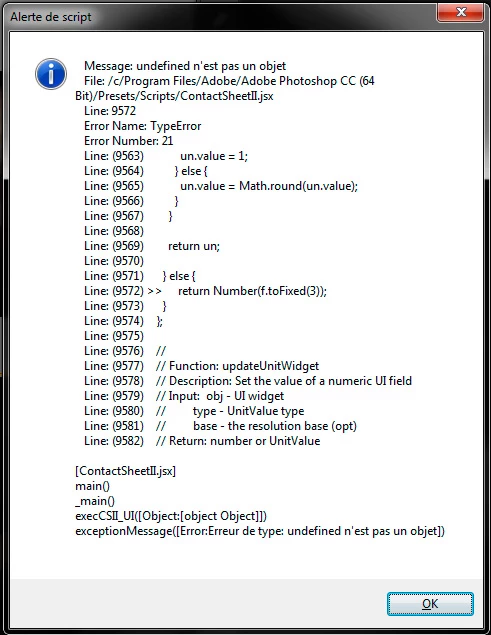
Please help me

3 replies

Participant
June 18, 2014

In Photoshop Preferences>Plug-Ins tick 'Additional Plug-Ins Folder' and point to Library/Application Support/Adobe/Startup Scripts CS6/Adobe Photoshop, then restart computer.

Fixed for me!

Participant
November 28, 2013

Same problem here, im on Macbook Pro with Mavericks

Participant
December 16, 2013

Hello,

I have the same problem on my Imac i5 2,5Ghz 10.7.5

Here is my error Message:

File: /Applications/Adobe CC/Adobe Photoshop CC/Presets/Scripts/ContactSheetII.jsx

   Line: 9572

   Error Name: TypeError

   Error Number: 21

   Line: (9563)            un.value = 1;

   Line: (9564)          } else {

   Line: (9565)            un.value = Math.round(un.value);

   Line: (9566)          }

   Line: (9567)        }

   Line: (9568)   

   Line: (9569)        return un;

   Line: (9570)   

   Line: (9571)      } else {

   Line: (9572) >>     return Number(f.toFixed(3));

   Line: (9573)      }

   Line: (9574)    };

   Line: (9575)   

   Line: (9576)    //

   Line: (9577)    // Function: updateUnitWidget

   Line: (9578)    // Description: Set the value of a numeric UI field

   Line: (9579)    // Input:  obj - UI widget

   Line: (9580)    //         type - UnitValue type

   Line: (9581)    //         base - the resolution base (opt)

   Line: (9582)    // Return: number or UnitValue

[ContactSheetII.jsx]

main()

_main()

execCSII_UI([Object:[object Object]])

exceptionMessage([Error:Typfehler: undefined ist kein Objekt])

Participant
December 25, 2013

Same here

I'm on a Mac Pro and the problem started a while back with Photoshop CS6 on OSX 10.6.8. I updated to OSX 10.9.1 but contact sheet still won't work (same error message as oliver 378 posted).

So this is clearly no OS problem. Please Adobe, fix this!

JJMack
Community Expert
Community Expert
November 19, 2013

When do you get the error?  Do you get the contactsheet II dialog fill it in and run? Do you see this in CC the line numbers shown in you screen capture seem to line up with what I see on CC contactsheetII script.

do you get this?

JJMack
Participating Frequently
November 20, 2013

I get the error as soon as I click on File > Automate > Contact Sheet II.

I don't get the page you are showing.

I have try to pass by Bridge, but it's open Photoshop and I got the error message

The only way I get able to have contact sheets is with Lightroom

November 20, 2013

It trying from Bridge make sure there are check marks for at least bridge and photoshop in edit/preferences/startup scripts.