

January 8, 2021
Question

Re: Incorrect text character being displayed

  • January 8, 2021
  • 7 replies
  • 872 views

Hello,


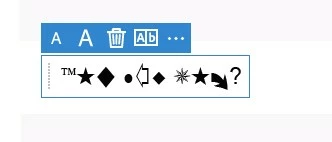
When i am adding a text in Adobe Acrobat Reader DC i get these characters inetead of regular ABC's. Any solution? 


Thank you! 
    This topic is closed to new replies. Start a new post to keep the conversation going.

    7 replies

    jane-e
    Community Expert
    Community Expert
    January 11, 2021

    I've branched this from an unrelated thread in the Photoshop forum to the Acrobat Reader forum since your question is about the free Adobe Acrobat Reader and not about Photoshop. [was in https://community.adobe.com/t5/photoshop/incorrect-text-character-being-displayed/m-p/11737015]


    To confirm: are you using Fill and Sign in Reader?


    It appears that the typeface is Wingdings or Zapf Dingbats, but that can't be changed in Fill and Sign in Reader, afaik. Can you try using the Type tool in Comments to see if it does the same thing? Did this just start? Was it working properly before?


    ~ Jane

    January 11, 2021

    Hi Jane,


    Yes, i am using the free version, so that means it cant be fixed?


    Thank you 

    War Unicorn
    Community Expert
    Community Expert
    January 8, 2021

    Not sure what's happening there. Is this what happens when you begin typing? Does it do this in all documents?

    January 11, 2021

    Thank you,

    Yes, when i placed the text box where i wanted to type i saw like a preview of these characters and it displayed it when i typed except when typing numbers. Today i updated Adobe and everything looked normal until the reciever of the file told me that he didn't see any ABC's he saw these characters as shown above.  is there any alternative program?


    Thank you 

    War Unicorn
    Community Expert
    Community Expert
    January 11, 2021

    There's a good chance the recipient's fonts are possibly messed up. I'd confirm this by sending the file to someone else to see if they are having the same problem. (You can try this yourself by sending the file to yourself if you have more than one system.)


    Restoring default fonts on Windows 10:

    https://www.tenforums.com/tutorials/119581-restore-default-font-settings-windows.html


    Restoring on macOS:

    https://support.apple.com/guide/font-book/restore-fonts-that-came-with-your-mac-fb34862/mac
