


Doc_Pit
Inspiring
April 12, 2021
질문

Monitor calibration: "Native" RGB Primaries and "Native" White Point

  • April 12, 2021
  • 1 답변
  • 1811 조회

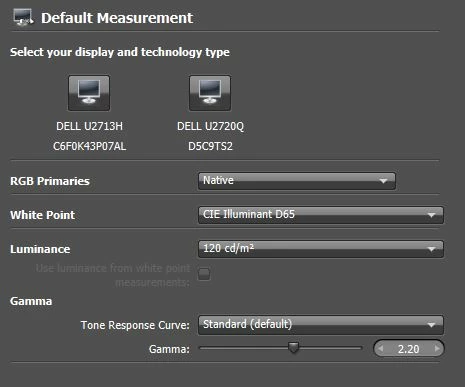
See image below:

If I use the Dell/XRite software to calibrate my monitor, the first parameters I have to specify are RGB Primaries and White Point. 

       Regarding RGB Primaries: As I understand it,  if I specify "Native" as the RGB Primary, I am choosing to calibrate based on the monitor's full gamut.  If I specify, say, "AdobeRGB," I am calibrating for the range of colors within that Adobe gamut. 

       Regarding White Point: If I specify "Native," I am specifying the white point of the monitor's full gamut.  That might be substantially higher than 6500K.

       In some of the XRite tutorials available online, I'll see "Native" specified for the RGB primaries and "CIE Illuminant D65" specified for the White Point.  It seems to me that this misaligns the white point with the color space.  I would expect that if I choose AdobeRGB as the RGB Primary, I would choose D65 as the white point.  If I choose Native as the RGB Primary, I also would choose Native as  the White Point.  Does that make sense?


이 주제는 답변이 닫혔습니다.

1 답변

D Fosse
Community Expert
Community Expert
April 12, 2021

For primaries, set "native". That's the full gamut of the monitor and that's what you need. Calibrating to Adobe RGB is pointless, it just imposes a slightly limited gamut for no benefit at all.


In addition, you might want to have an sRGB emulation if you need to work with non-color managed software.


For white point, D65 is always a sensible starting point. What you really want is a visual match to the intended output, and for print the intended output is paper white. You adjust the white point so that it is a visual on-screen match to paper white.


That's a purely visual match, if it looks right, it is right. Nevermind the numbers. But for most "normal" viewing conditions, D65 is a good place to start. Fine-tune from there if required.


Same principle for white point luminance. Get it to match paper white in your preferred viewing light, and again, 120 cd/m² is usually a good starting point for most normal situations.


All the above assumes print output, but it works for screen/web as well. The only real reference for white that we all have in common, is a piece of white paper. That brings us all on the same page.


Just to be absolutely clear, there is no coupling between primaries and white point. Set each as you wish. You may confuse this with the standard color space specifications (sRGB/Adobe RGB), but they have no relevance here. The monitor has its own color space, it doesn't need to match anything else.